SLA working hours make response and resolution clocks follow the support schedule. Set the working days, the daily support window and the time zone. Outside that schedule, the SLA clock pauses.
A high-priority ticket lands on Friday at 4:45 pm. The support schedule runs Monday to Friday, 9 am to 5 pm. A continuous clock shows a wait of over sixty hours by Monday morning.
The team has logged fifteen minutes of service time.
That is not a missed deadline. That is a clock that never paused.
SLA Working Hours Pause the Clock Outside the Support Window
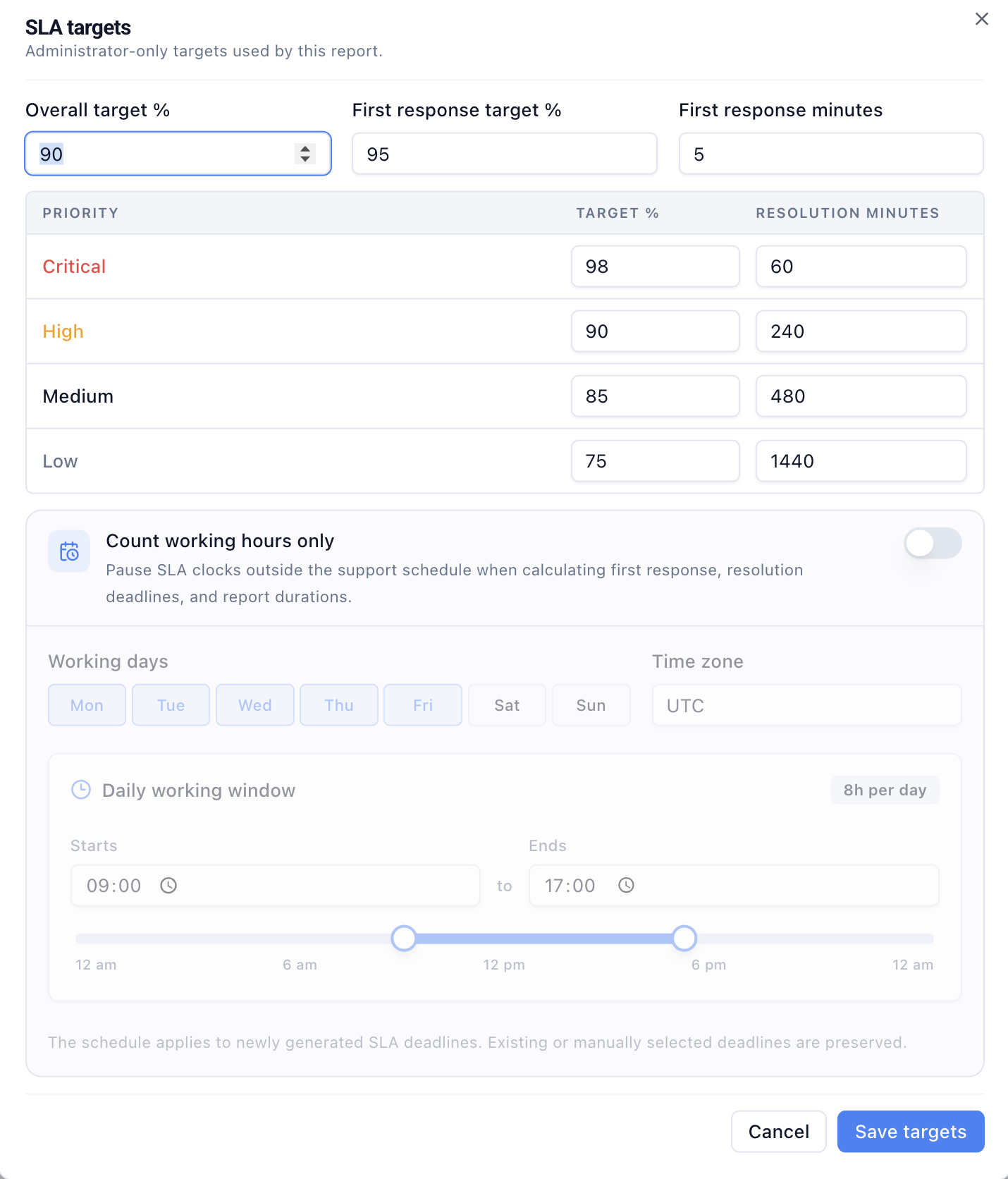
Enable Count working hours only to define which business hours count towards the SLA.
Choose:
- the working days
- the time zone
- the daily start and end time
With a Monday-Friday, 9 am-5 pm schedule, a Friday ticket consumes the remaining Friday minutes. The clock resumes when the next working window begins.
Latch uses the same working-hours schedule for:
- first-response time
- resolution deadlines
- SLA report durations
- at-risk windows
- breach time
The deadline and the report share one definition of elapsed service time.
Business-Hours SLA Calculations Decide What a Deadline Means
An SLA pairs two decisions: the time allowed and the business hours that count. Many reports surface the first and bury the second.
A four-hour resolution target means one thing against a non-stop clock and something else against scheduled hours. Nights and weekends can turn expected downtime into apparent breaches.
That creates familiar arguments:
- Operators dispute reports that penalise closed hours.
- Managers lower targets to offset a clock that never stops.
- Customers see an inconsistent promise.
- Teams compare queues across time zones without adjusting for the schedule.
The target is not the whole SLA. The support schedule is part of the policy.
Use the SLA deadline calculator to check a received timestamp against a time zone, business window, holiday list, priority target, and approved pause. The result keeps the counted target, closed time, and pause duration separate.
SLA Working Hours Follow the Time Zone, Not the Browser
A time like "9 am" is incomplete without a zone. A London team and a Nairobi team can display the same window but operate on different clocks. Latch stores the zone with the schedule, so the SLA follows the support operation, not the browser or server location.
This matters when managers review performance across locations. Each report should reflect when that support schedule is active, not whichever machine happened to calculate the timestamp.
Priority-Based SLA Targets Show Where the Service Promise Breaks
The support-hours clock defines when time counts. Priority targets define how much time each type of work gets.
Latch lets administrators set:
- an overall SLA attainment target
- a first-response attainment target
- a first-response time in minutes
- separate attainment and resolution targets for Critical, High, Medium, and Low priority work
A Critical ticket deserves a tighter target than a routine request. The report compares actual time with the target for that priority.
A single average can hide serious misses among routine work. Priority-based SLA targets show where the service promise is breaking.
Existing SLA Deadlines Stay Fixed When the Schedule Changes
Changing the schedule does not rewrite history. The working-hours clock applies only to new SLA deadlines. Existing deadlines stay. Manually set deadlines stay.
That boundary keeps a policy change from moving the target for work already in progress. Teams get a better clock without retroactively altering the commitment on an existing ticket.
The Support Schedule Does Not Cover Holidays or Rotations
This is a repeating weekly support schedule: selected working days, one daily window, and one time zone.
It is not a holiday calendar. It does not define different hours per day or model follow-the-sun rotations. It does not replace an escalation policy. Teams that need those still require a fuller coverage model.
For many support operations, the weekly schedule is the important first fix. It removes the largest source of false urgency without making the policy hard to understand.
SLA Reports Improve When the Clock Stops Counting Closed Hours
First response is useful, but it is only one view of queue health. Aging, blocked work, rework, and outcome quality still matter. Queue health metrics beyond first response time covers the broader operating picture.
The working-hours clock makes the SLA part of that picture more credible. Operators see real deadlines. Managers see which priority is missing its target. Closed hours stop looking like a service failure.
Accurate time also depends on clear ticket states and ownership. Hard-edged ticket status workflows keep reporting tied to meaningful operational events instead of loose labels.
For teams building a broader support operating model, Latch brings these controls into one operational workflow system.
An SLA should measure the service the team agreed to provide.
It should not measure the hours when nobody was scheduled to provide it.