A field engineer does not stop a repair to write up the ticket. The machine is open. One hand holds a phone. The other holds a cable. The team needs to know what the engineer found, not whether a form is complete.
Most software forces the opposite. Step away from the equipment. Open a form. Locate the right field. Compose the note. Upload the photo through a separate screen. Update the status somewhere else. The record may look complete after the visit. The interface adds steps right when the engineer should stay focused on the equipment.
A field interface should follow the shape of the job. The engineer receives context and runs the next check. They explain what they found and attach the evidence. The ticket moves forward. All of it happens in one focused conversation.
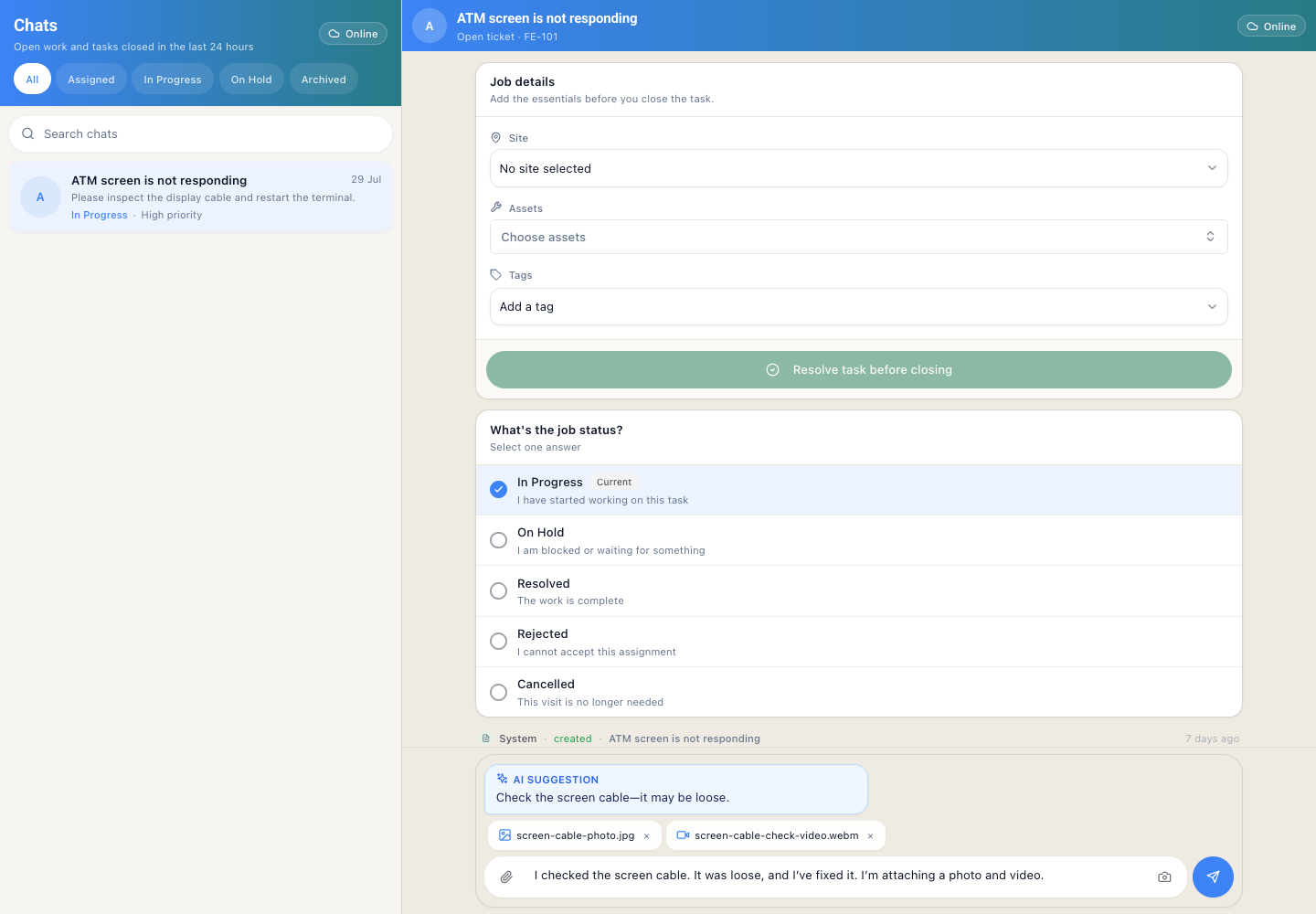
Assigned tickets and the active field conversation stay in one place. The example uses illustrative local data and staged attachments.
Field teams work in front of equipment, not forms
- Field service leads need the findings before the engineer returns to a desk.
- Operations coordinators hand off assignments that start with evidence, not an empty ticket.
- Product and engineering teams decide whether a mobile workflow should reduce admin work or improve the work itself.
Forms create a second job at the wrong moment
Forms can store information. That is not the problem. The problem is where the form places it. It separates the finding from the decision that produced it.
Take a dead ATM screen. The engineer needs the site, the asset, the reported symptom, and recent history before testing anything. Context appears in one view. The note sits in another. The photo travels through a separate upload flow. The ticket becomes a reconstruction of the visit, not a record of it.
The gap opens at the handoff. The coordinator reads "screen issue". The supervisor notices a status change. The next engineer finds a photo with no explanation. Each person sees a fragment. The decision and the evidence that explains it never sit together.
A conversation is useful when it stays attached to the ticket
Chat alone does not make this work. Unstructured messages do not create a control. The conversation gives the engineer one place to act while the ticket retains its structure.
The ticket still carries the scope, the owner, the workflow state, the timestamps, and the identities of everyone involved. The conversation becomes the interaction layer over that record. An update can read naturally without losing the detail someone else will need later.
The difference is precision. "Screen issue" only names a symptom. "The display stayed black because the screen cable was loose; the connection is now fixed" records what the engineer found and what changed.
When the explanation and the evidence sit beside the decision, the next operator can continue without reconstructing the visit.
AI can suggest the next check. The engineer decides what is true.
AI plays a narrow role in this conversation. It can read the ticket and analyse the context. It can propose a sensible next check. It must not turn the suggestion into a diagnosis. It must not close the ticket without confirmation from the engineer on site.
In the example, the assistant recommends checking the screen cable. The engineer performs the check. They find the loose connection and secure it. They reply in the same thread. The suggestion removes the time spent guessing where to begin. The engineer still verifies the fault and owns the decision.
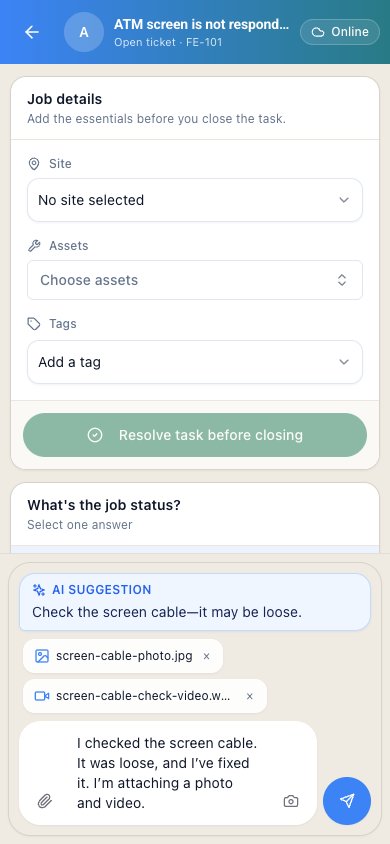
AI recommends a next check. The engineer verifies the fault and writes the update. They prepare the evidence before submitting the update.
The boundary matters. AI can propose routing and next steps, but the operator decides what actually happens. The ticket must keep the recommendation separate from the completed action.
Evidence belongs beside the explanation
A photo without an explanation leaves the next person guessing. An explanation without a photo may still leave the team unable to verify what changed. A field update needs both.
The engineer describes what was checked and what was found. They state what changed. Then they attach a photo of the connection and a short video of the screen responding. The attachments are not a separate report someone must tie back to the ticket later. They belong to the same conversation.
On a phone, the attachment controls should match the work in front of the engineer:
- Take a photo of the component or connection.
- Record a short video of the result.
- Choose an existing file when the evidence was captured earlier.
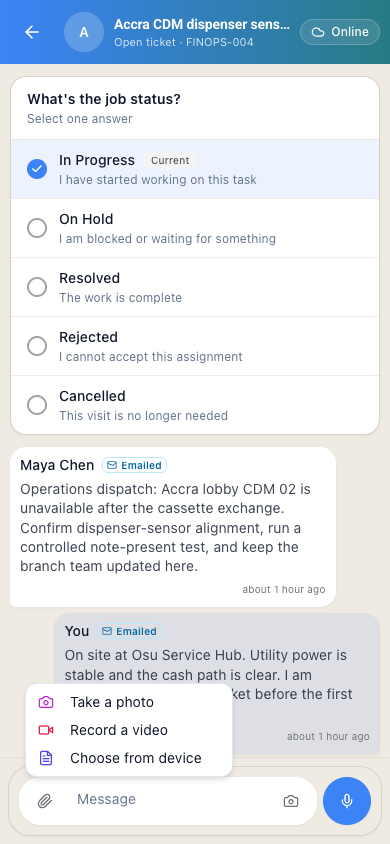
The field update can capture a photo or video from the same composer. The media stays connected to the explanation that gives it meaning.
The goal is not more files. It is evidence that stays attached to the decision it supports.
Mobile first does not mean desktop second
On site, the engineer needs a compact view that works beside a machine. In the office, a coordinator or supervisor may need a wider view showing several assigned tickets at once. The physical environments differ. The ticket record they both access must remain the same.
On the phone, the conversation offers the field engineer one clear path through the update. On the desktop, a two-pane layout keeps the list of assigned tickets visible while the active conversation fills the main workspace. The interaction adapts to the screen. The ticket history, the identities, the status, and the evidence do not change.
That continuity carries the handoff. The coordinator does not translate a mobile message into a separate administrative record. They read the update from the engineer and open the attached evidence. The next step starts from the same ticket.
Conversation does not weaken the controls
"Chat" sounds like something that happens outside the system of record. That is the wrong model for field work.
A controlled field conversation keeps the operational boundaries in view:
- The engineer sees their assigned tickets.
- Status changes follow the workflow, not a free-form message.
- Every update carries an attributable author and a timestamp.
- Photos and videos stay with the ticket that asked for them.
- The next operator receives the context they need to continue the work.
The interaction is conversational. The record is not casual.
Latch fits at the point of work
Latch treats the ticket as the unit of work. It treats the conversation as the fast way for an operator to update the ticket. Latch does not ask a field engineer to manage a separate system while diagnosing equipment. Assignment, status, messages, and evidence sit together, so the update happens at the point of work.
The model applies to more than an ATM screen. A technician can report a failed sensor, a damaged cable, or a repeated alarm in the words they would use with a colleague. The ticket still records who made the decision and what they observed. It records what evidence they attached and what needs to happen next.
This does not replace workflow controls. It is an interaction layer that makes those controls usable in the field.
The operating principle is updating the ticket without stopping work
A field interface should not ask an engineer to stop working to update the system. The update happens as part of the work. Receive the context. Check the equipment. Share the evidence. The ticket moves forward in one conversation. The message is quick. The record remains durable.
Continue reading: the ticket record outlasts the conversation
- Asset context is the missing layer in field service tickets
- Email-to-ticket context preservation
- When AI triage should stay silent
- Case records as systems of action
If your team recognises this pattern, try it on your workflow.