Claims audit trail software built into every checklist
A motor claim arrives through a form. Collision photos stay in a shared drive. An adjuster recommends a settlement in a spreadsheet. A manager approves the instruction in chat. When the claim is sampled, the team rebuilds the decision from four systems.
Latch keeps claim evidence, changes, approvals, and upstream results in one audit trail. Each claim type starts the right checklist, while support staff and AI work inside it. Approved plugin actions run upstream and return their results to the same case. Latch is deployable in your environment, with source code available on Enterprise.
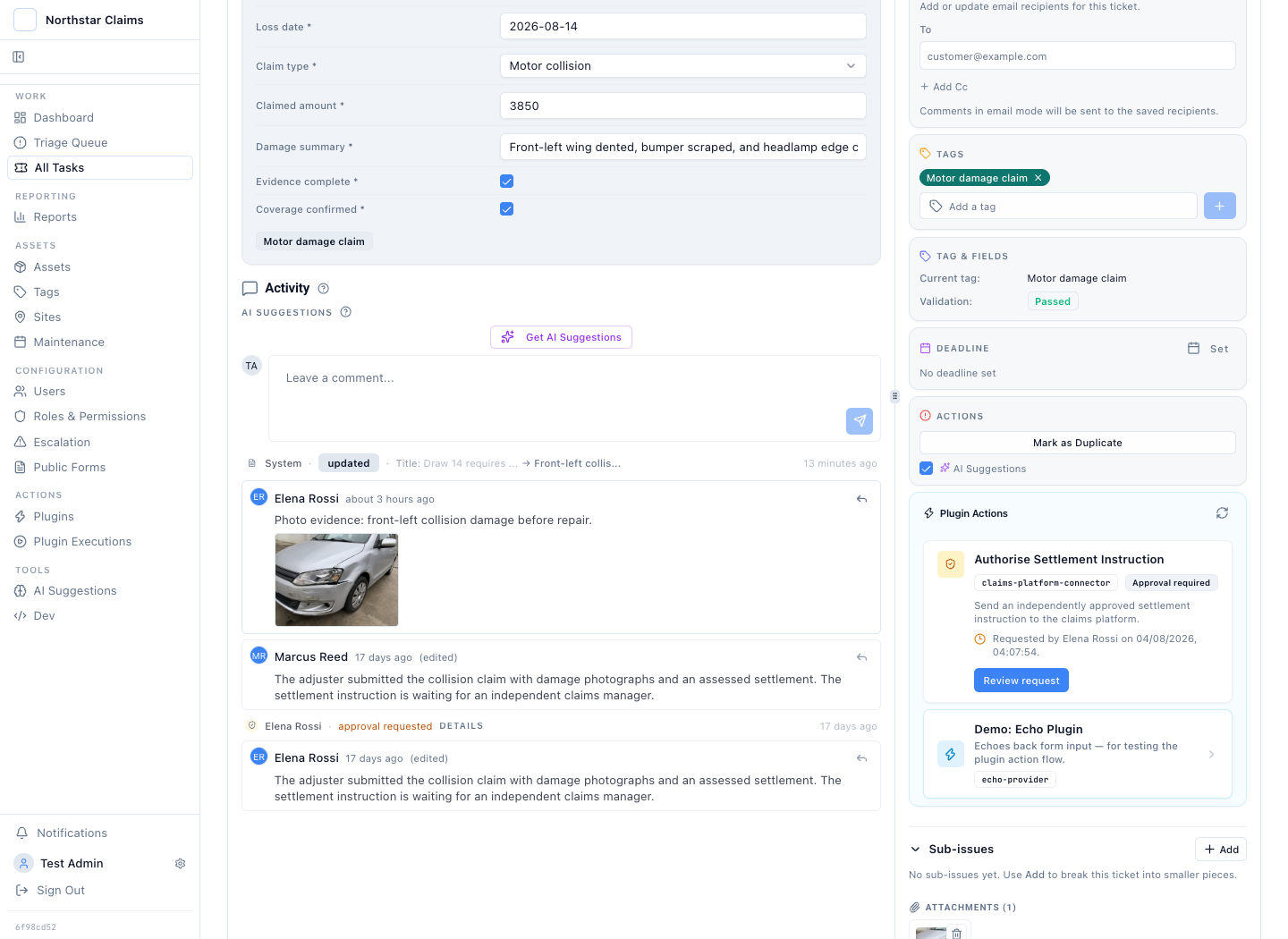
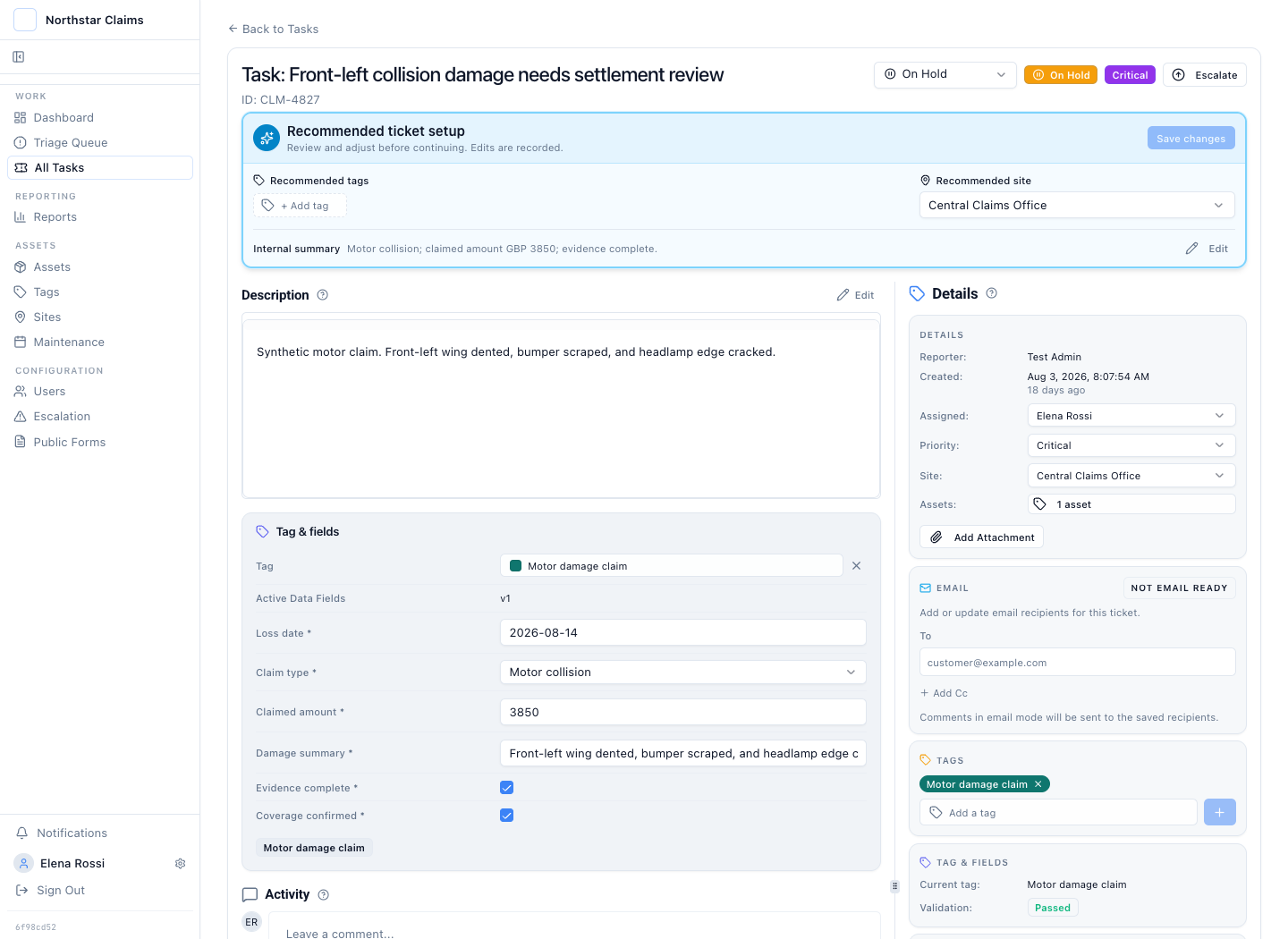
Front-left collision damage
Silver compact car · Policy POL-77421 · 14 Aug 2026
Prepared by Elena Rossi. Waiting for an independent claims reviewer.
A claims quality audit and a claims audit trail are different requirements
A claims quality audit evaluates whether a claim was handled correctly while it is still open: sampling files, scoring handling, hunting leakage. A claims audit trail preserves the evidence of how the claim was handled: who acted, what changed, when, what was decided, and what the upstream system returned.
The two are related, not interchangeable. A quality program without a trail cannot prove what the reviewer actually saw. A trail without review never asks whether the decision was right. Teams often buy them as different products: claims QA analytics on one side, the operating record on the other.
Latch is the operating record, with the workflow that schedules the quality check. The recurring open claim file review creates the review work. The case keeps the evidence that review depends on.
Claims quality audit
Evaluates open claims against handling standards: sampling, scoring, leakage analysis, reviewer calibration. Answers whether the claim was handled correctly. Usually a claims QA analytics product.
Claims audit trail
Preserves the record of handling: actor, timestamp, before-and-after values, evidence, approvals, and execution results. Answers how the claim was handled and proves it later.
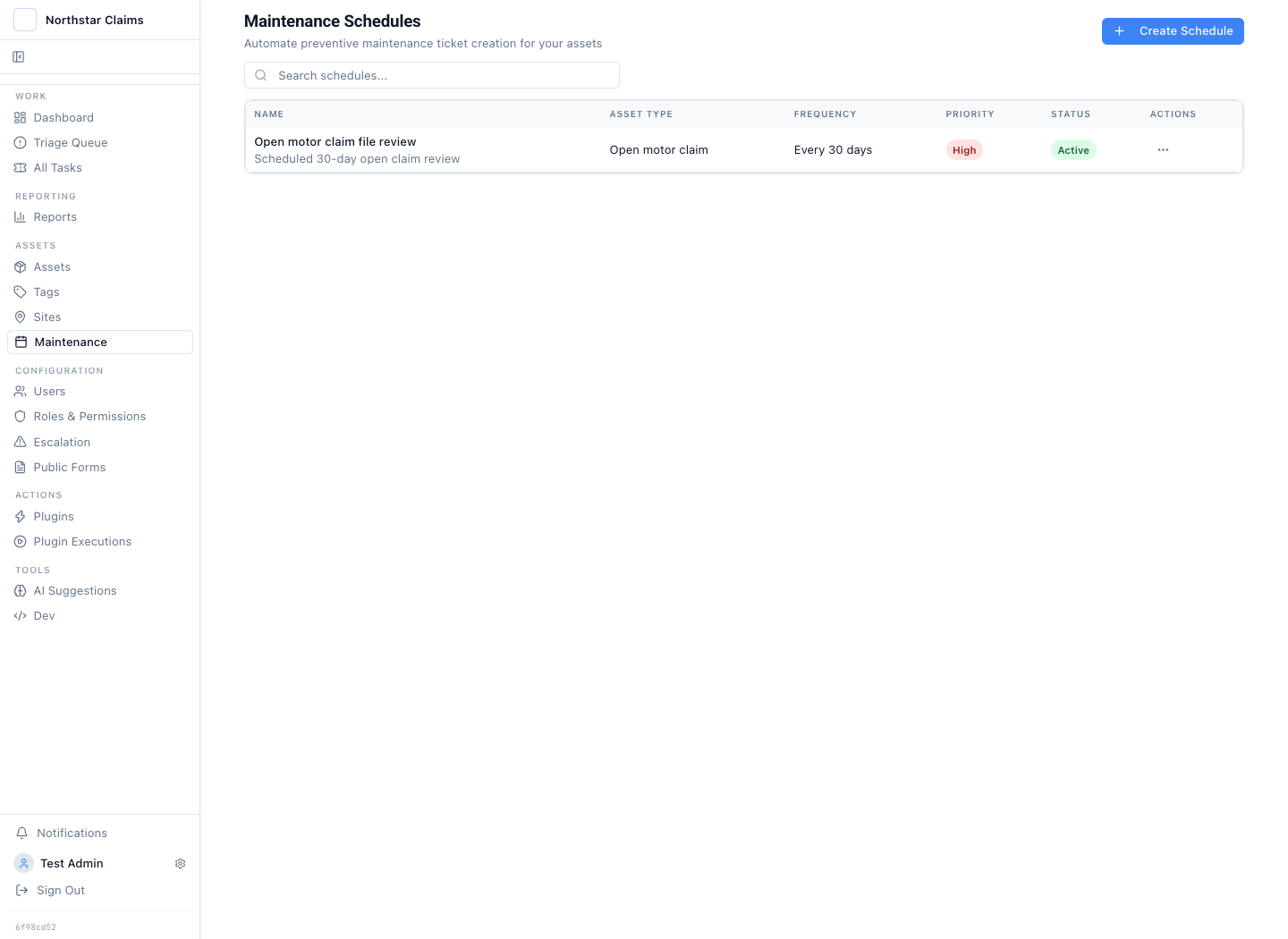
Create the next open claim file review before the diary reminder is missed
An open claim file review runs every 30 days. The active schedule targets open motor claim files and creates a high-priority review case with the Motor damage claim checklist and the fields the reviewer must complete.
The scheduled review samples and records the portfolio control. It does not approve, deny, or alter an underlying claim without the separate decision and plugin action recorded on that claim.
This is a file-review control, not leakage analytics. Latch does not score claims or predict recovery. Teams that need those models run a claims QA analytics platform beside Latch and keep the scheduled review evidence here.
Different claims should start different checklist workflows
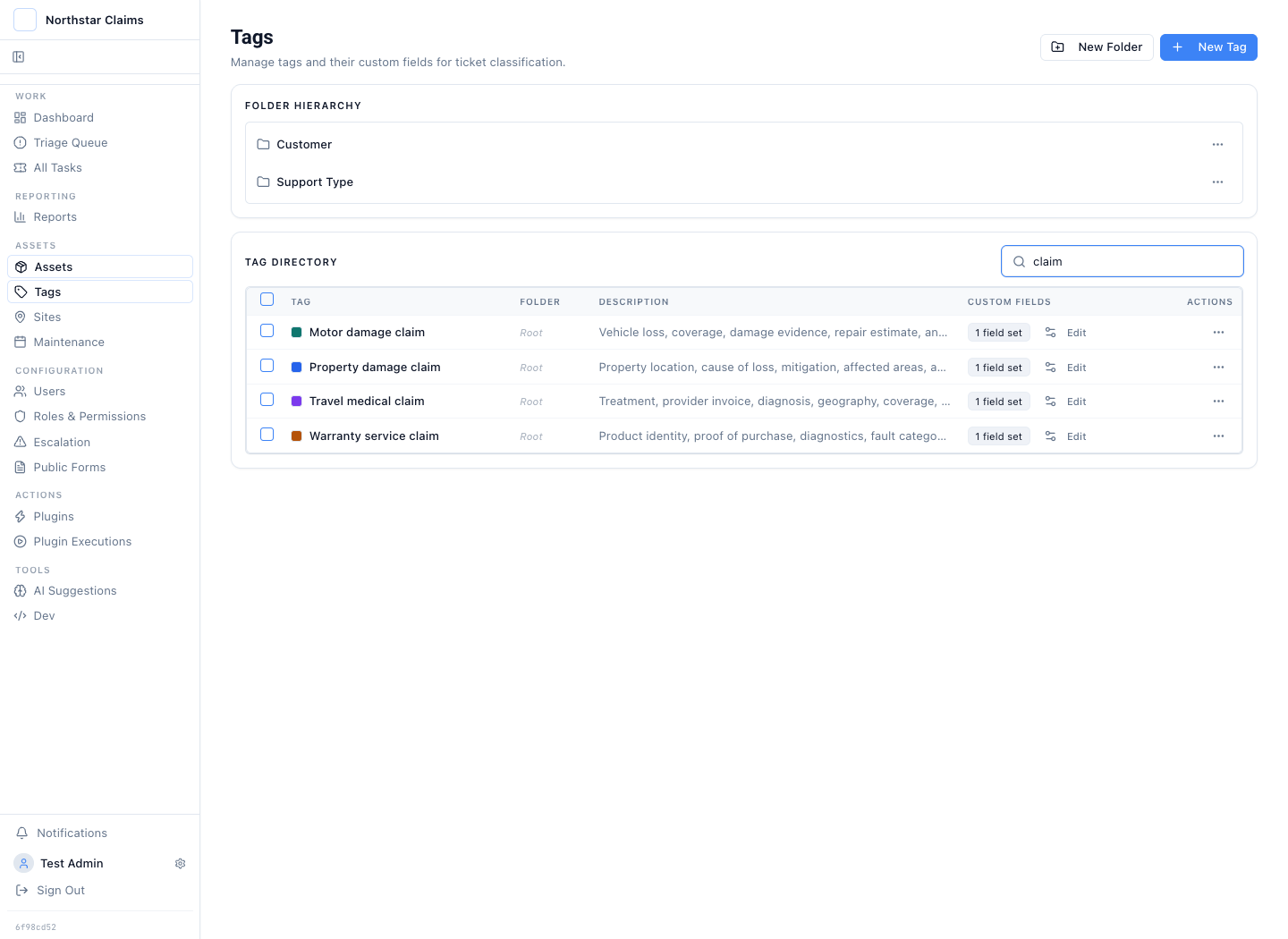
A claims checklist should do more than standardise fields. It should start the right work, keep missing evidence visible, and define what must be true before the claim advances. Motor, property, travel medical, and warranty claims should not share one generic path.
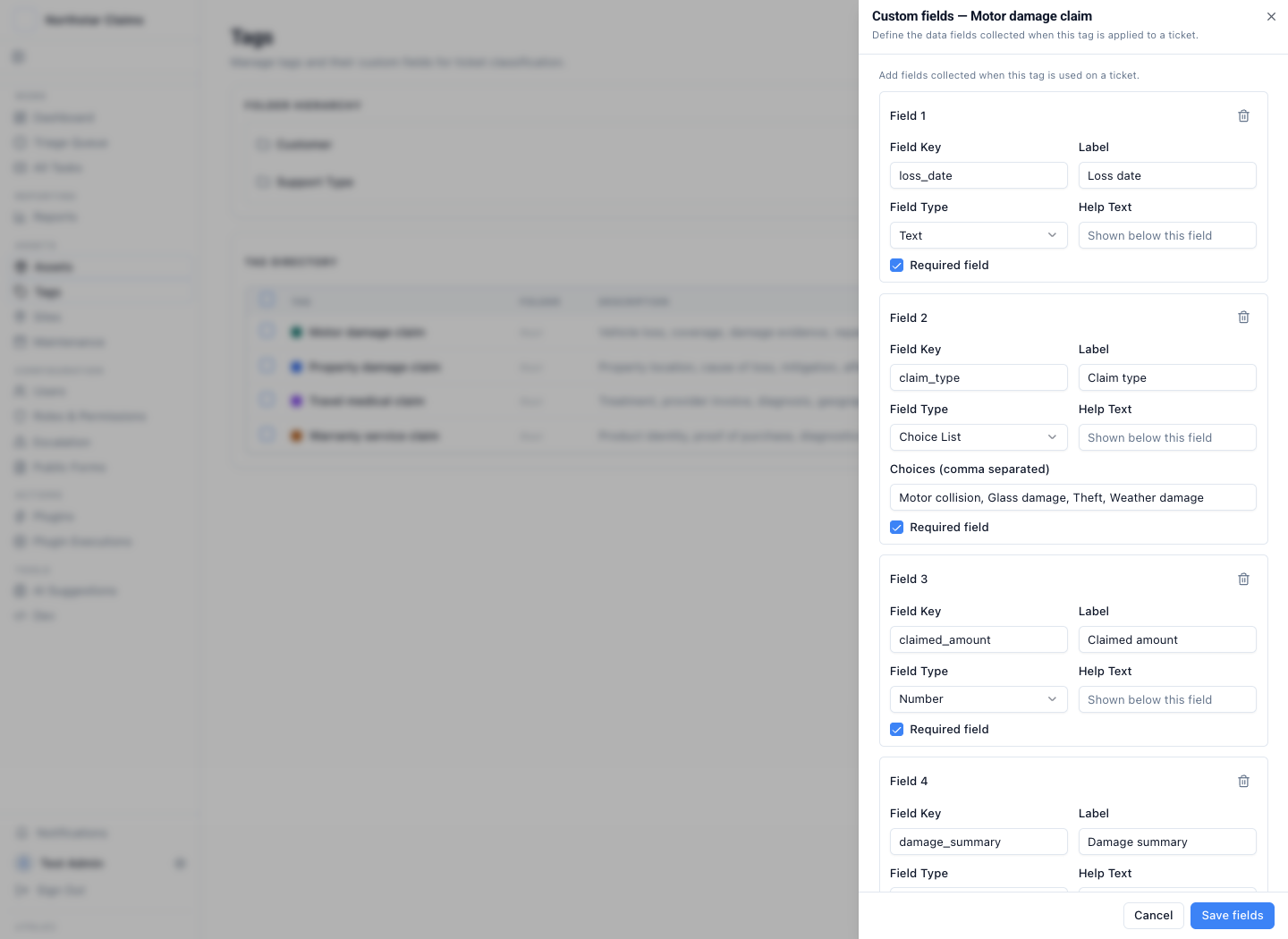
Custom claim types attach the right required fields to the case. Those fields remain visible to support staff, can block incomplete work, and stay available for claims audit reporting.
When staff need more detail on the ticket, a custom field can hold a nested classification: Vehicle damage → Collision → Motor collision, Water damage → Escape of water, or Product function → Electrical. This configures ticket-type fields; a public claim form can keep its ordinary single-level dropdown. See the nested-choice setup guide.
Motor damage claims
Require loss date, collision category, damage summary, claimed amount, coverage confirmation, photos, repair estimate, settlement instruction, and downstream claim reference.
Property damage claims
Require the property address, cause of loss, affected rooms or structures, emergency mitigation status, contractor estimate, assessor files, and approved action.
Travel medical claims
Require treatment date, country, medical provider, diagnosis summary, invoice amount, policy-exclusion check, supporting documents, and reviewer decision.
Warranty service claims
Tie the serial number, purchase date, fault category, diagnostic result, proof of purchase, remedy, return authorization, and replacement request to one case record.
AI, MCP, and plugins work inside the checklist workflow
A model can classify an incoming claim, extract candidate checklist fields, identify missing evidence, or propose the next workflow action. An AI automation can start review work or hold a claim when a check fails. An MCP client can search or act through the tools allowed by its credential. A plugin can send the approved instruction upstream.
Every path still meets the checklist state, role, permission, approval, and audit checks. The model proposes. Support staff decide. The system records the recommendation, correction, request, decision, and result.
Inspect, extend, and run the claims workflow on infrastructure you control
Latch runs in your environment, private cloud, or a disconnected network. Claim data, attachments, model inference, MCP, plugins, approvals, and the audit trail stay inside the deployment boundary.
Source code is available on Enterprise. Teams can inspect and extend what runs, build claim-specific plugins, query or export their data, and operate the software without a hosted-only dependency. The team running Latch owns upgrades, backups, monitoring, retention, and security.
Explore open source ticketingFollow one claim from checklist trigger to upstream proof
The claim type starts the checks. Evidence and operator decisions advance them. A consequential action stops for review, then the upstream result returns to the same workflow.
The claim type starts the right workflow
Motor, property, travel medical, and warranty claims start with different required facts, evidence, policy checks, and decision fields.
The operator advances one live checklist
The form becomes a claim with its answers, evidence, owner, status, and history attached. Missing or failed checks remain visible and hold the workflow at review.
Completed checks prepare the next action
When the required evidence is present, the workflow can prepare an exact reserve update, settlement instruction, referral, or closure payload for review.
Consequential actions stop for a reviewer
Maker-checker blocks the operator who prepared a gated plugin action from approving it. Each separately gated action keeps its own requester, reviewer, decision, and timestamps.
The approved action reaches the upstream system
A plugin can call a claims platform, policy system, payment service, ERP, or internal API. The settlement request, returned reference, failure, and execution time write back to the claim case.
The trail answers who, what, when, change, and outcome
The case preserves actor, timestamp, before-and-after values, evidence, decision, and downstream result. Reports group the activity for sampling with a path back to the source claim.
A status and a settlement amount do not explain the claim
Required fields make the notice of loss complete enough to triage. The photo shows the silver car's front-left collision damage. The form accepts up to five supporting attachments, so a repair estimate or incident report can enter with the notice instead of arriving later by email.
The case keeps each file beside the form answers, notes, owner, and later decision history. It preserves what was supplied without claiming that storage alone proves authenticity.
See how form intake becomes operating work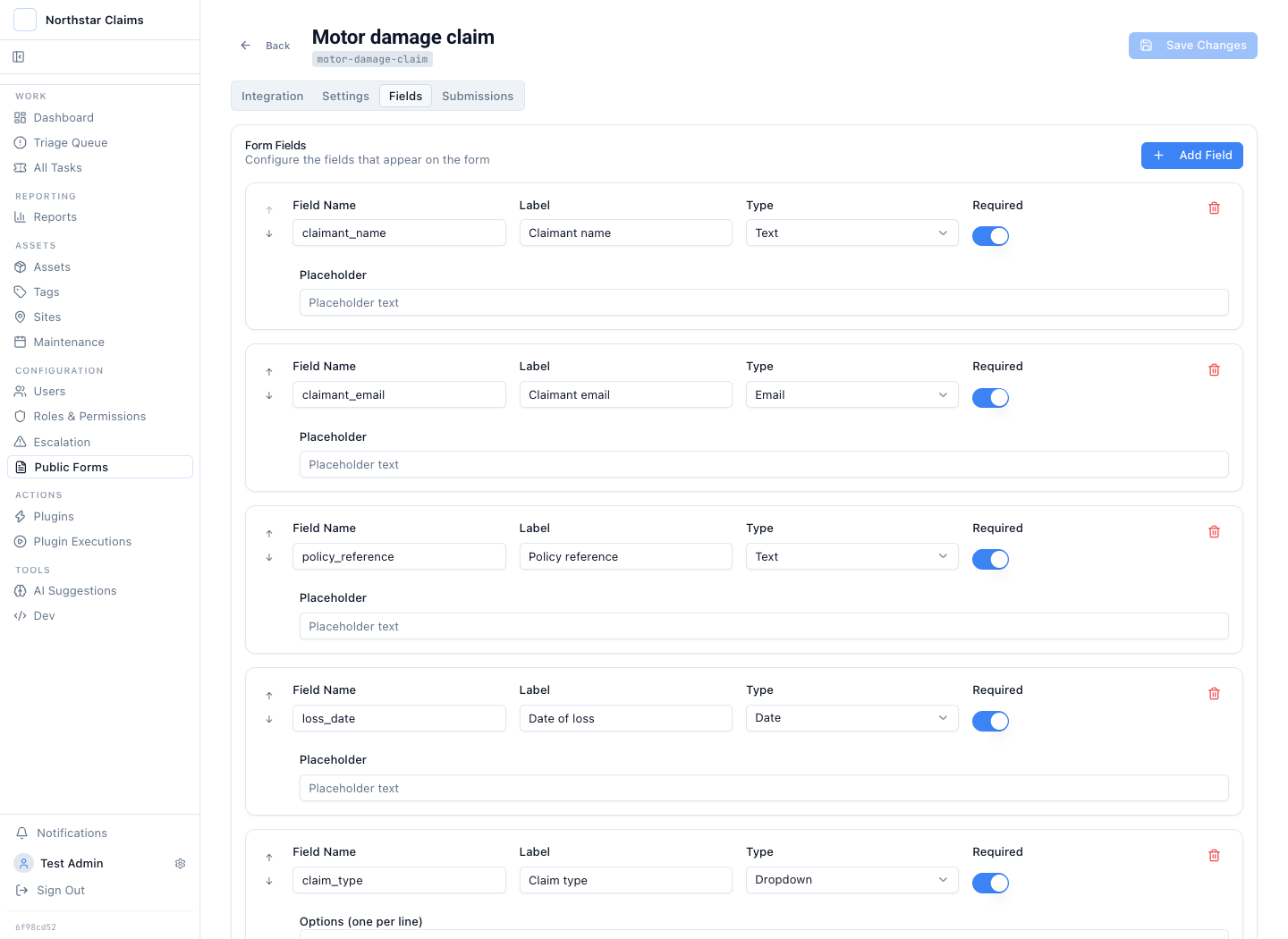
Gate each consequential claim action on its own evidence
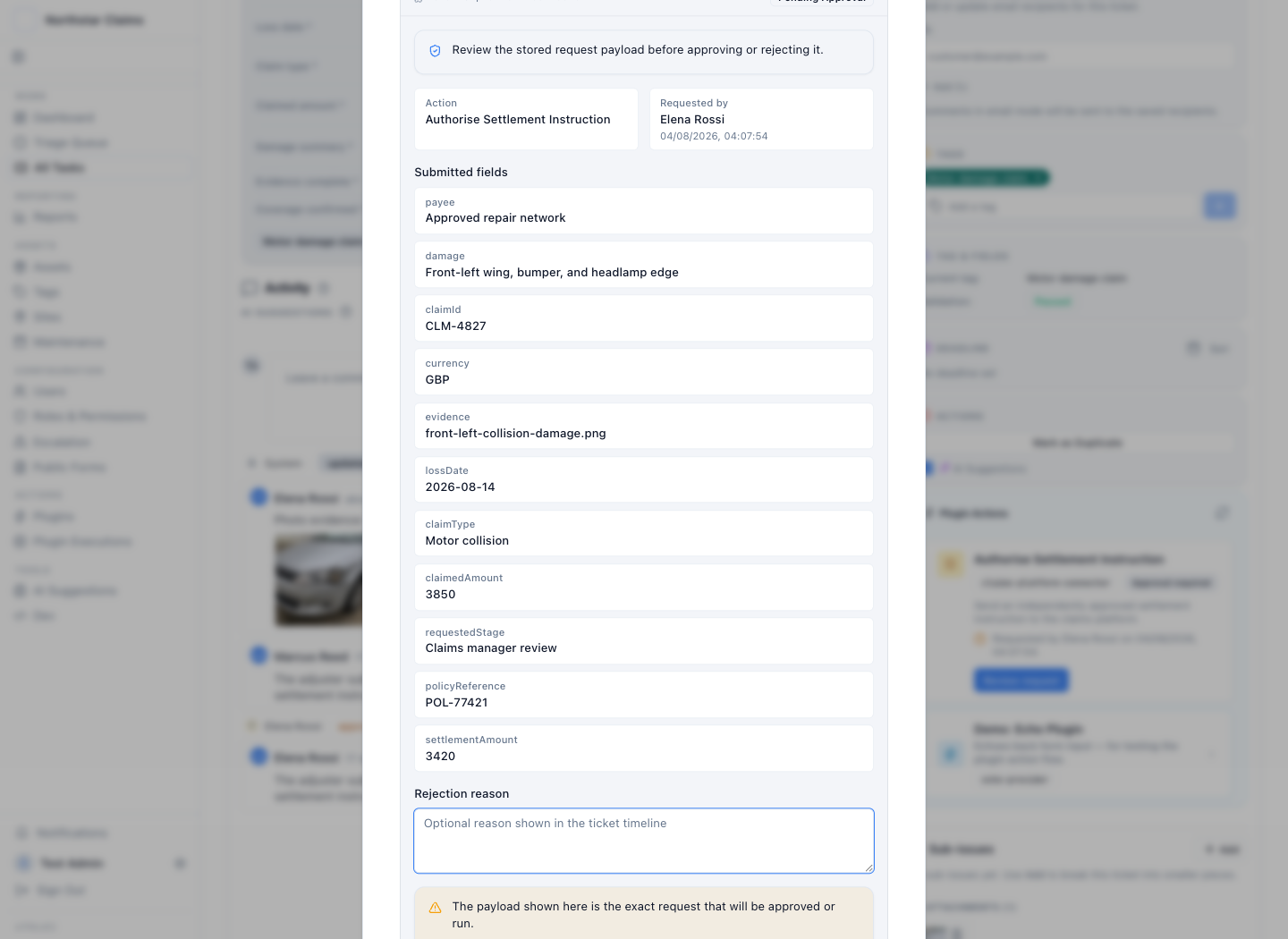
A claim can lead to several actions. A reserve update, a repair authorization, a settlement instruction, and a closure can each be separate plugin actions with separate maker-checker records.
Each gate records who prepared the request, who reviewed it, what payload they saw, and what happened next. If the claim changes while approval is pending, the request can be superseded so the old decision does not silently apply to new evidence.
Latch enforces one independent reviewer per gated plugin action. It does not present one action as an arbitrary serial, parallel, or n-of-m approval matrix. Teams that need that exact model should test it in the workflow review.
Approval is evidence only if it stays connected to execution
After approval, the plugin sends the stored settlement instruction to the claims or payment system. The returned claim reference, payment reference, response body, failure, and execution time write back to the same case.
The audit trail can then answer what the reviewer approved and what the upstream system returned. A permission failure or rejected request stays visible instead of disappearing behind a final status.
See how plugins trigger upstream systems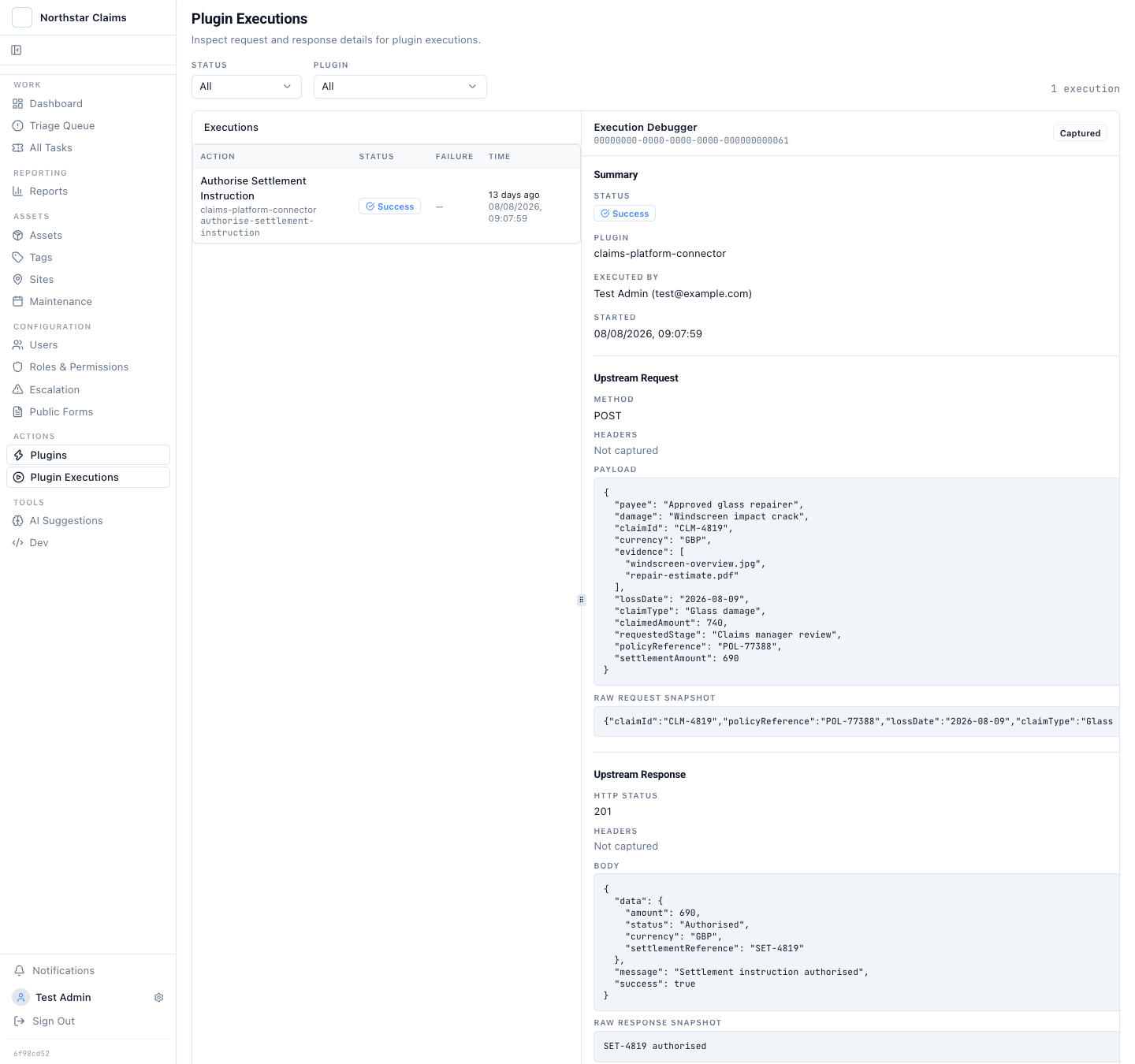
Support staff advance the checklist without leaving the claim
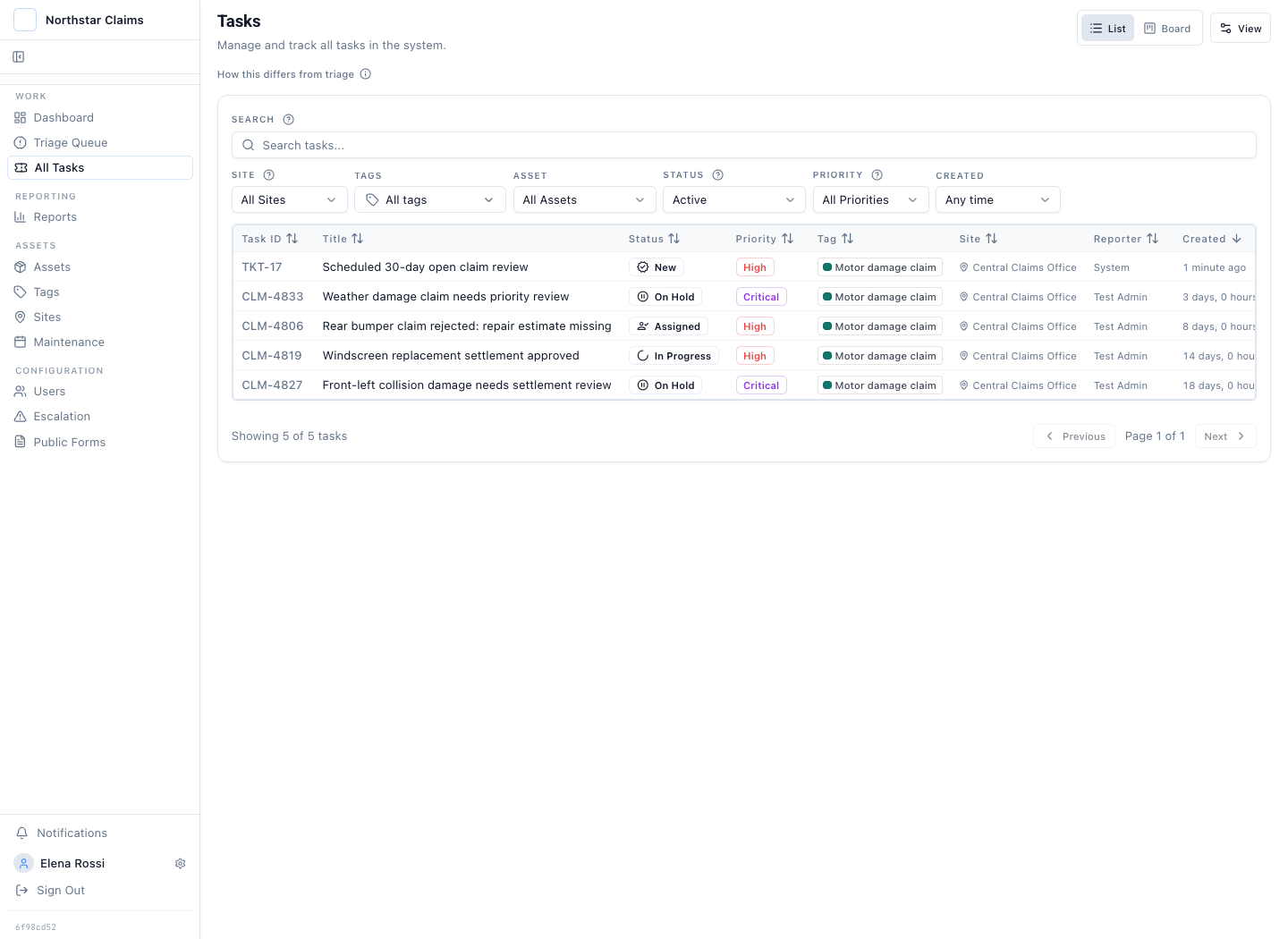
The queue shows claim type, status, priority, and ownership. The claim shows required fields, evidence state, assignee, changes, and approval activity. Support staff complete the workflow in the operating record instead of copying a separate checklist back into it.
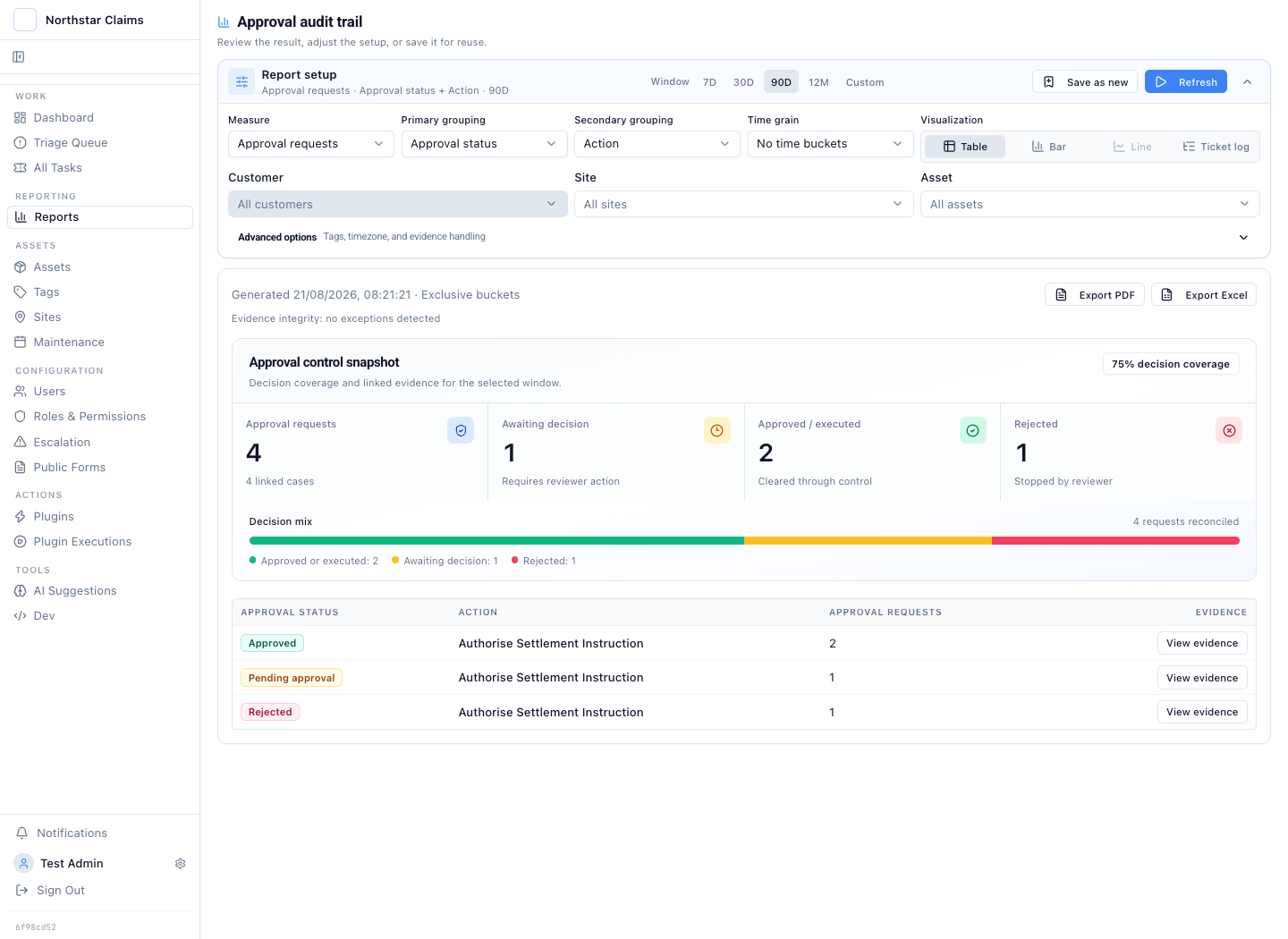
The claims report is an index into the decision evidence
A report can group approval requests by status, action, requester, approver, provider, or time. Operational reports can group governed claim fields and keep missing values visible.
Download the result as PDF or Excel for sampling and handoff. The case remains the source record because it holds the photos, files, field values, notes, decisions, and plugin execution underneath the aggregate.
How to test claims audit trail software in one demonstration
Ask any vendor to run the same four checks. The results separate a status timeline from a record that survives scrutiny.
Approve a settlement instruction
See who prepared the request, who reviewed it, and the exact payload the reviewer approved. The decision must bind to that stored payload, not to a summary copied elsewhere.
Change the claim while approval is pending
Edit the evidence after the request is submitted. A sound system supersedes the pending request so a reviewer cannot unknowingly approve stale facts.
Force the upstream payment to fail
Make the settlement call return an error. The payload sent, the response, and the failure must stay on the record instead of disappearing behind a final status.
Export the record and probe privileged access
Download the complete history, then ask an administrator to alter or delete an event. What a privileged user can change is the real boundary of the audit trail.
Each check maps to a control Latch demonstrates: stored approval requests with exact payloads, superseded requests when the case changes, plugin execution records that keep failures, and PDF or Excel export of the linked case.
The claim needs to produce a controlled action and defensible evidence
Latch fits when claims enter an operating queue, supporting evidence changes during review, some downstream actions need independent approval, and a reviewer must trace a report result back to one claim case.
The team only needs a policy and payment ledger
If the claims platform already keeps intake evidence, review, approvals, execution, and audit reporting together, another case layer adds duplication. Latch earns its place when those control points are split across the inbox, files, chat, and upstream tools.
Inspect the claim control at each boundary
The claims use case combines several product surfaces. These pages explain the individual contracts.
How form submissions become cases in the triage queue with the supplied evidence attached.
How role checks and a stored approval request stop a sensitive claim action before execution.
How a plugin calls a claims, policy, payment, or internal system and returns the outcome to the case.
How claims, models, MCP tools, plugins, and audit evidence run inside infrastructure the team controls.
Questions about claims controls and evidence
The product boundary matters most where forms, claim evidence, approvals, upstream systems, and audit reporting meet.
How is a claims audit trail different from a claims quality audit?
A claims quality audit evaluates whether a claim was handled correctly, usually while it is still open. It typically runs on sampling, scoring, and leakage analysis, and it is the territory of claims QA analytics platforms. A claims audit trail preserves the evidence of how the claim was handled: actors, timestamps, before-and-after values, approvals, and execution results. Latch provides the audit trail and the recurring open claim file review that schedules the quality check. It does not score claims or predict leakage.
Can claims enter through a structured form?
Yes. Latch forms support text, long text, email, phone, number, date, select, checkbox, image, and file fields. Fields can be required, and a form can allow several supporting attachments. The submission creates a case in the operating queue instead of stopping in a form-response table.
How does a claims checklist drive the workflow?
A custom claim type defines the required fields and checks for that category of work. The checklist stays on the live claim, so missing evidence remains visible, support staff complete or correct the required values, AI can propose bounded updates, and consequential plugin actions can stop for approval before execution.
Can a claims team schedule recurring reviews?
Yes. A recurring schedule can create a review ticket at a fixed interval with a chosen classification, field template, priority, and title. For example, a claims quality team can create a high-priority open claim file review every 30 days. This recurring review is a separate control record. It does not silently change the underlying claims.
What claim evidence can stay on the case?
Structured form answers, ticket fields, comments, images, video, and files can stay with the case. A motor claim can keep collision photos, a repair estimate, a police or incident report, and the claimant declaration beside the decision history. Latch stores the evidence; it does not claim that every document is independently verified as authentic.
Can one claim have more than one approval point?
Yes. A claim can carry several plugin actions, and each sensitive action can have its own stored maker-checker request, reviewer, decision, and execution result. A reserve change and a settlement instruction can therefore be separately gated. The built-in gate enforces one independent reviewer for each action. It is not an arbitrary serial or n-of-m quorum engine for one action.
What happens if the claim changes after approval is requested?
By default, a pending request is superseded when the case version changes. The reviewer does not unknowingly approve a request against evidence that has since been edited. The team submits a fresh approval request against the current record.
How does Latch update a claims or payment system?
A plugin lists the actions available for the current case and runs the selected action against a claims platform, policy system, payment service, ERP, internal API, CLI, or another programmatic interface. Permissions and any approval gate run first. The request and returned outcome then write back to the case.
Does this replace a core claims or policy administration system?
Usually not. Latch holds the operating case, evidence, review path, and controlled handoff. The specialist system can remain the source of truth for policies, coverage, reserves, payments, and settlement. A plugin connects an approved claim decision to that system.
Can claim audit results be exported?
Reporting results can be downloaded as PDF or Excel. The export supports sampling, review, and handoff. The linked case, its attachments, approval request, and plugin execution remain the source evidence.
Is the audit trail the same as a legal records archive?
No. Latch keeps an append-only operating history of case changes, evidence, approval events, and plugin execution. Teams should apply their own retention, legal-hold, privacy, backup, and storage controls to the deployment and its attachment store.
How do AI automations, MCP, and plugins work in a claims process?
A model can classify a claim, extract candidate fields, identify missing evidence, or propose a next action. An MCP client sees only the claims and tools allowed by its credential. A plugin executes an action against the claims platform. Human and AI paths use the same role, policy, approval, and audit checks. The operator remains the decision-maker.
What does source-code access mean for a claims workflow?
Source code is available to Enterprise customers. Teams can inspect and extend what runs, build plugins, retain direct access to their database and exports, and deploy in their environment, private cloud, or a disconnected network. The team running Latch also owns upgrades, backups, monitoring, retention, and deployment security.
Test one checklist-driven claims workflow
Bring the claim type, required checks, evidence, approval points, and the system that should receive the approved action. The walkthrough should produce a fit or no-fit answer on that workflow.