Ticketing with approvals before sensitive actions run.
Bring the service request, supporting evidence and approval decision into one ticket workflow. With Latch, an operator requests a sensitive plugin action and another eligible person reviews the saved details before it can run.
Require independent review for selected actions while routine work continues. Keep the request, decision and reported execution result together, so your team can trace what was requested, who approved it and what happened next.
How the ticket approval workflow works
- Capture the request. An email or form becomes a ticket with the description, attachments and notes needed to understand the case.
- Submit the action details. The operator selects a connected plugin action and saves its inputs for review.
- Get independent review. Another eligible operator checks the saved values alongside the ticket evidence and approves or rejects the request.
- Execute and check the result. An eligible operator other than the requester runs the approved action in a separate step. Its reported outcome stays linked to the ticket.
Choose which actions need approval
A transaction reprocess can require maker-checker review while a routine lookup remains available without a gate. Administrators set a plugin default and overrides for individual actions. Both paths still use the configured roles and permissions.
The approval gate controls the selected action; it does not automatically require sign-off for ticket edits or closure. Amount and transaction-eligibility rules belong in the connected action logic. See the approval controls and request lifecycle before deciding how your business rule should be implemented.
Use the value-at-risk approval planning guide to map request risk and wider exposure before choosing the review route and the rules your connected action must enforce.
One transaction reprocess, two accountable people
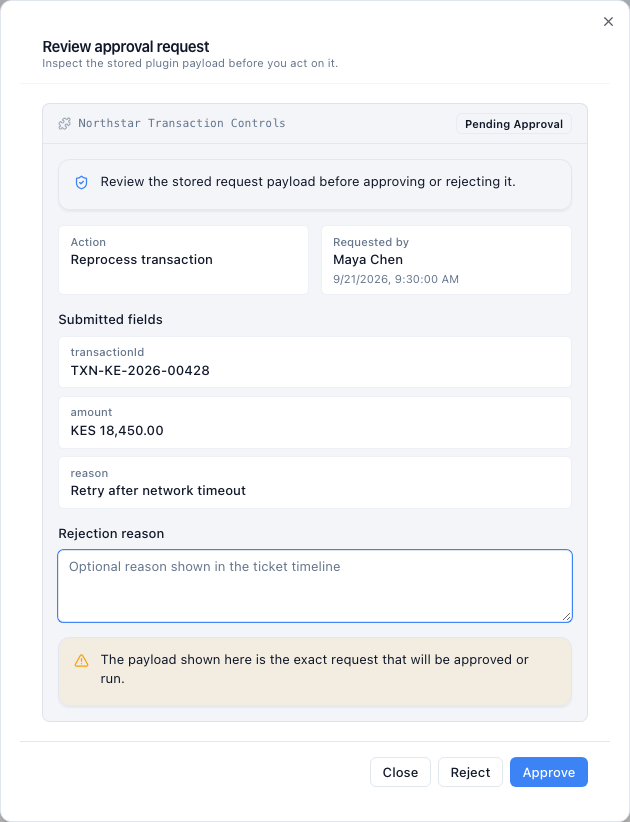
Maya and Daniel work on a fictional service desk. Their names, transaction details, and screenshots use synthetic example data. The connected action supplies the operation; Latch supplies the review and execution controls around it.
Maya prepares the request
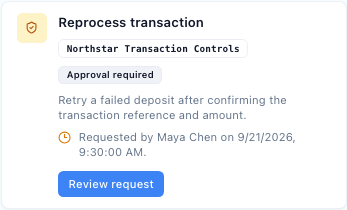
Maya is reviewing a failed transaction case. She selects the reprocess action, enters the transaction reference and retry reason, and submits the form. Latch saves those inputs with the requester, action, request time, and ticket version.
The request waits for independent review. Maya cannot approve, reject, or execute her own request. That rule follows the action requester, who may be different from the person who created the ticket.
Daniel reviews, then chooses whether to execute
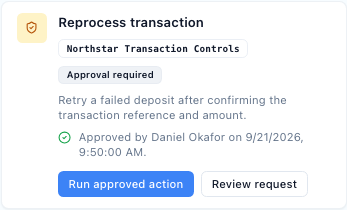
Daniel opens the saved fields beside the case evidence. He can approve or reject, with an optional rejection reason. Approval makes the request ready to run; it does not retry the transaction.
Daniel, or another eligible operator other than Maya, may execute it later. The reviewer may also execute, so a third person is not required. Latch rechecks the request state, expiry, roles, permissions, and current action availability.
Execution uses the saved submitted fields with current ticket context. If ticket-change invalidation is enabled and the case has changed, a fresh request is required before the action can proceed.
This same control pattern can support other connected actions your team builds. A vendor-record update, for example, needs an ERP connection and its own business rules. It is a customization example, not an included ERP connector. Explore finance controls or the complete guide with review screens.
Approval and completion answer different questions
The reviewer decision establishes that the request cleared review. The execution record shows the result reported by the plugin afterward. A timeout can leave the external outcome uncertain even if the operation reached the connected system.
An executing or uncertain request cannot simply be clicked again. Inspect the execution history and the connected system before authorizing another operation. The ticket audit history links the decision and action; it does not replace checking the authoritative result.
Keep a fresh request tied to a fresh review
A reviewer can reject a pending request. Its requester can cancel it. Different submitted values require a new request, and configured expiry or ticket-change invalidation can prevent stale requests from being used.
The history preserves the request and decision as separate events. An approval count is not a count of completed external operations. Use the request status and execution evidence when reviewing what actually ran.
Is this the right approval workflow for your team?
Latch fits teams that need a second person to review a connected action from a ticket. Start with one safe test action and two accounts. Check what the reviewer sees, what approval permits and what record remains after execution.
| Requirement | What to establish |
|---|---|
| Independent action review | The requester cannot approve or execute their own request. Another eligible person can inspect the saved values. |
| Current permission and context | Expired or invalidated requests cannot proceed. Execution checks current authority and action availability. |
| Several reviewers or stages | Specify sequential order, parallel groups, or a decision quorum separately. Latch's current maker-checker gate is a focused two-person control. |
| Execution evidence | Find the submitted request, decision, execution attempt, and reported outcome. Test rejection and uncertain results as well as success. |
An existing service desk may already meet your approval needs. The Zendesk approval workflow comparison explains current native options and the requirements to test. For the narrower independence rule, see maker-checker review.
Run and adapt the control in your environment
A customer-deployed installation gives your team responsibility for the application, its storage, backups, and configured connections. Adapt ticket fields and expose your own actions through the plugin interface. Source-code access is available on Enterprise under the agreed commercial licence.
Your choice of integrations and model services determines which data crosses the deployment boundary. Review that flow along with identity and operating responsibilities in self-hosted ticketing and the security and deployment guide.
Connect the operation your team needs
A plugin supplies an action and its inputs; the configured Latch gate applies independent review around the request. Your team owns the custom action's business rules and maintenance.
See plugin actions and integrations for the product view, or Enterprise source access when inspection or contractually permitted source changes are part of the evaluation.
Choose the deployment and control detail you need
Start with self-hosted ticketing or the complete approval workflow. The feature pages explain how independent review, action records and deployment controls fit together.
Evaluate your infrastructure, operating responsibilities and customization path.
Prevent the action requester from approving or executing their own request.
See configured action gates, request states and separate execution checks.
Review decision and execution records alongside the controls needed for independent retention.
Inspect identity, storage, integration traffic and operational responsibilities.
Bring email, forms and API requests into one ticket queue.
Apply ticket records, checklist reviews and configured approval actions to claims work.
Questions about ticket approval steps
Define the action, reviewer, and evidence your workflow requires.
What is ticketing with approvals?
Ticketing with approvals connects a service request and its supporting evidence to a review decision. In Latch, an operator requests a configured plugin action and another eligible operator reviews the saved details. Approval is followed by a separate execution step, with the decision and reported result linked to the ticket.
What does the approval step control?
A configured plugin action. An operator submits its details, another eligible person reviews the saved request, and an eligible person other than the requester executes it afterward. The gate does not automatically govern every ticket edit or status change.
Who can approve a request?
Another eligible operator with ticket access, an approved plugin role, and the required action permission. The person who submitted the action request cannot approve, reject, or execute that same request. They may be different from the person who originally created the ticket.
Does approval automatically run the action?
No. Approval makes the request ready for a separate execution step. The reviewer may execute it if they remain eligible; a third person is not required. Latch checks the request and current authority again before execution.
Where do amount thresholds and business rules live?
In the connected action logic. Latch configures a plugin default and named-action overrides using either no gate or maker-checker review. The gate settings do not provide an amount-rule builder, sequential approval chain, parallel review groups, or a quorum.
What if the request changes or expires?
An expired request cannot be approved or executed. With ticket-change invalidation enabled, a ticket change supersedes pending or approved requests before execution. Different submitted values require a new request for review.
Does every ticket need approval?
No. Apply independent review to actions that need it under your operating and access policies. Routine work can continue without an action gate while still passing its configured role and permission checks.
Can we run and adapt this workflow in our environment?
Yes. A customer-deployed installation runs on infrastructure your team operates. Configure the ticket fields and connect your actions through plugins. Source-code access is available on Enterprise under the agreed commercial licence; your deployment and configured external services determine the data flow.
Follow one reviewed action from request to result
See the request fields, independent review, separate execution step, and approval report in an illustrative product workflow.
Free workspace · 100 tickets · No card required. See what is included.