Zendesk approval workflows: native fit and action controls
Zendesk has native approval requests and action flows. Latch applies maker-checker review to connected ticket actions. Choose by testing the real request, reviewer boundary, approved inputs, and downstream result your team needs to retain.
Stay with native Zendesk when its configured workflow meets your requirements. Evaluate Latch when customer deployment or custom action control changes the decision. A different system should earn its place in the operating process.
Product documentation reviewed 3 October 2026. Availability depends on the account and feature access; this comparison is not a live Zendesk configuration test.
Credit the workflow Zendesk already provides
Zendesk records ticket approval requests for designated agent or end-user approvers, with decisions and reporting. Pending requests prevent ticket closure. Its overview also describes API, action-flow, and Slack response paths. See Zendesk's approval documentation.
The newer release announcement documents flows that pause for a decision and continue afterward, sequential steps, and variable-selected approvers. It gives a rollout of 31 August–9 September 2026 for eligible accounts. Confirm the suite, plan, and available actions.
Check documentation date and actual access
The older workflow recipe retains an EAP reference despite the newer release notice. Use the newer announcement for release status and test the account configuration before depending on a particular path.
Do not treat an approval response in a configured Zendesk flow as an informal chat message. Establish what the flow waits for, what it does next, and which request and outcome records it retains.
Compare the requirement, then the configuration
A transaction retry can be reviewed through different operating paths. The useful test starts with the submitted values and ends with evidence of the external outcome.
| Requirement | Zendesk | Latch | What to test |
|---|---|---|---|
| Reviewer pattern | Native requests and sequential flow steps. Release details | A different eligible person reviews an action request. No general sequential chain, parallel group, or quorum. | Who is required to decide, in what order, and with what independence? |
| Approval and execution | A flow can wait for the response before continuing. Current announcement | Approval makes the request ready for separate execution by an eligible non-requester. The checker may execute. | Which transition or downstream operation is actually prevented until the decision exists? |
| Submitted values | Inspect the configured request and downstream action inputs. | Review displays saved form inputs. Execution uses them with current ticket context. | What did the reviewer see, what may change, and what will be sent? |
| Expiry and changed context | Verify the lifecycle in the selected native workflow. | Configured request expiry and optional ticket-change invalidation are checked before execution. | Can a stale decision authorize different work? |
| Outcome evidence | Test what the configured external action and flow retain. | The linked execution record captures the plugin's reported result; uncertain outcomes need investigation. | Can the operator reconcile local history with the authoritative target result? |
| Operating and extension model | Evaluate the Zendesk service and the configured flow. | Customer deployment and custom plugins are supported; source access is available on Enterprise under commercial terms. | Who operates the system, maintains the custom action, and controls the data flow? |
Inspect Latch's current action-review path
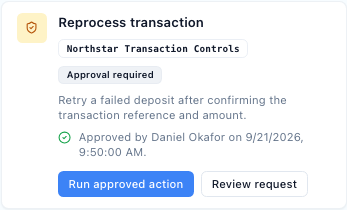
An operator submits a plugin action from the ticket. Another eligible person inspects the saved fields and approves or rejects it. The requester cannot approve, reject, or execute that same request. The reviewer may execute later if eligible.
A plugin default or named-action override selects either no gate or maker-checker review. Amount eligibility belongs in the connected action logic. The current gate is not a multi-stage routing designer.
See the approval guide with synthetic product examples, the feature controls, and ticketing with approvals for the complete operating context.
Stay native when the workflow fits
Use Zendesk when the tested approval flow, downstream operation, and retained evidence meet your requirements. Additional software adds integration and operating work.
Evaluate the deployment requirement
If customer operation and adaptation are requirements, inspect self-hosted ticketing, custom plugin actions, and Enterprise source access. Configured connections still determine where data is processed.
Keep the comparison specific
For broader migration and product choices, see the Zendesk alternative. For an approval decision guide, read when native approvals are enough.
Questions before choosing an approval path
Confirm the current feature access and run the specific request and outcome test.
Does Zendesk have native approval workflows?
Yes. It supports ticket approval requests and action flows. Its current release notice also documents waiting for a response, continuing afterward, and sequential approval steps for accounts with access to the relevant features. Confirm the suite, plan, and account configuration.
Is Zendesk approval automation still early access?
The newer release notice says the wait-and-continue and sequential capabilities rolled out from 31 August to 9 September 2026 for accounts with action flows and approval requests. An older recipe still contains an EAP reference. Use the newer notice and verify actual account access before designing a workflow.
Can Latch replace a multi-stage approver chain?
Latch currently provides maker-checker review around a plugin action. Another eligible person reviews the saved request, and execution is separate. Sequential approvers, parallel groups, and a quorum are different requirements; they are not features established by this gate.
Does Latch include a refund or ERP connector?
A connected plugin supplies the operation and its business rules. The examples illustrate how a custom action can use the current request, review, and execution path. They are not a promise of bundled Stripe or ERP connectors.
When should a team evaluate Latch?
When its requirements include customer-controlled deployment, custom ticket actions, the current requester-reviewer boundary, or Enterprise source access under commercial terms. Evaluate the actual configured request and result evidence in both products before deciding.
Bring one action and its evidence requirements
Inspect the request, independent review, and separate execution path. Then decide whether Latch fits the deployment and extension requirements.