Priority and city tier
Maintain a versioned target matrix for response and restoration or resolution. Map branch and city-tier IDs explicitly. Missing mappings create an exception for review rather than silently selecting a more convenient target.
SLA management
Connect your service desk, kiosk monitoring, and engineer evidence to a reviewable SLA workflow. Use your agent and Latch MCP to turn contractual rules into evidence-backed breach proposals, customer review, and monthly service reporting.
Build on Latch with your agent and MCP
You can build this workflow on Latch. Your agent connects to your approved service desk and monitoring systems, applies your contractual rules, and uses Latch MCP to retrieve permitted ticket context, record findings, attach evidence, and request governed actions.
Latch supplies the ticket workflow, existing SLA controls, scoped MCP access, attachments, and action approval infrastructure. Your integration supplies the contract-specific rules engine, versioned service calendar, durable review timers, cause proposals, and service-credit ledger. The design below is an implementation blueprint, not a claim that these custom services are already installed.
01 · Your systems
Service desk tickets, kiosk heartbeat and device state, application logs, and engineer-submitted logs and evidence. Your connectors define which systems and records the agent can read.
02 · Your agent and services
Deterministic clock calculations, a versioned calendar, provisional cause analysis, a durable accept-or-dispute process, and reproducible monthly credit calculations.
03 · Latch MCP
Scoped ticket reads, internal findings, evidence attachments, permitted API operations, and requests for approval-gated provider actions in the same ticket context.
Configure the agent to use an explicit source allowlist. A heartbeat gap is an observation; a service desk ticket records the reported impact; an engineer attachment may explain what happened on site. Keep their source IDs, kiosk and branch IDs, event times, collection times, and original files together. Link every finding back to the source record and preserve the attachment hash where available.
Missing telemetry, conflicting timestamps, and incomplete engineer evidence remain visible. They do not become proof of an outage or proof of fault. The agent has no need to browse the public web for a cause. Its model and hosting are separate choices: configure an approved private runtime when the operating requirement is to keep evidence within your infrastructure.
The contractual clock
Your rules service selects the applicable agreement by effective date, priority, and city tier. It produces the same result from the same inputs. The agent can explain that result; a language model does not decide the contractual arithmetic.
Maintain a versioned target matrix for response and restoration or resolution. Map branch and city-tier IDs explicitly. Missing mappings create an exception for review rather than silently selecting a more convenient target.
Calculate against the agreed time zone, working windows, holiday dates, and branch closures. Keep the contract calendar separate from the built-in weekly SLA schedule when its rules are richer.
Record pause start, end, reason, supporting evidence, and required approval. Apply only the pause types the agreement permits. A waiting status or an unanswered question is not an automatic contractual exclusion.
Record the clause and evidence for planned maintenance, customer dependencies, access restrictions, or other agreed exclusions. Preserve gross duration, excluded intervals, counted duration, and overlap handling separately.
Each assessment should retain the rule version, calendar version, priority and city-tier mapping, interval calculation, deadline, breach duration, and evidence references. If the contractual result differs from the native ticket SLA, label both results and their purpose. Store the contractual assessment through your integration instead of implying that an MCP call adds holiday support to the native weekly clock.
A proposal the customer can challenge
For each potential breach, your agent prepares a proposed cause and responsible party. The review packet includes the event timeline, target, calculation, supporting and contradictory evidence, uncertainty, and the contract clause used. Where evidence is insufficient, the proposal can remain unassigned or require human investigation.
Write a finding to the incident or a linked breach-review ticket, attach the evidence packet, and record the assessment revision. Proposed cause and proposed responsible party are separate from an accepted decision.
In an example agreement, the customer has five business days to accept or dispute. Your service calculates the due time from the contract-defined notice event using the agreed review calendar and records delivery evidence. Do not start the timer merely because an internal comment was created.
Capture the reviewer identity, timestamp, assessment revision, decision, reason, and counter-evidence. A timely dispute moves the case to joint review and prevents the undisputed timeout path from finalizing that assessment.
Your durable scheduler records deemed agreed only after the applicable deadline and only if the agreed notice conditions hold and no timely dispute exists. A missing delivery record or uncertain timing routes to review. This is a contract-specific rule, not an automatic Latch approval.
Keep the original proposal and both parties' evidence available to the named joint reviewers. Record their decision, rationale, adjustments, and sign-off. Preserve later corrections as new revisions rather than overwriting the original record.
Classify the result as explicitly accepted, deemed agreed, jointly resolved, or still disputed. Carry that status into reporting and credit eligibility. An unresolved proposal does not silently become an agreed financial liability.
The five-business-day period is an example contractual term. Configure its start event, time zone, holiday treatment, cutoff, evidence requirements, and correction or re-notification rules from the signed agreement. A durable workflow service must handle timers and concurrent decisions; an agent conversation alone is not the review register.
Versioned service calendar
Build a calendar register in your integration for national and local holidays, branch-specific closures, special service windows, and effective dates. Each change records who made it, when, what changed, why, and any required approval, including the before and after values.
Retain the calendar version used by each assessment. A backdated closure produces a traceable recalculation and a new assessment revision. The original assessment, notice, and decision remain available. Your calendar service owns the full change audit; Latch records the ticket and action events you write through its supported interfaces.
Monthly service and credits
Your reporting job combines operational SLA outcomes with the contractual assessment register. Show eligible incident counts, priority and city-tier performance, gross and counted downtime, accepted exclusions, proposed responsibility, final responsibility, and open disputes. Every reported line links back to its ticket, evidence packet, and decision revision.
Calculate service credits deterministically from the agreed fee base, breach bands, attribution rules, exclusions, caps, rounding, and duplicate-incident treatment. Retain the formula version and line-item inputs. Keep provisional estimates and approved credits separate; define how unresolved disputes and late corrections enter the next period.
Attach the monthly report and calculation worksheet to a reporting ticket. Use a governed provider action when finance approval or a downstream ledger posting is needed. A generated worksheet is not proof that a credit was approved, invoiced, or paid.
The implementation path
An administrator enables MCP Agents, creates a scoped profile, selects the allowed tools and risk level, and issues a credential for the approved client. Connect to your workspace at https://<account>.latchworkflow.com/api/v1/mcp. Discover the permitted catalog with tools/list; available operations depend on the profile and deployed version.
Your agent reads kiosk monitoring and any external service desk through your own authorized connectors. Latch MCP provides access to Latch records; it is not a connector to every monitoring system. Keep the agent, deterministic rules service, calendar register, and durable scheduler as explicit parts of the solution.
| Step | Supported interface | How your integration uses it |
|---|---|---|
| Find and read tickets | tickets.searchtickets.get | Retrieve permitted incident context. Use allowed API tools when the assessment needs fields beyond the native redacted ticket view. |
| Read the record | ticketing://tickets/{ticketId}/timelinePermitted ticket audit-log API tool | Read bounded note history and authorized audit records. Follow pagination where supported and retain source identifiers; a bounded resource is not the entire historical evidence set. |
| Record the finding | tickets.createtickets.comment.create | Create a review ticket when needed and add internal proposals, rule references, and review outcomes. Customer notice and external reviewer access require their own configured workflow. |
| Attach and verify evidence | api.post.tickets_id_attachmentsapi.get.tickets_id_attachments | Upload evidence bytes, then verify the returned attachment ID, size, and SHA-256 hash. The decoded per-file limit is 30 MiB, subject to workspace quota and normal file validation. |
| Read permitted reports | Profile-allowed api.* report operations | Read SLA and service-delivery data where exposed and authorized. Your reporting service joins these results to its contractual decisions and credit ledger. |
| Request a governed action | actions.discoveractions.request_approval | Discover allowed provider actions and request approval for a configured action, such as finalizing a credit statement in your system. These tools do not give the agent unrestricted provider execution or authority to approve its own request. |
Start with a read-only assessment profile, then allow only the writes needed for findings and attachments. Current human authority, record access, tool allowlists, and risk controls still apply. An own-tickets profile is too narrow for a fleet-wide reporting agent: use a deliberately scoped profile for the required records and report operations. Provider actions have additional permission, approval, and network gates.
Use stable idempotency keys for the same write intent and verify results before advancing the review. Keep a durable incident and assessment key to prevent duplicate breach cases. Your workflow service must serialize a dispute arriving near the deadline against the deemed-agreement job. Reconcile uncertain downstream outcomes before retrying a credit posting.
Prove one complete monthly cycle
Bring the priority-by-city-tier matrix, source system schemas, holidays and closure rules, allowed pauses and exclusions, review and notice terms, and credit formula. Implement one evidence-to-decision path before expanding to the fleet.
Validate a weekend and holiday overlap, a branch closure, overlapping pauses, missing heartbeat data, contradictory engineer evidence, a late notice, a timely dispute, an unanswered valid notice, a calendar correction, and a duplicate retry. Reconcile a sample monthly report and credit worksheet with the agreed manual calculation. That establishes the workflow you built; it is separate from enabling the native weekly SLA policy.
Built-in SLA controls
A response allowance, a resolution allowance, and an attainment percentage answer different questions. Latch keeps them explicit, with a general fallback and complete policies for tagged work.
01
Set a response allowance in minutes and a separate attainment objective. Track operational acknowledgment through recorded assignment or qualifying status changes.
02
Give Critical, High, Medium, and Low work separate resolution allowances and attainment targets. Keep urgent work visible when the overall rate looks healthy.
03
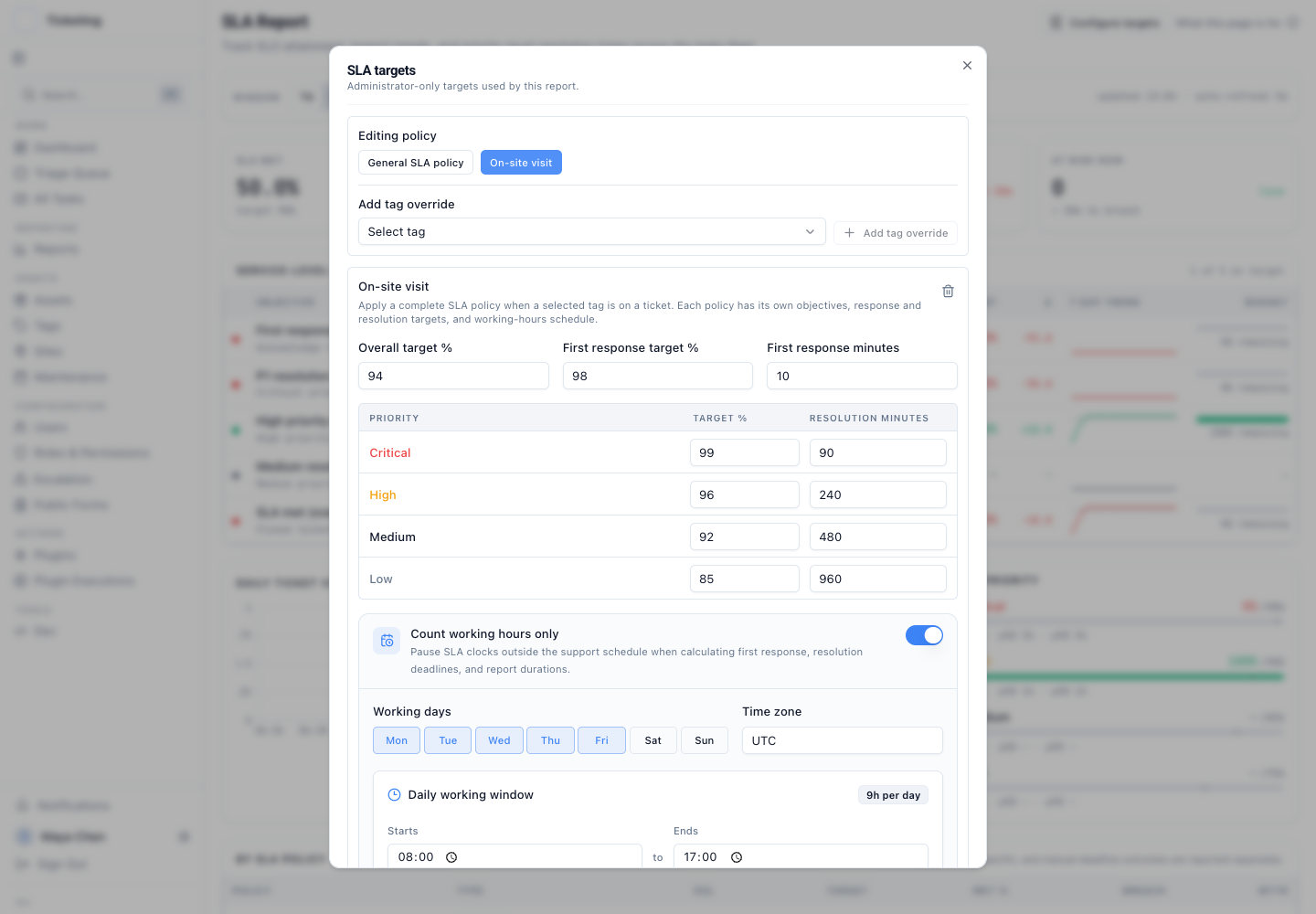
Choose working days, one daily support window, and a named time zone. Count service time inside the schedule or use continuous time for 24/7 coverage.
04
Give field visits, remote recovery, or a service tier its own complete policy. Keep different commitments in the same ticket queue.
05
Keep the applied source, tag, thresholds, attainment targets, and schedule with the ticket so reports retain the context behind the deadline.
06
Preserve manually selected deadlines and report their outcomes separately from default and tag-specific policies.
The support clock
With weekday coverage from 09:00 to 17:00, a ticket arriving Friday at 16:45 with a four-hour allowance is due Monday at 12:45. Closed hours contribute no service time.
Example · Monday–Friday · 09:00–17:00 · policy time zone
Choose the time zone of the promise and the working days of the team. For continuously staffed service, use a policy without working-hours restrictions.
Check your own deadline in the calculator →
One queue, different commitments
Use a tag-specific policy for weekday field visits and another for continuously staffed remote recovery. Set each policy's response threshold, priority resolution targets, attainment objectives, and schedule without splitting the triage queue.
When several SLA tags match, the shortest resolution-minute target for the ticket's priority wins. The entire selected policy applies. A shorter allowance does not always produce the earliest calendar deadline when schedules differ.
Explore tag-specific SLA policies →From a warning to a decision
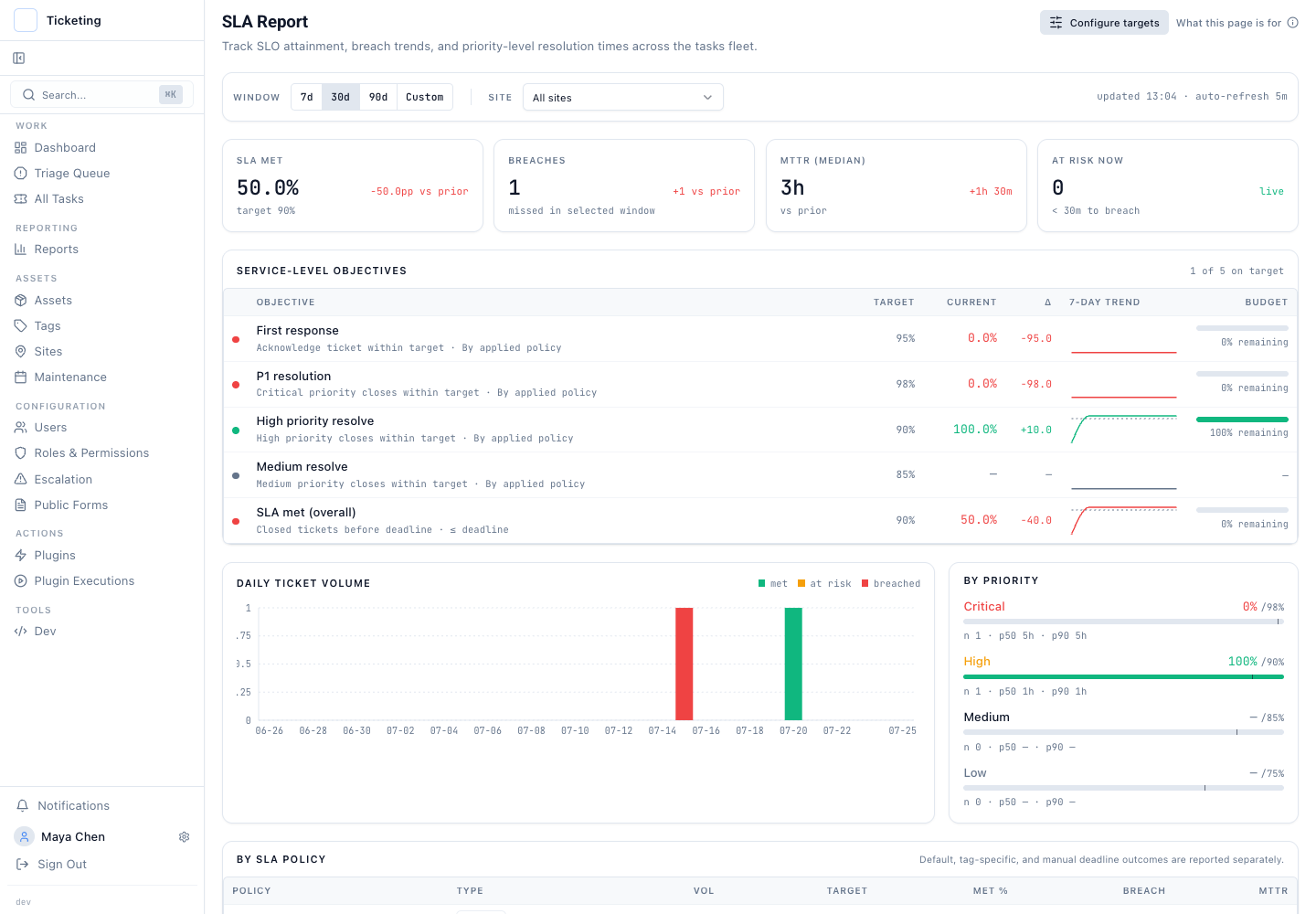
At risk now surfaces eligible open tickets due within thirty working minutes. Historical views show completed outcomes for the selected period. Follow the signal to the contributing tickets before changing staffing or policy.
Compare first response, priority resolution, and overall attainment with their targets. Review recent trends alongside the eligible ticket population.
Separate default, tag-specific, and manual-deadline outcomes. Compare sites without hiding differences in the commitments each ticket followed.
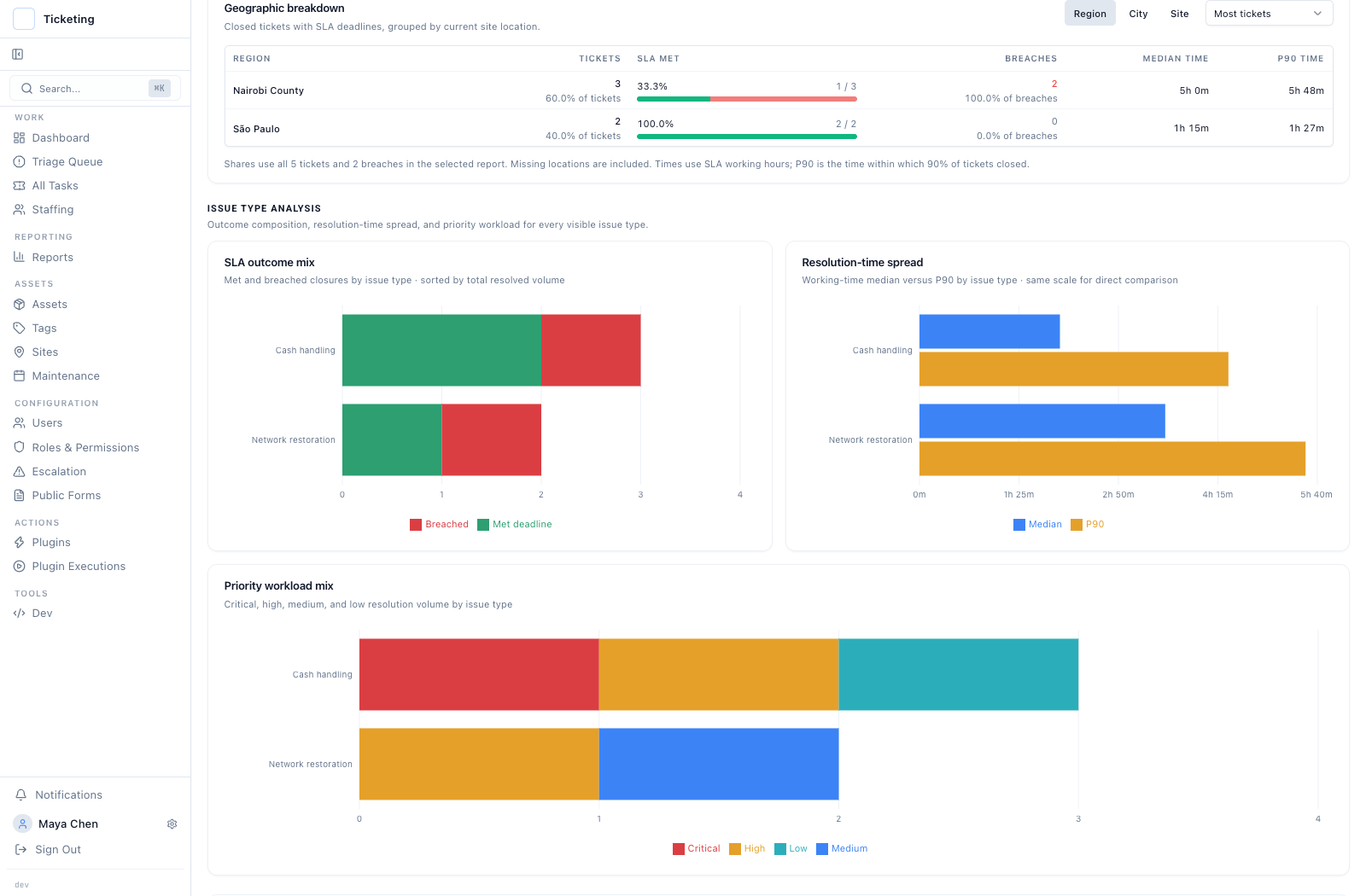
Use the Service delivery resolution view to compare region, city, and site, then inspect issue-type outcomes and resolution-time spread.
Review SLA history alongside staff workload and ticket context. Use it to investigate service patterns with the underlying work in view.
Escalation
Configure tag-based escalation rules with timeouts and recipients. Automatic escalation checks time since the ticket's last update, adjusted for priority, and records the escalation history. This is a separate inactivity control: it does not use the working-hours deadline as its timer.
Communication
Ticket participants and followers can receive status and SLA updates through configured notification channels, subject to personal preferences and delivery readiness. Review the ticket history and delivery context alongside an alert.
See how ticket following works →Policy continuity
Tickets retain applied policy details, including source, tag, thresholds, attainment targets, and working hours. Saving settings preserves existing deadlines. Manual deadlines take precedence and their outcomes are reported separately.
Changes to ticket priority, tags, or SLA activation can trigger policy selection again. Review the recorded policy together with the ticket history. First-response and completed-resolution views also use different eligible populations, so compare their rates with that context.
Use these boundaries when agreeing service terms and configuring your support workflow.
Yes. Use your agent and connectors for approved source systems, deterministic services for contract calculations and review timers, and scoped Latch MCP tools for ticket context, findings, attachments, and governed action requests. Contract calendars, deemed-agreement rules, and credit calculations are implemented by your integration.
Yes, when your integration enforces that source policy. Restrict connectors to your service desk, kiosk monitoring, and engineer evidence. Preserve source references and uncertainty. Choose an approved agent and model runtime for your data-handling requirements; MCP alone does not determine where model processing takes place.
No. Your durable workflow service implements the signed review terms, including the notice event, review calendar, deadline, delivery evidence, dispute handling, and deemed-agreement conditions. Record the result on the ticket. Native provider approval is a separate control.
Yes. Your reporting service can combine authorized SLA data with its contractual assessment register, calculate credits using the agreed versioned formula, and attach the report and worksheet to a ticket. Approval and downstream financial posting need explicitly configured controls.
Yes. Each tag-specific policy has its own response threshold, priority resolution targets, attainment objectives, and weekly working-hours schedule. Tickets without a matching SLA tag use the general policy.
The policy with the shortest resolution-minute target for the ticket priority applies in full. Equal targets use a stable tag-ID tie-break. The system does not mix fields across policies or choose by the earliest calculated calendar deadline.
No. A settings save preserves existing deadlines, and manual deadlines take precedence. Changes to ticket priority, tags, or SLA activation can trigger policy selection again, so review those ticket changes separately.
The SLA report measures recorded assignment or a qualifying status transition out of initial intake states. That measures operational acknowledgment. It does not prove delivery of a human reply to a customer.
The weekly policy supports selected days, one daily window, and one time zone. It does not provide a holiday calendar, different daily windows, split shifts, overnight windows crossing midnight, or automatic follow-the-sun routing.
It counts open eligible tickets due within the next thirty working minutes under their recorded schedule. It is live queue context, separate from completed outcomes in the historical reporting period. It does not confirm that an escalation or notification was delivered.
Map your agent and MCP integration from kiosk events to breach review, the monthly report, and a reproducible credit calculation.