Many construction-finance teams call a draw controlled because one person prepares it and another replies "approved". That proves a conversation happened. It does not prove what the reviewer saw, which payment request they approved, or whether treasury released the same amount.
A defensible workflow keeps the draw package, decision, payment action, and reporting record together. This walkthrough follows one fictional progress payment through that model in Latch.
All people, companies, projects, references, and amounts in these screenshots are dummy data created for this walkthrough.
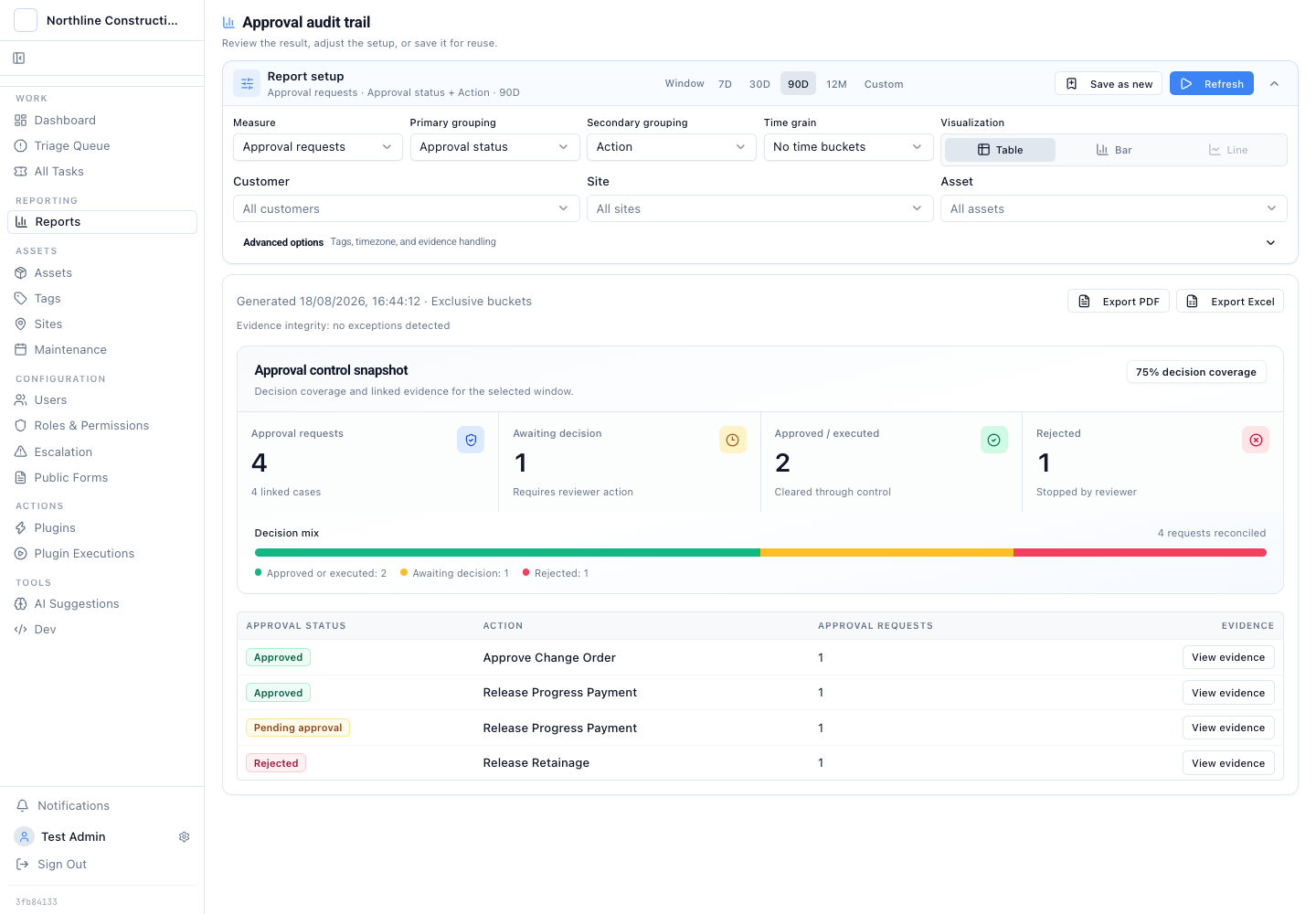
The audit view starts with the operating questions: how many requests entered review, what happened to them, which cases they belong to, and where the evidence sits.
This is for:
- Construction loan administrators who receive draw packages, inspection evidence, invoices, and lien waivers from several parties.
- Finance or credit leaders who require maker-checker review before a progress payment, retainage release, or change order can proceed.
- Audit and risk teams that need downloadable evidence without rebuilding the approval path from email, shared drives, and treasury records.
A Signed PDF Does Not Connect the Decision to the Payment
A progress draw carries more than an amount. It can include a certification of payment, cost category, inspected completion, retainage, invoices, and lien waivers. The OCC Commercial Real Estate Lending handbook describes progress payments in the same terms: a draw request by construction phase and cost category, followed by review and independent confirmation of work before disbursement.
The control breaks when those facts split across tools:
- The draw package arrives by email or file share.
- An analyst checks the schedule of values in a spreadsheet.
- A credit officer approves a PDF or chat message.
- Treasury releases the payment in another system.
- The quarterly audit report is assembled by matching names, dates, and amounts after the fact.
Each step can be reasonable on its own. The chain is weak because no single record proves which payload crossed the approval boundary.
Latch keeps the approval inside the case that holds the draw evidence. The plugin action stays paused until an independent reviewer approves the stored request. The execution record then shows what the downstream system received.
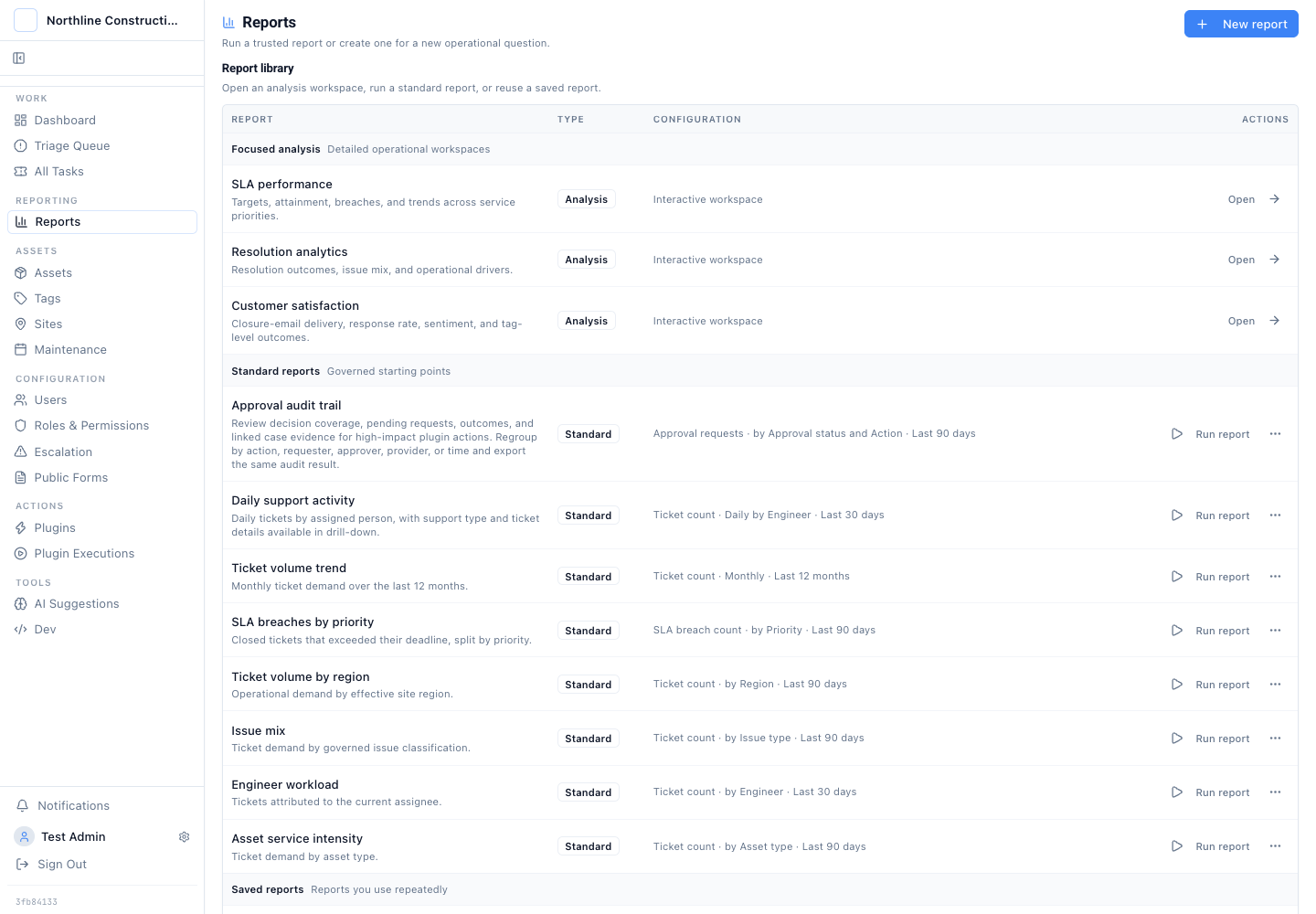
Approval evidence uses the same reporting area as operational ticket, SLA, and workload reports. It does not require a separate audit dashboard.
One Draw Package Survives the Whole Workflow
The example starts with Rivergate Tower Draw 14. The contractor requests USD 1,284,600 for structural steel and concrete work. The case carries the architect certificate, site inspection, invoices, budget comparison, current lien waivers, retainage, and inspected completion percentage.
The queue also shows the surrounding exception states: a previously approved progress payment, a retainage release rejected for a missing lien waiver, and a change order above delegated authority. Approval is part of the work queue, not a second inbox that reviewers must reconcile later.
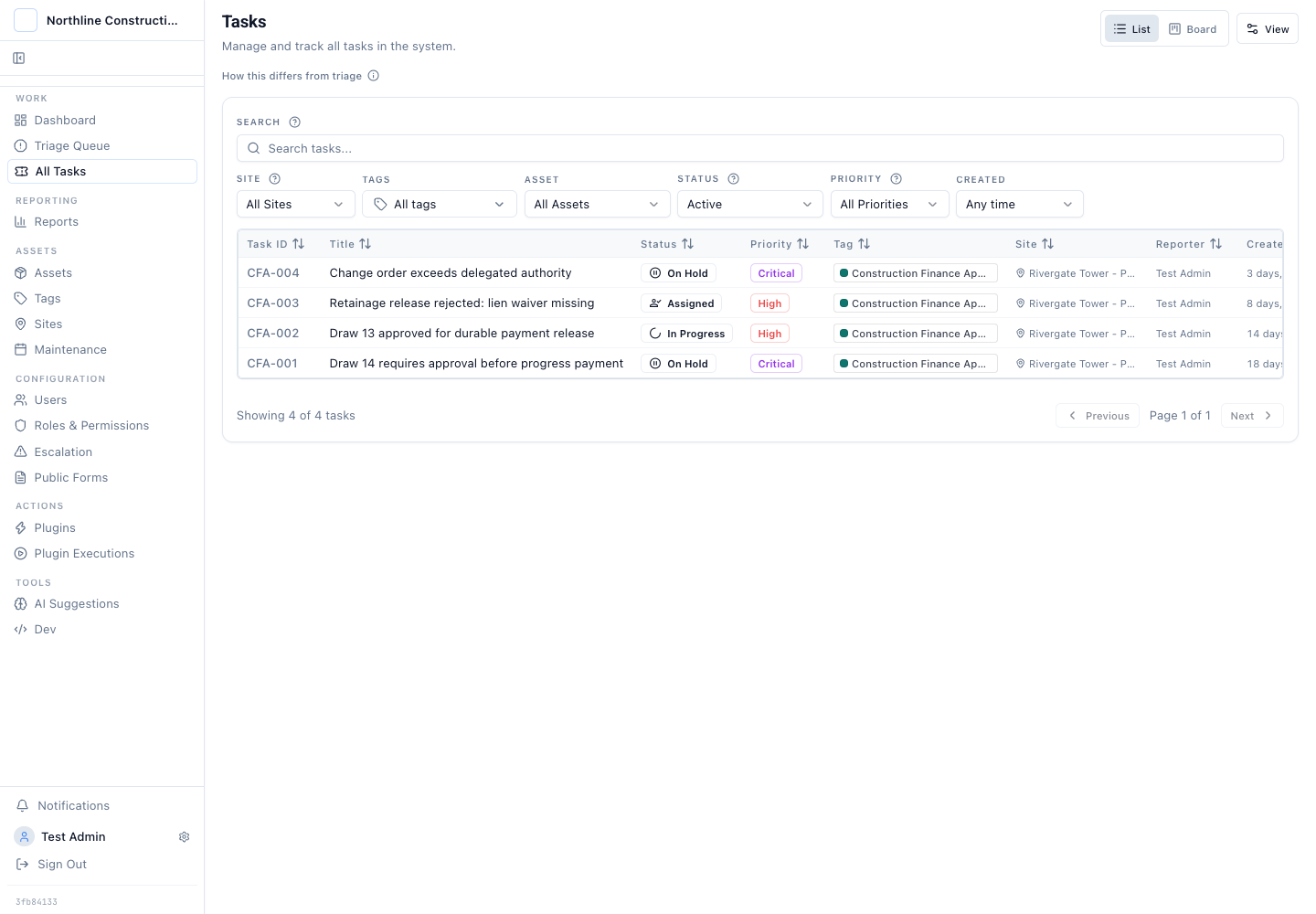
The queue keeps approval work attached to the case. Operators can see why each draw is waiting before they open it.
On Draw 14, the payment action is pending. The card names the requester, the plugin action, and the current state. Nothing has moved to treasury.
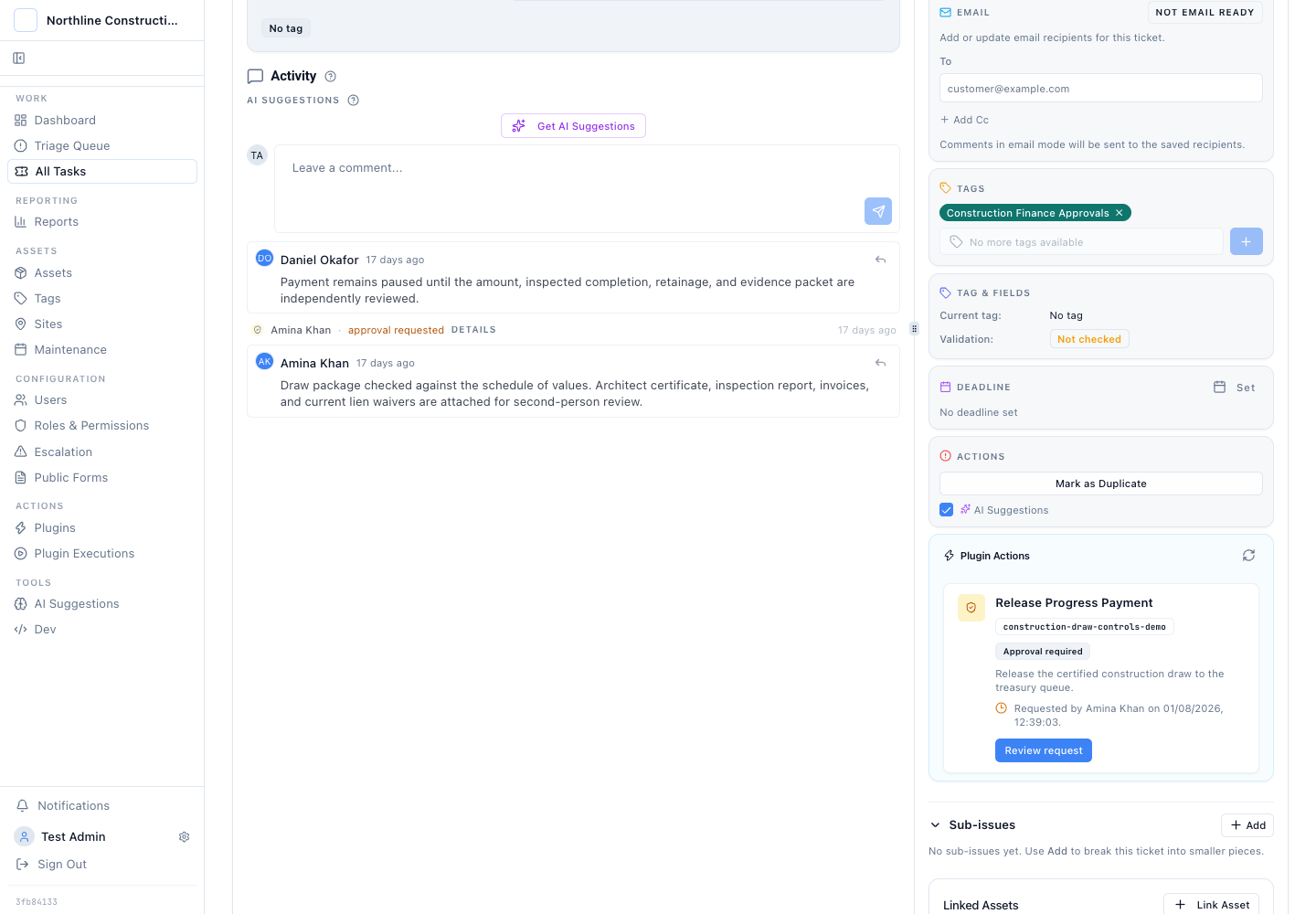
The payment stays paused on the draw case. The requester can prepare the action, but cannot turn preparation into approval.
Maker-checker only works when the second person reviews the real request. A generic prompt that says "approve payment" is not enough. The reviewer needs the amount, draw number, payee, inspected completion, retainage, budget line, and supporting evidence in front of them.
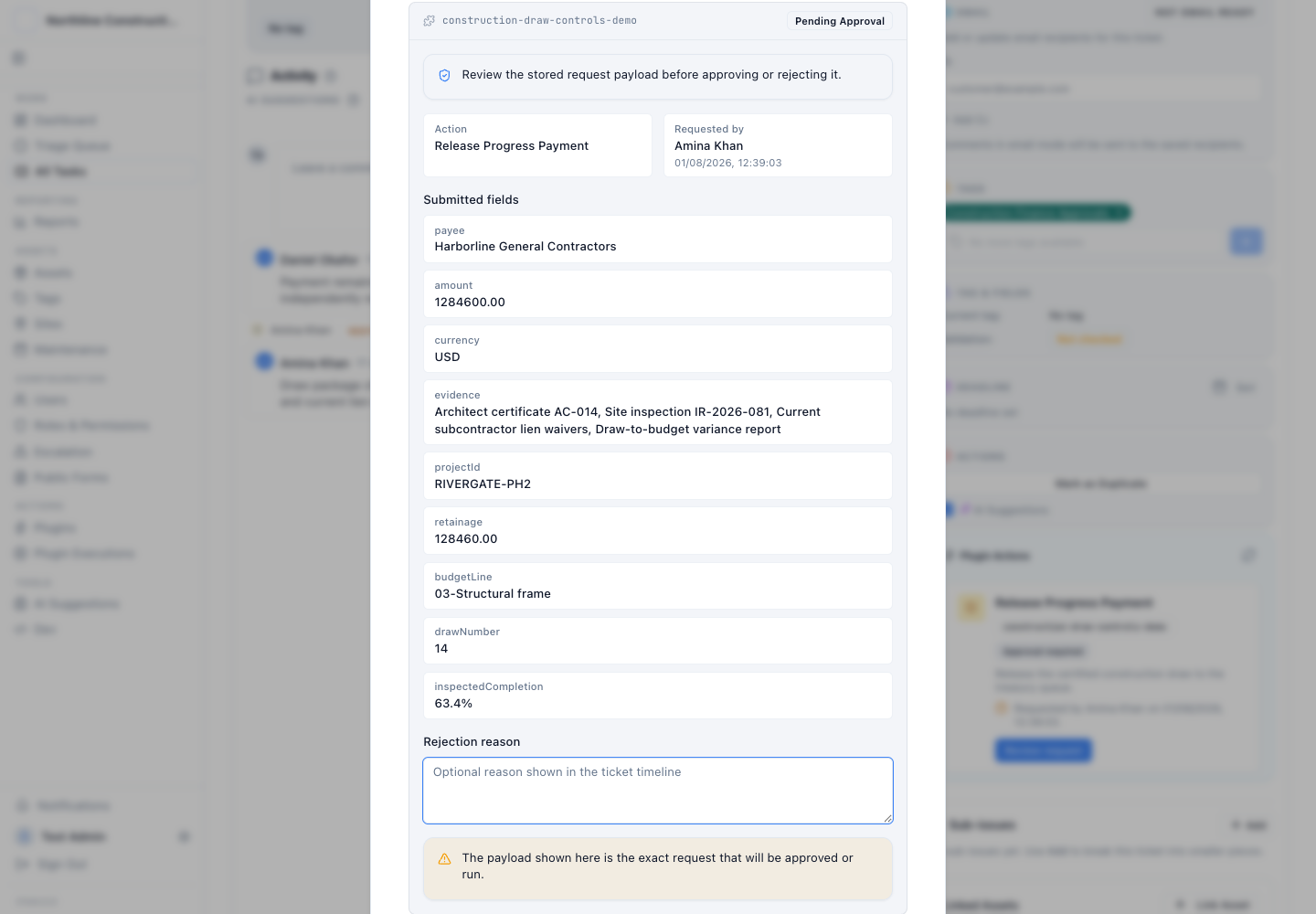
The review dialog shows the exact stored request. The decision attaches to this payload, not to a summary that can drift from execution.
This is the important boundary. The reviewer is not approving a ticket status. They are approving one named plugin action with one stored payload. If the amount or evidence changes, the old decision should not silently authorise the new request.
Segregation of Duties Must Be Visible on the Case
Two names on a document do not automatically create segregation of duties. The system has to prevent the requester from approving their own action and record the independent reviewer as a separate actor.
The approved Draw 13 case shows that separation. Amina Khan prepared the release. Daniel Okafor approved it. The timeline records both events with timestamps and keeps the approved payload tied to the case.
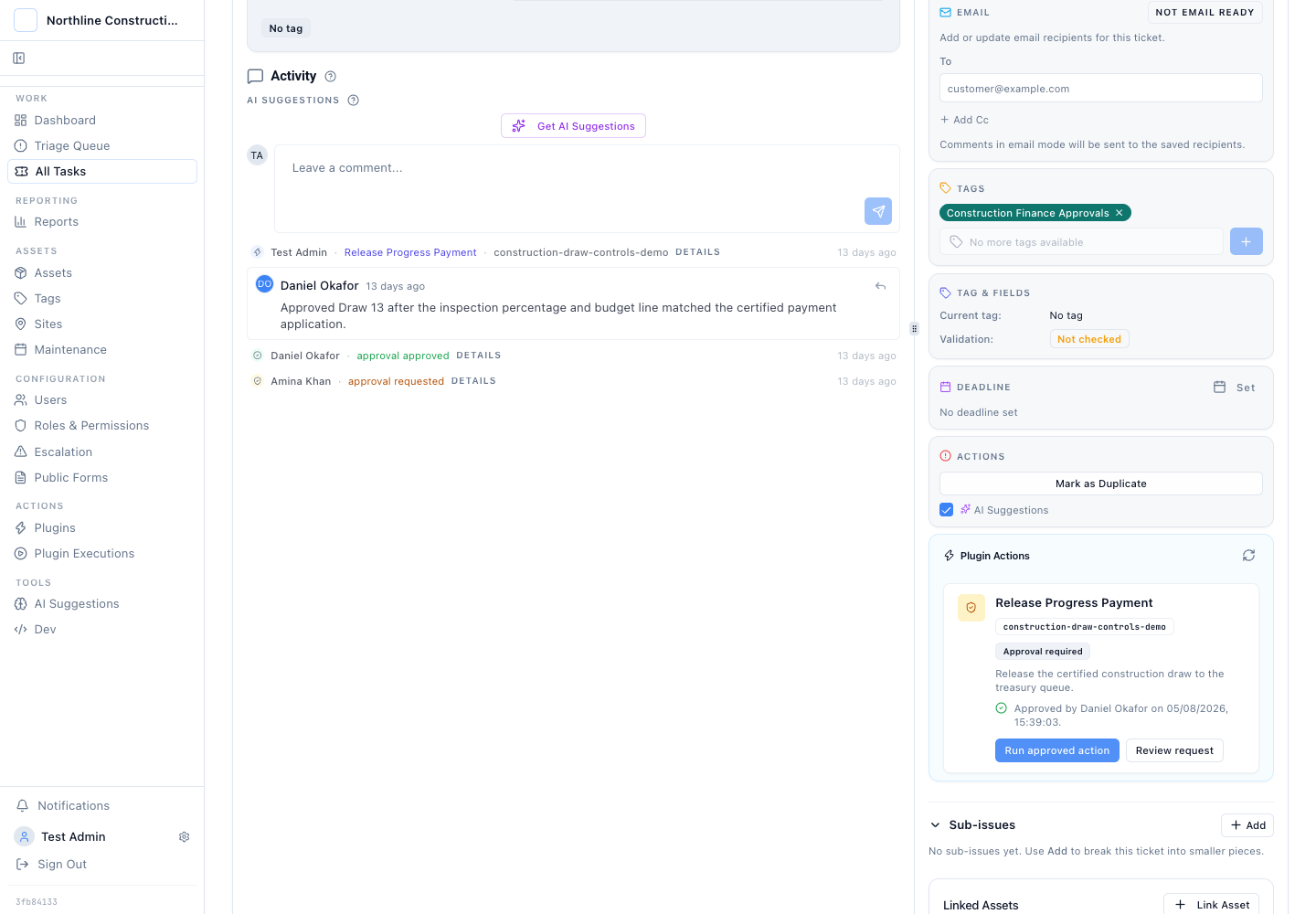
The case record preserves requester, reviewer, decision, time, and payload together. A later reviewer does not have to infer the path from an email chain.
Rejection needs the same treatment. In this dummy portfolio, a retainage release is rejected because the electrical subcontractor lien waiver is missing. The rejection reason remains on the case, so resubmission starts from a named evidence gap. It does not restart from "please review again".
Does every construction-finance step need maker-checker approval? No. The control earns its place where an action moves money, changes a committed budget, releases retainage, or crosses delegated authority. Routine evidence collection can remain ordinary case work.
This walkthrough is an operating pattern, not a substitute for a lender's credit policy, loan documents, legal review, or jurisdiction-specific lien requirements.
Execution Evidence Closes the Gap after Approval
Approval is not the final proof. An auditor still needs to know what ran.
The execution record for Draw 13 shows the approved payment payload, operator, downstream request, response status, and timing. This is where the workflow connects a human decision to an external financial action.
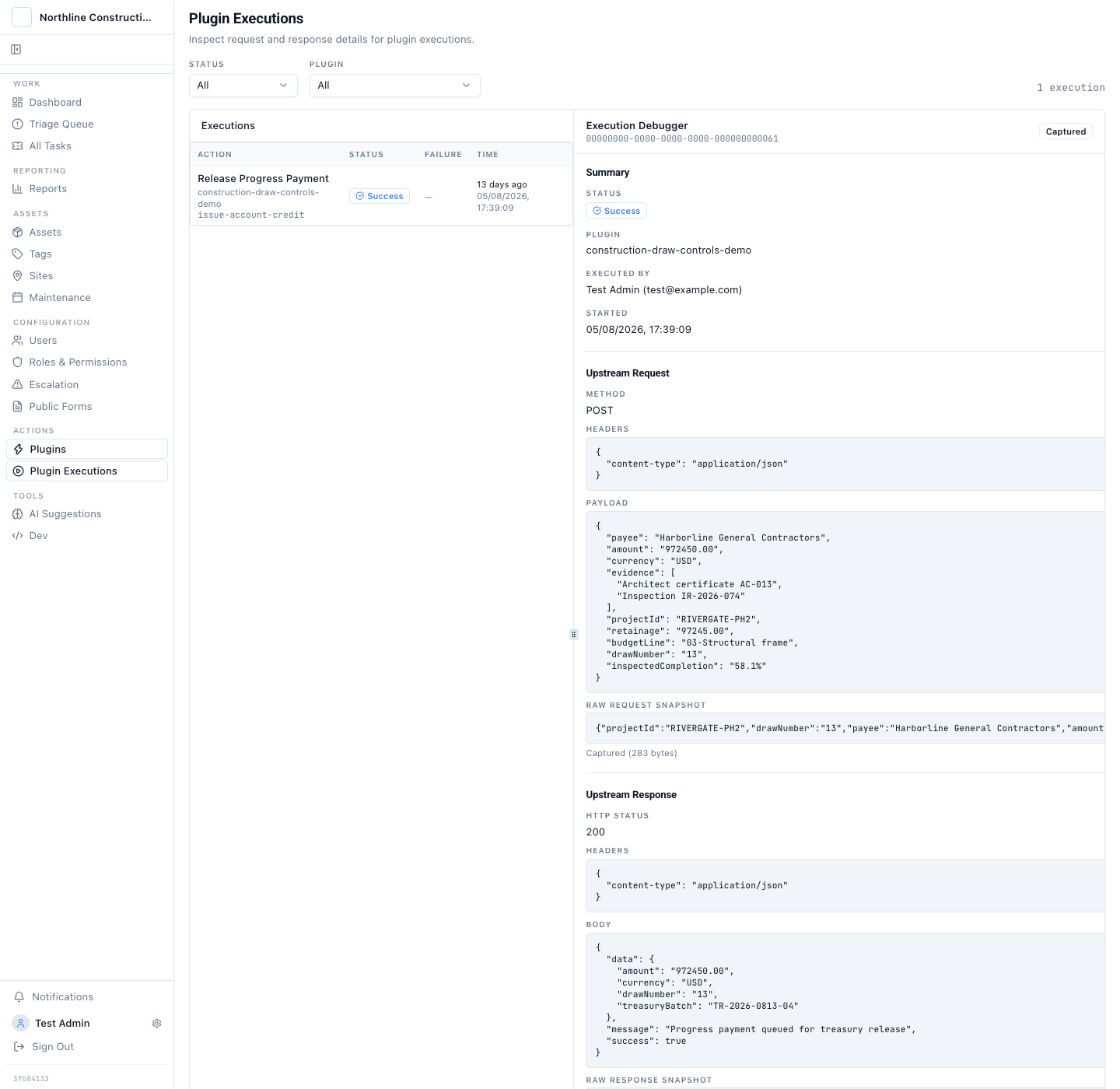
The execution record answers the second audit question: what did the system actually send after approval?
The distinction matters. An approval trail proves who authorised a request. Execution evidence proves what followed. A finance control needs both when the downstream action changes financial state.
The same design also makes denied and failed outcomes useful. A rejected retainage release shows the control stopped an incomplete request. A failed treasury call shows approval succeeded but execution did not. Those are different states and should not collapse into one "not paid" bucket.
The Approval Report Is an Index into the Evidence
Case-level evidence is necessary, but an audit rarely starts with one known case. The reviewer asks for all approval activity in a period, then groups it to find the records worth opening.
The Approval audit trail report uses the existing Latch reporting framework. It can group approval requests by status, action, requester, approver, or time. A user can choose two dimensions, change the date window, save a variation, and drill back to the cases behind the result.
The first screen is a control snapshot, not just a row count. It separates requests awaiting a decision from approved or executed actions and rejected actions, shows decision coverage for the period, and reconciles the requests to linked cases. A reviewer can see the shape of the control population before choosing which evidence to sample.
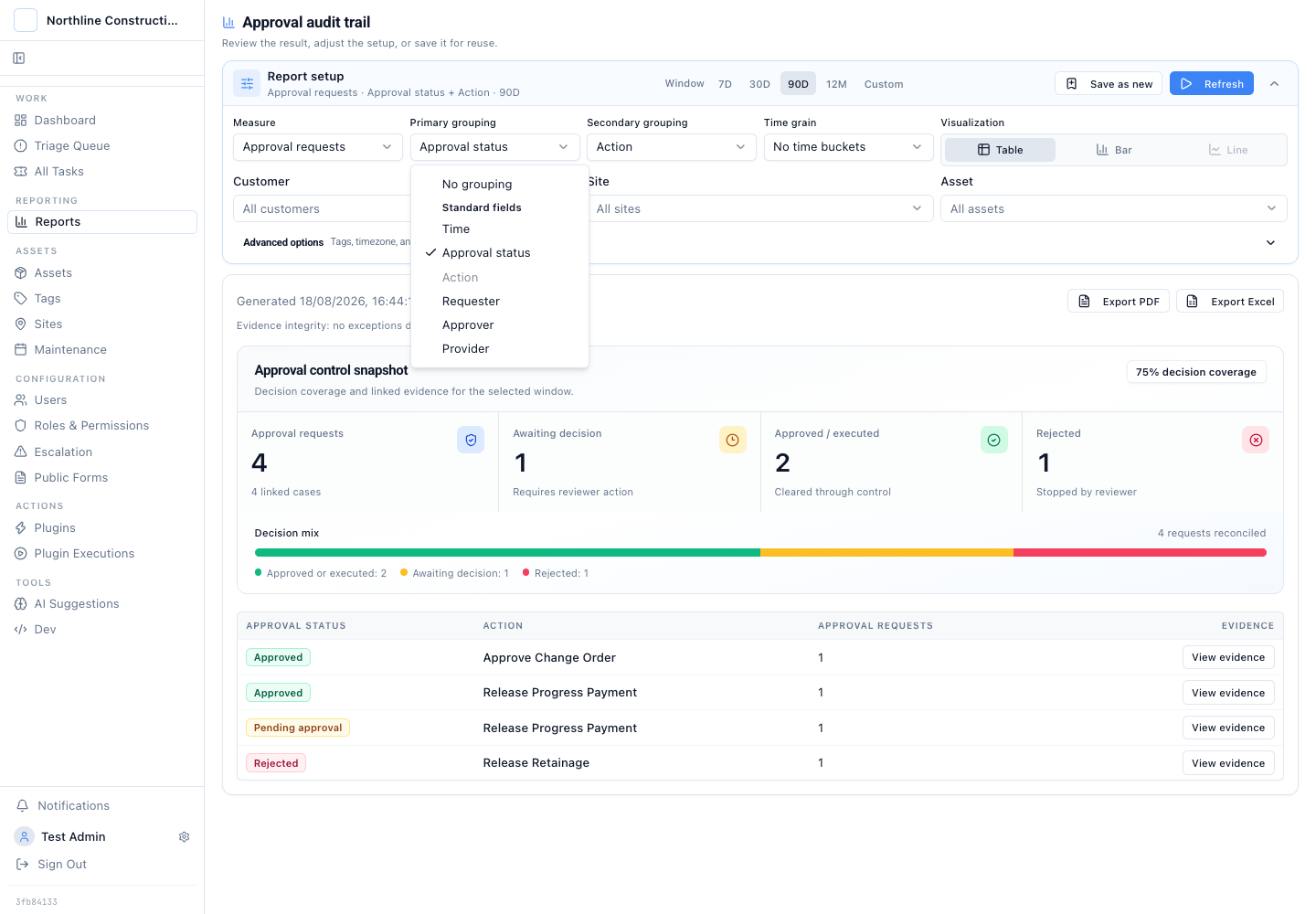
The grouping choices are semantic fields, not free-form SQL. The report can change shape without changing the underlying evidence.
The default view groups approval activity into the categories an auditor can test:
- Pending requests show work that has not crossed the decision boundary.
- Approved requests show the reviewer path and the cases eligible for execution.
- Rejected requests show which controls stopped an action and why.
- Actions separate progress payments, retainage releases, and change orders.
- Requester and approver groups expose workload and repeated concentration around one person.
The result can be downloaded as PDF or Excel from the same screen. The export carries the report title, filters, grouping, decision coverage, outcome counts, linked-case totals, evidence-integrity notes, rows, and generation time. The file is a portable index. The linked case and execution records remain the source evidence.
That boundary prevents a common reporting mistake. A spreadsheet export is useful for sampling and handoff, but it should not become a second editable approval ledger.
What a Construction Draw Audit Should Be Able to Reconstruct
For any sampled draw, the evidence should answer a short sequence without manual matching:
- Which project, draw, cost category, payee, and amount entered review?
- Which inspection, invoice, waiver, budget, and retainage evidence was present?
- Who prepared the payment request?
- Who approved or rejected it, and what reason did they record?
- Was the requester prevented from self-approval?
- What exact payload reached the downstream system?
- What status and response came back?
- Which report population included the case?
That is the useful test for an audit trail. It is not the number of event rows. It is whether another person can reconstruct the decision and the action without asking the original operator to explain it from memory.
The durable rule is simple: keep the evidence, approval, and execution tied to the same case, then make the portfolio report an index into those records.
Continue with four-eyes control without inbox approvals, audit trails that answer real questions, or the end-to-end approval design walkthrough.