A queue built on ticket status alone forces a choice. Make status expressive and reporting breaks. Keep it clean and operators lose context. Most teams push the detail into tags, form notes, or a separate spreadsheet. The ticketing system penalises granularity. Add "Awaiting third-party inspection" as a status and metrics on open tickets become unreadable.
Subcategories fix this. They add operational detail inside a governed status without creating a new status slot. Canonical states such as Assigned, In Progress, On Hold, Resolved, and Closed stay the anchors for reporting and transition rules. A subcategory such as "Field visit scheduled", "Parts in transit", or "Monitoring after repair" sits beside the status label and changes as work progresses.
Subcategories matter most when status conveys phase, not activity.
Consider a field-service operation where a technician must visit a remote site to repair equipment. The ticket moves to In Progress the moment dispatch confirms the visit. That single status hides at least four moments. The visit is scheduled. The technician is en route. The repair is underway. The equipment is under observation after the fix. A reporting dashboard groups all four under In Progress. The operator triaging the queue needs to distinguish a ticket that can advance today from one that cannot.
Without subcategories, the operator opens each ticket to read the notes. With subcategories, the queue shows the exact moment and the status remains In Progress. Labels such as "Visit booked", "Site arrival", "Repair in progress", and "Post-repair monitoring" appear inline next to the status. Reporting ignores them, so the count of open tickets stays clean. The operator sees where each ticket stands without breaking the transition guardrails discussed in ticket status workflows need hard edges. The status still governs allowed transitions. Adding a subcategory does not change that enforcement.
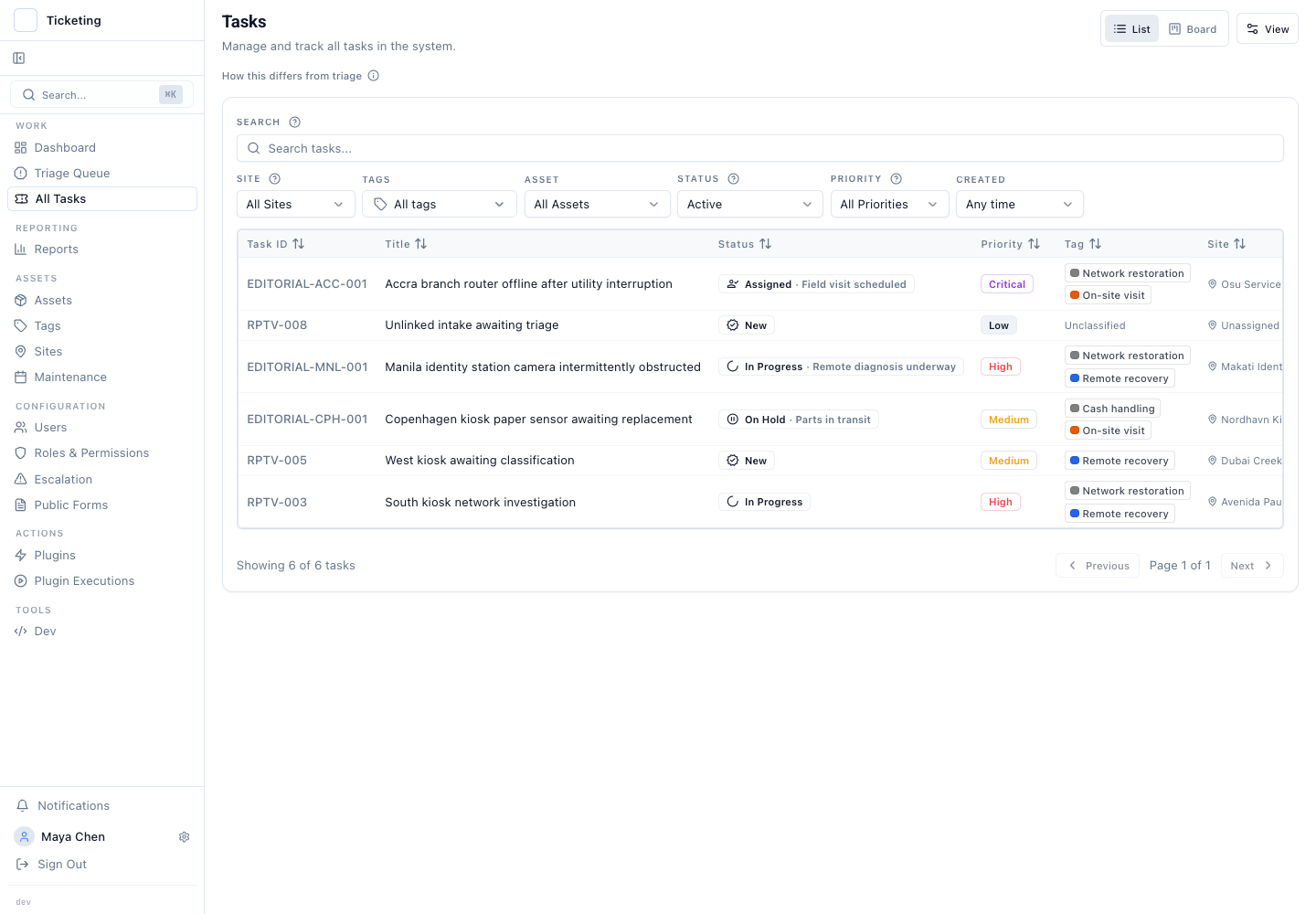
Decide between a subcategory and a tag by what changes.
A subcategory earns its place when it describes where the operator is in the resolution sequence. It changes as work moves. It is valuable to see in the queue at a glance.
Static detail belongs in a tag. "Hardware", "Software", and "Payment discrepancy" are tags. Subcategories answer "What is happening right now?" Tags answer "What is this ticket about?" Conflating the two creates noise. A "Hardware" tag with a "Parts ordered" subcategory is clear. A ticket with a dozen subcategories that mix classification, priority, and phase becomes unreadable.
One common failure mode is treating subcategories as soft statuses. Teams add "Awaiting customer approval" as a subcategory inside In Progress. Then they expect status reporting to count it as a separate state. It does not. The canonical status stays In Progress. That is a feature. If the work needs a different transition gate, use the status workflow. If it needs a different service commitment, use the applicable SLA policy. Subcategories describe activity within a phase. They do not create new phases or policies.
Another failure mode is subcategory sprawl. A configured list that encodes every person, vendor, and part number turns the queue into a second notes field. Subcategories work best when they are few, standardised, and understood the same way across the team.
Subcategories have limits.
Latch validates that an active subcategory belongs to the ticket's current status. The label does not prove the underlying event happened. If an operator marks a ticket "Parts in transit" but the order was never placed, the subcategory will not catch the gap. Subcategories cannot replace workflow branching logic or change the allowed status transitions.
Subcategories do not create reopen paths or blur what "Resolved" means. They describe work happening inside a known phase. If a ticket needs to reopen after resolution, the status machinery handles it as described in designing safe reopen paths. The subcategory resets to match the new phase.
For operations that treat duplicate, rejected, and cancelled as real outcomes, stage-specific subcategories can add a standard operational label. They do not replace the notes and references that explain an individual decision.
Start with the signal you need, not the signal the tool can store.
A subcategory is valuable when it cuts the clicks an operator needs to open a ticket during triage. If it does not save a click or change a decision, it is not worth maintaining. Test it on a real queue. Pick three subcategories for In Progress. Run them for a week. Ask the team if the queue is faster to scan. If yes, keep them. If no, remove them. The standard is operator seconds, not feature completeness.
Read more in the July product update.