CP inspection records · Android app in early beta
Cathodic protection inspection forms and mobile app
A reading without its reference electrode or test-station photo leaves the reviewer chasing context. Build a CP inspection form that keeps readings, evidence and follow-up together, then see how the Latch Android beta brings that record to an assigned job on the phone.
Preview configured inspection fields, photo attachments and attributed review updates. The beta supports cached jobs and queued updates when coverage drops; structured form saves require a connection.
Preview the Android inspection appSee native screenshots and check the beta's field and offline capabilities before requesting access.
Download the editable CP form checklist →Plain text. No sign-in required. Adapt the fields with qualified CP personnel and your approved measurement procedure.
Keep an audit trail from inspection to follow-up
A form captures the reading; the audit trail also needs the people, evidence and decisions that follow. Keep the technician's attributed update, attached photographs, reviewer questions and follow-up action on the same job record.
Latch's cathodic protection survey software workflow holds configurable survey fields, attachments, decisions, and plugin action results on a ticket. For a team rollout, agree the required fields, assignment rules and reviewer responsibilities before onboarding. Specialist measurement collection, instrument capture, and GIS remain with the field tools; mapping their output into Latch requires configuration or an integration.
Latch mobile · Early beta
Preview the mobile inspection form and audit-trail workflow
Open an assigned test-station or rectifier job, record the configured inspection fields while connected, and attach the photograph to the update it supports. Attributed replies keep reviewer questions beside the field evidence.
The current native preview runs on Android.
Request mobile beta accessRequest access through the form. Latch contacts your team to arrange beta onboarding and confirm your inspection workflow, devices and required fields.
The app opens on Jobs. Opening an assignment retains its site and asset context above the update history. Replies stay connected to the update they answer, and a small passive icon shows local or delivery state while saved updates send automatically when connection and account checks allow.
Actual native Android preview captures. Names, locations, readings and job records are fictional; equipment photographs are AI-generated illustrations. These examples show record design and collaboration, not a determination of CP adequacy or compliance.
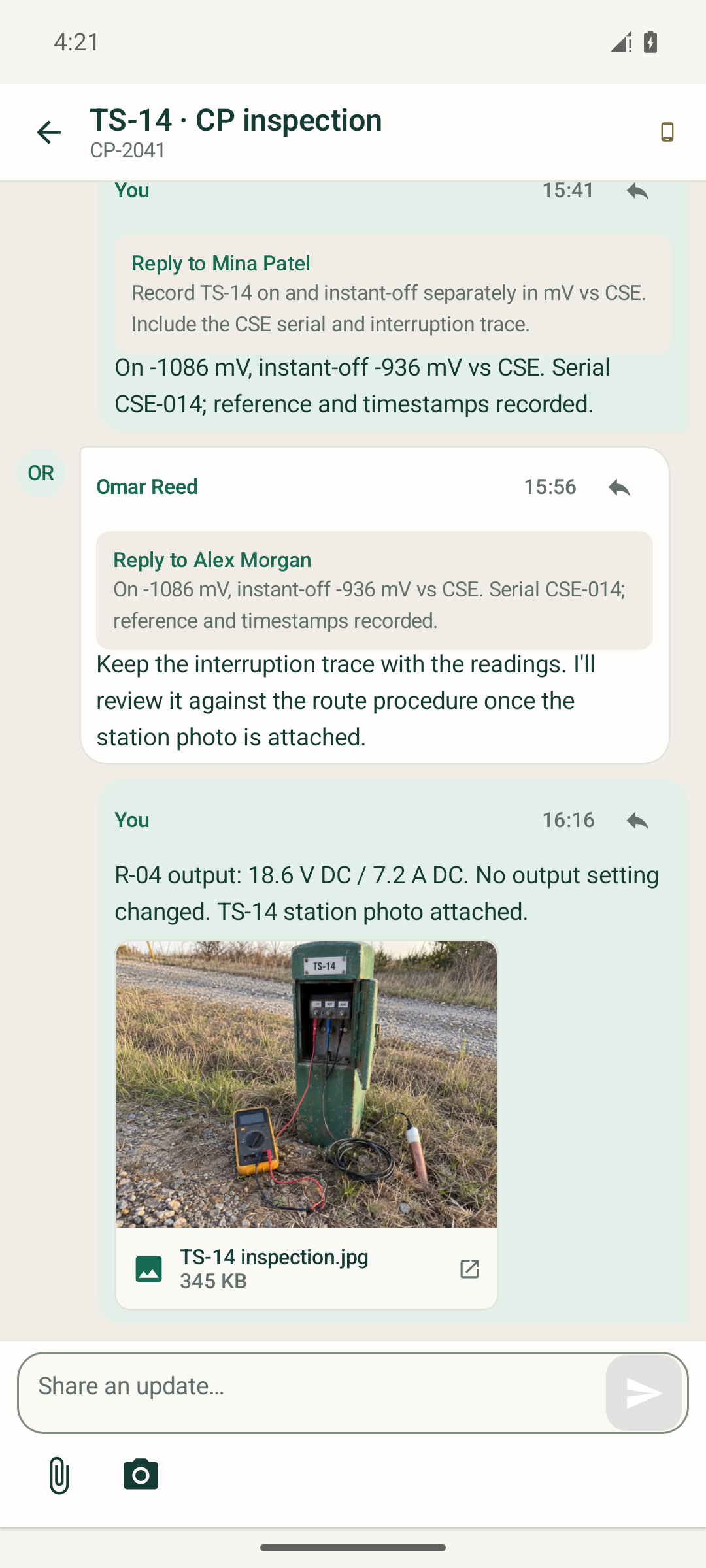
TS-14: keep the review with the reading
Separate on and instant-off readings retain the reference identity. A teammate asks for the interruption trace, and the station photograph stays beside the follow-up update.
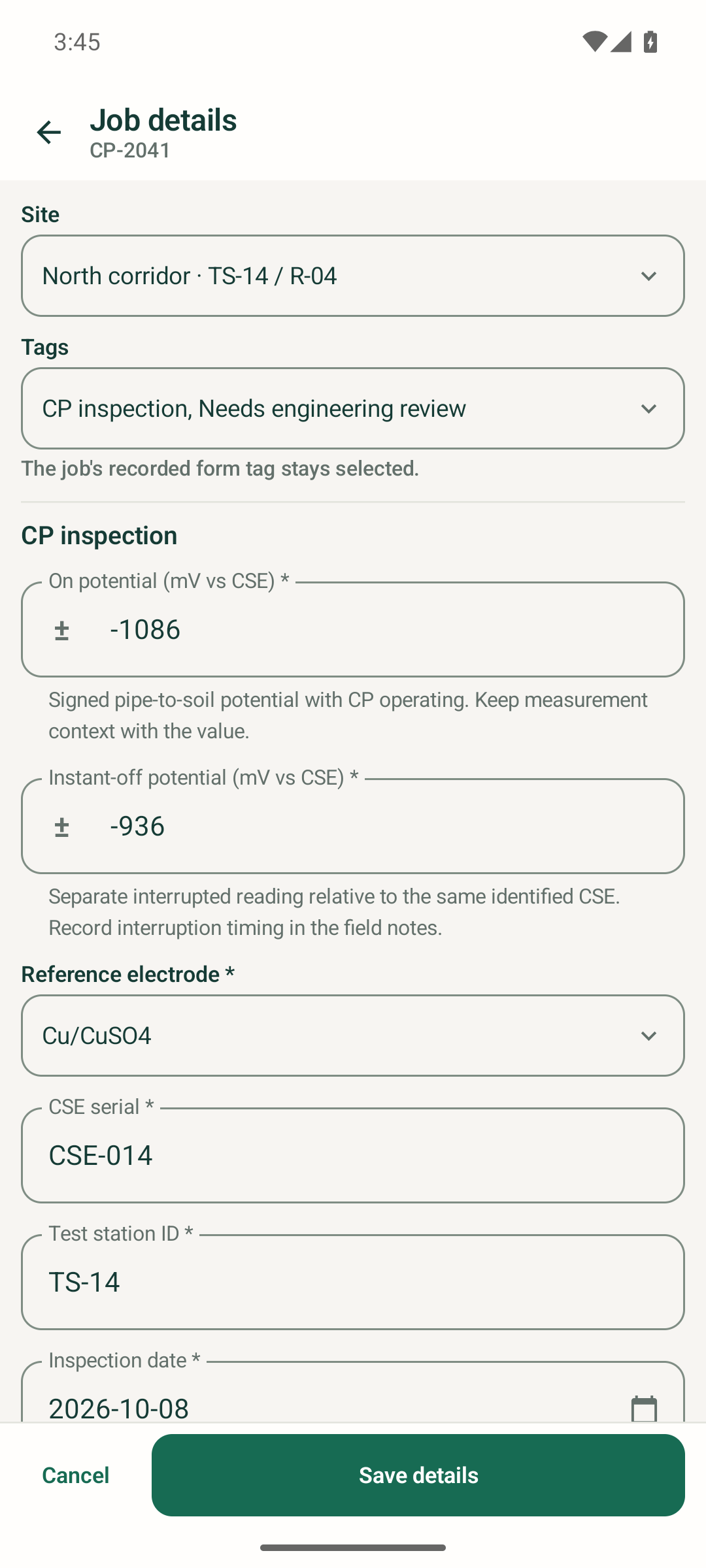
Configured fields: preserve the context
The CP inspection tag supplies the job's configured form. Signed numbers, reference choices, a serial and a date keep the reading distinct from its measurement context. Live form saves require a connection.
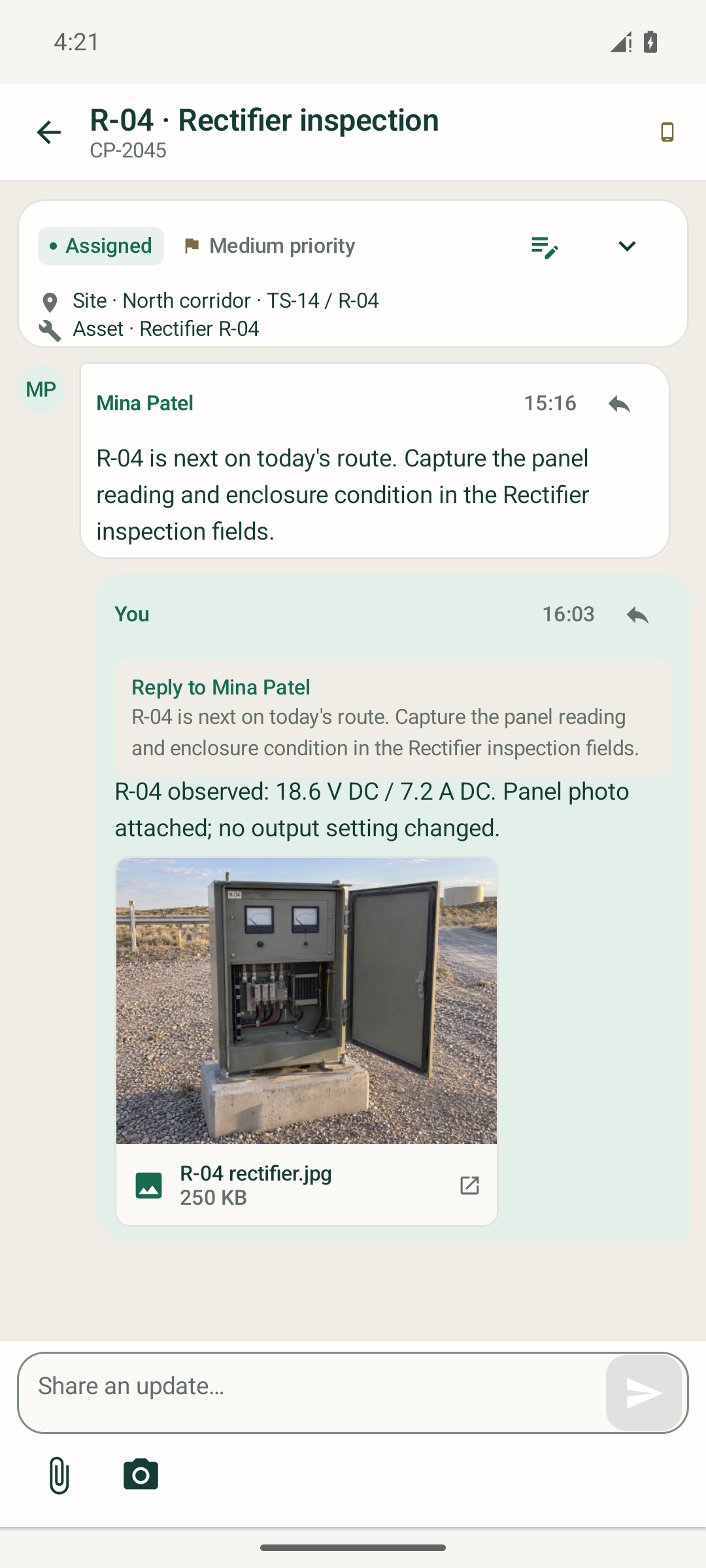
R-04: attach the observation to the equipment
The rectifier update keeps voltage and current alongside the panel photograph and a note that no output setting changed. The next reviewer can see which site and asset the update concerns.
Use custom fields and tags for the inspection record
In the TS-14 form, the on potential and instant-off potential are separate signed numeric values in mV versus the identified CSE. The record also holds the reference-electrode choice, CSE serial, test-station ID and inspection date. Required values and configured constraints are checked before saving.
The beta supports configured date and time fields, choices and nested leaf selections as well as ordinary tags. A survey classification can follow Potential measurements → Pipe to soil → Test-station check. A review tag can identify work needing engineering attention without changing the recorded form.
Attributed updates, replies and attachments keep the review conversation tied to the job. Use the wider inspection audit trail workflow to connect the field record to reviewer decisions and returned action results. Qualified CP personnel still interpret measurements against the approved procedure.
Can the inspection app work offline?
- Cached job context and durable drafts
- Previously loaded assignments and their context can remain available on the device, with a 24-hour account-validation window. Downloaded evidence can be reopened locally.
- Queued comments, replies and selected evidence
- Saved updates enter a persisted queue. Delivery resumes automatically subject to Android background scheduling, retry backoff and current account and assignment checks. The engineer does not manage a separate synchronization step.
- Connected changes to the structured record
- Structured fields, site and tag changes, job status and closure require a connection. A queued update is not yet a server-confirmed record; rejected or conflicting updates remain associated with the affected job for review.
The preview has controlled tests for local persistence and delivery behavior. Connected-workspace sign-in, live cross-device collaboration and reconnect checks are being validated during beta onboarding. Specialist instrument connections, automatic GPS capture and GIS are outside this initial mobile beta.
Six parts of a reviewable CP inspection form
Treat these as record-design prompts. Your procedure determines which measurements, units, evidence, and review steps apply to each survey type.
01
Identify the survey and test point
Survey ID, asset or pipeline reference, test station or rectifier ID, survey type, CP system, operator procedure and revision.
Review check: Can a reviewer identify the location and measurement procedure without opening a separate spreadsheet?
02
Keep each reading with its context
Applicable on and instant-off potentials with units, rectifier voltage and current where relevant, reference electrode type and serial, instrument reference, and measurement notes.
Review check: Keep unavailable values distinct from zero. Use the fields required by the survey procedure; a test-station check and a close interval survey need different records.
03
Record where and when collection happened
Technician identity, measurement timestamp with time zone, latitude, longitude, reported accuracy when available, and location source.
Review check: Distinguish device coordinates from manual entry. Keep the field measurement time separate from the later upload time.
04
Preserve the evidence received
Original survey export, relevant CSV or KML files, photographs, field notes, source application, source record ID, and submission reference.
Review check: Tie each attachment to the correct survey or test point. Keep the original when adding a corrected file and explain the revision.
05
Make the review decision reconstructable
Assigned reviewer, review outcome, decision time, rationale, missing evidence, and any request for a repeat visit or further engineering review.
Review check: An accepted record, an incomplete record, and an engineering exception should lead to different next steps. A workflow label is not a compliance determination.
06
Close the loop on the action
Proposed work request, approval request and decision, execution outcome, returned work-order reference, and follow-up evidence.
Review check: Record a failed handoff as a failure. An approval alone does not establish that a work order was created or that field work was completed.
Test the offline handoff before relying on it
For a mobile inspection form, ask the field-tool supplier to demonstrate a complete disconnected visit: open the assigned test point, collect the required data and photos, close and reopen the app, reconnect, and confirm which records reached the receiving system. Include an interrupted upload and a corrected submission in that evaluation.
Agree how source IDs, timestamps, attachment associations, and corrections will be preserved. Check how duplicate submissions and upload failures are surfaced. These are acceptance checks for your chosen collection and integration path; this checklist does not establish that a particular tool passes them.
The mobile beta covers cached job context and queued team updates; structured form edits require a connection. Keep specialist offline measurement collection and instrument capture in the field tool that supports your procedure. The current CP survey walkthrough shows stored coordinates from a field-device import. Automatic browser-device GPS capture remains a planned feature.
Use the checklist with worked CP examples
The checklist helps define what a record should contain. See how routine and exception examples keep readings with their context, then follow an exception through evidence review and a proposed downstream action. Qualified CP personnel decide how measurements are interpreted.
Follow TS-14 from evidence to a work request
In the synthetic walkthrough, survey ticket CP-2041 identifies test station TS-14 and keeps the readings, reference electrode, coordinates, source export, and cabinet photograph together. Its operator review state is "Engineering review required." The example makes no engineering or compliance determination.
The proposed integrity work order carries the survey context into a stored approval request. A separate reviewer can inspect that request before execution. The record then shows the plugin outcome and returned reference, so the team can distinguish a requested action from a successful handoff.
Use maker-checker approval where a separate decision is required. Review the audit trail alongside the original evidence. An exported form remains a document; the operating record needs the decisions and results that followed it.
Keep engineering criteria in the approved procedure
A generic form should not assign a universal pass/fail threshold. PHMSA describes several close interval survey types with different measurement contexts in its close interval survey fact sheet. Qualified personnel must choose and interpret the applicable procedure for the asset and jurisdiction.
Record the procedure reference, the review decision, and the reason for any follow-up. Retention, access, backup, and legal-hold requirements also need to be established for your deployment.
For wider inspection workflows, use the inspection audit trail guide. For a standalone findings document, the inspection report builder creates an editable report; it does not create an immutable audit trail.
See the survey record through the reviewer's eyes
Follow a fixed synthetic CP survey through evidence, review, and the work-order handoff. Then map one of your existing forms to the same steps.