Latch mobile is entering early beta. The app brings assigned jobs, team updates, threaded replies and photo evidence into one mobile view for Field Engineers. The current native preview runs on Android and includes fictional cathodic inspection jobs so teams can review the workflow before connecting a workspace.
A field inspection leaves more than a reading. It leaves a job to complete, a photograph to retain and a question for the next person reviewing the work. When those details sit in separate messages, the reviewer has to reconstruct the visit.
Include your inspection workflow, devices and required fields. Connected-workspace access is arranged during beta onboarding.
This opens your email app with a draft to hello@latchworkflow.com. Send the draft to request access.
Live workspace sign-in and collaboration are still being validated.
Start with the assigned job
The app opens on Jobs. Each row shows the assignment and its context; opening a job brings its details and team updates together. Replies retain the message they answer, and photo attachments appear beside the update with a file-opening action.
The interface keeps the job and conversation close. A small passive icon communicates local or delivery state, while saved updates retry automatically when connection and account checks allow. There is no separate synchronization task for the engineer to manage.
Two inspection examples in the mobile beta preview
The screenshots below were captured from the actual native Android app on an Android 15 emulator. Both examples were opened with network access disabled after a fresh app-data reset. The equipment photographs inside the screenshots are AI-generated illustrations. Names, locations, readings and job records are fictional.
TS-14: keep the reading and the review context together
In the TS-14 example, an engineer records separate on and instant-off readings with the reference-electrode identity. A teammate asks to retain the interruption trace, and the station photograph stays in the same job update history. The point is the connection between an observation, its context and the next review step.
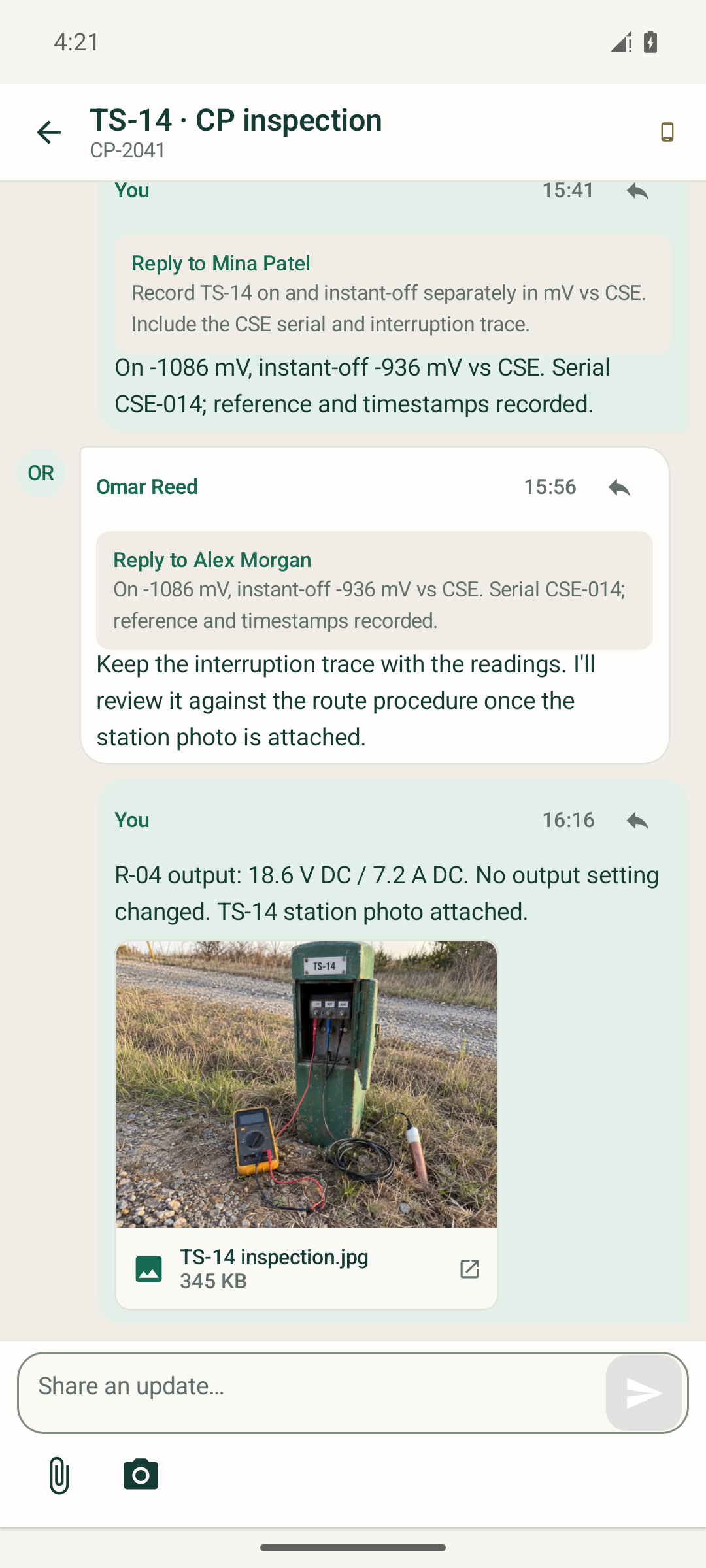
TS-14: threaded review context and station evidence in the same job.
The configured inspection form retains typed values such as signed numbers, dates, choices and GPS coordinates. Forms follow the job’s configured tag-backed fields, with required values and constraints checked before a save. Recording coordinates does not validate a measurement.
R-04: preserve the observation and the photo
The rectifier example records voltage and current alongside the panel photograph and a note that no output setting changed. The job keeps the site and asset context visible above the conversation, so the next reviewer can identify which equipment the update concerns.
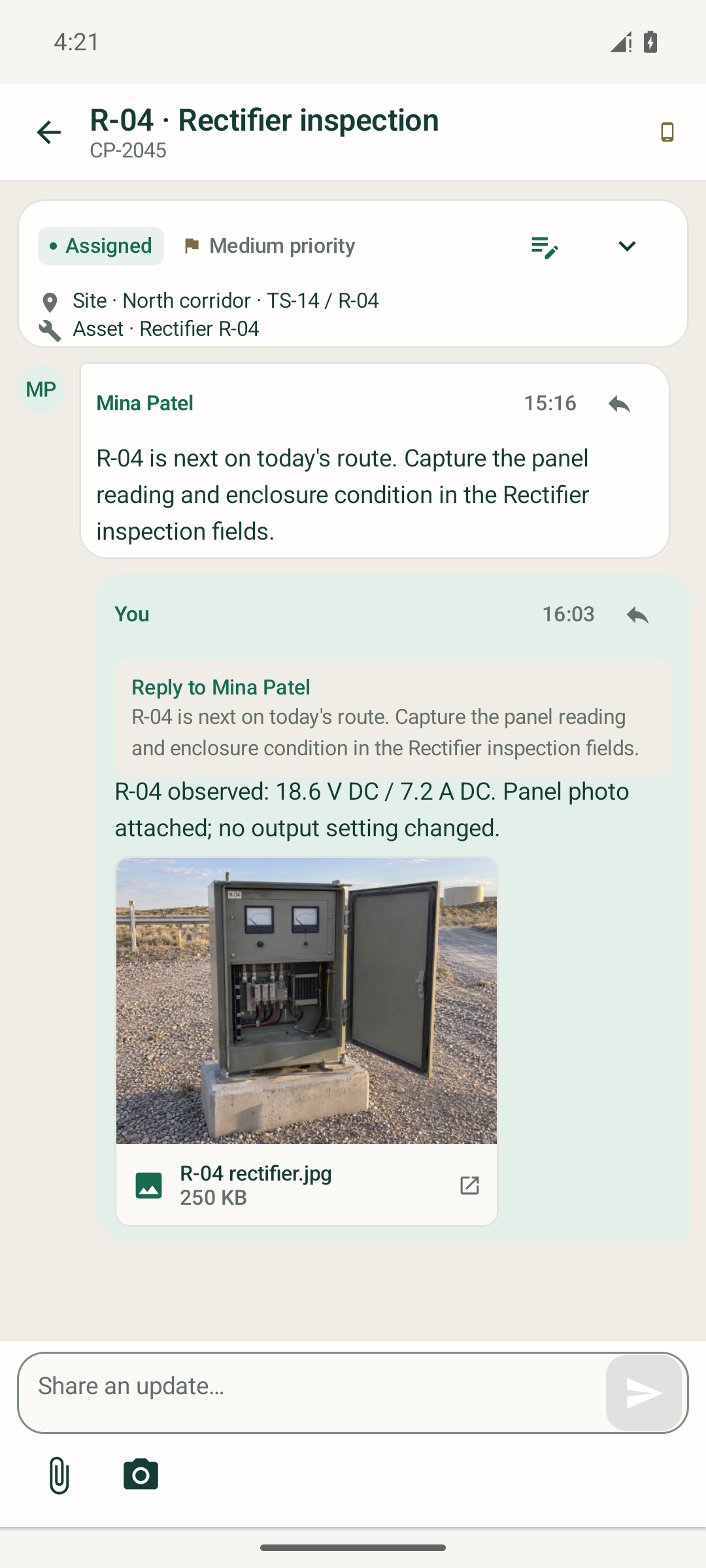
R-04: site and asset context above a panel observation and its attachment.
These examples show field recording and collaboration. Their readings and task statuses do not establish cathodic protection adequacy or compliance, and the app does not apply a universal pass/fail potential threshold. For the broader record design, see the cathodic protection inspection form checklist.
What happens when connectivity drops
The beta implementation keeps cached job context and durable drafts on the device. Comments, threaded replies and selected evidence enter a persisted queue before sending. Automatic delivery retains the update’s identity across interruptions and checks the current account and assignment before it sends.
Structured fields, site and tag changes, job status and closure require a connection. Cached account access has a 24-hour validation window; account denial or reassignment is enforced when the app can check the server. Delivery also depends on Android’s background scheduling and retry backoff. Conflicts or rejected updates remain attached to the affected job for review.
The current preview validates this behavior with controlled test responses. Live cross-device collaboration and reconnect checks remain part of beta onboarding. Background push notifications, in-app voice recording and advanced object or conditional form editors are outside this initial version.
Review your field workflow in the mobile beta
The first beta is for teams reviewing how assigned field work, inspection context and evidence fit together on a mobile device. Early reviews should focus on the job list, update history, evidence placement and configured fields that an engineer needs during a visit.
Email your beta access request. Latch will arrange access and confirm the connected-workspace setup for the beta.