Everyday work · 4 steps
Review a ticket’s activity
Read the comments and recorded changes on a Latch ticket so you can understand the work before taking the next step.
Before you start
- Open a ticket you have permission to view. Check its ID and title before reviewing the history.
- This guide uses the desktop interface in English. Screenshots contain illustrative sample data. The activity available to you depends on your role.
Read the current state
Read the description and check the current status in the main work area. On a wide screen, the Details panel on the right shows the reporter, assigned person, priority, project, site, and linked assets where present. On a smaller screen, this context appears below the main ticket content.
Use these fields to understand who owns the work and what it concerns before reading earlier updates. Related cards for email, tags, fields, deadlines, actions, and sub-issues may also appear in the right panel when they apply.
Scroll to Activity
Find Activity in the main work area, below the ticket fields. If AI Suggestions are enabled, the suggestion panel appears above the comment box and timeline.
Read the author and time on each entry. Comments explain the work; recorded changes show updates made to the ticket. An Emailed badge identifies a comment that was sent through the ticket's email conversation.
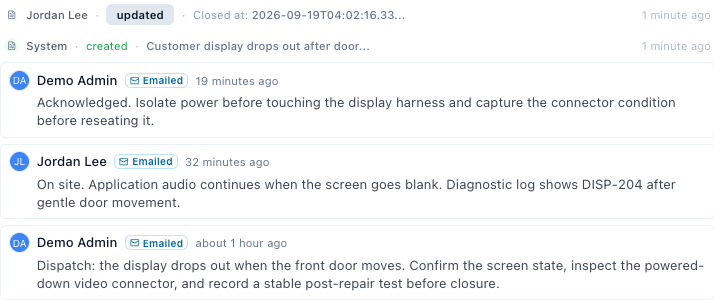
Sample workspace · Select the image to view it full size. Read the relevant updates
Scroll through the timeline to find the handoff or change you are investigating. Where a group of changes is collapsed, select it to see the entries inside.
Compare the recorded updates with the current ticket fields. A comment describing a planned action is not proof that the action has finished.
Identify the next step
Check whether the latest relevant update explains what was done, what remains, and who should act next.
If the handoff is unclear, ask the assigned person for the missing context before making a change.
Check the result
You can identify the ticket’s current owner and state, and explain the relevant updates from its activity.