A weekly maintenance review should not begin with an operator rebuilding last week's spreadsheet. The question is already known: where is planned work waiting, in progress, on hold, or complete? The report definition should be known too.
Latch reporting includes built-in reports for common operational questions. An operator sets the measure and chooses up to two grouping dimensions. The operator narrows the scope and saves a personal definition for reuse.
This walkthrough builds one report for a finance-hardware service operation. The team runs ATM replenishment, CDM inspections, and POS-printer maintenance across several cities. It needs a repeatable view of that planned work by city and current status.
The operational question defines the report
The question decides the setup:
- Measure the number of tickets created in the review window.
- Group first by city, then by status.
- Limit the window to the last 90 days.
- Include tickets tagged for cash and consumables replenishment or scheduled preventive maintenance.
- Present the result as a bar chart with the underlying table visible.
Each choice is explicit in the builder. There is no hidden spreadsheet cell or undocumented pivot setting.
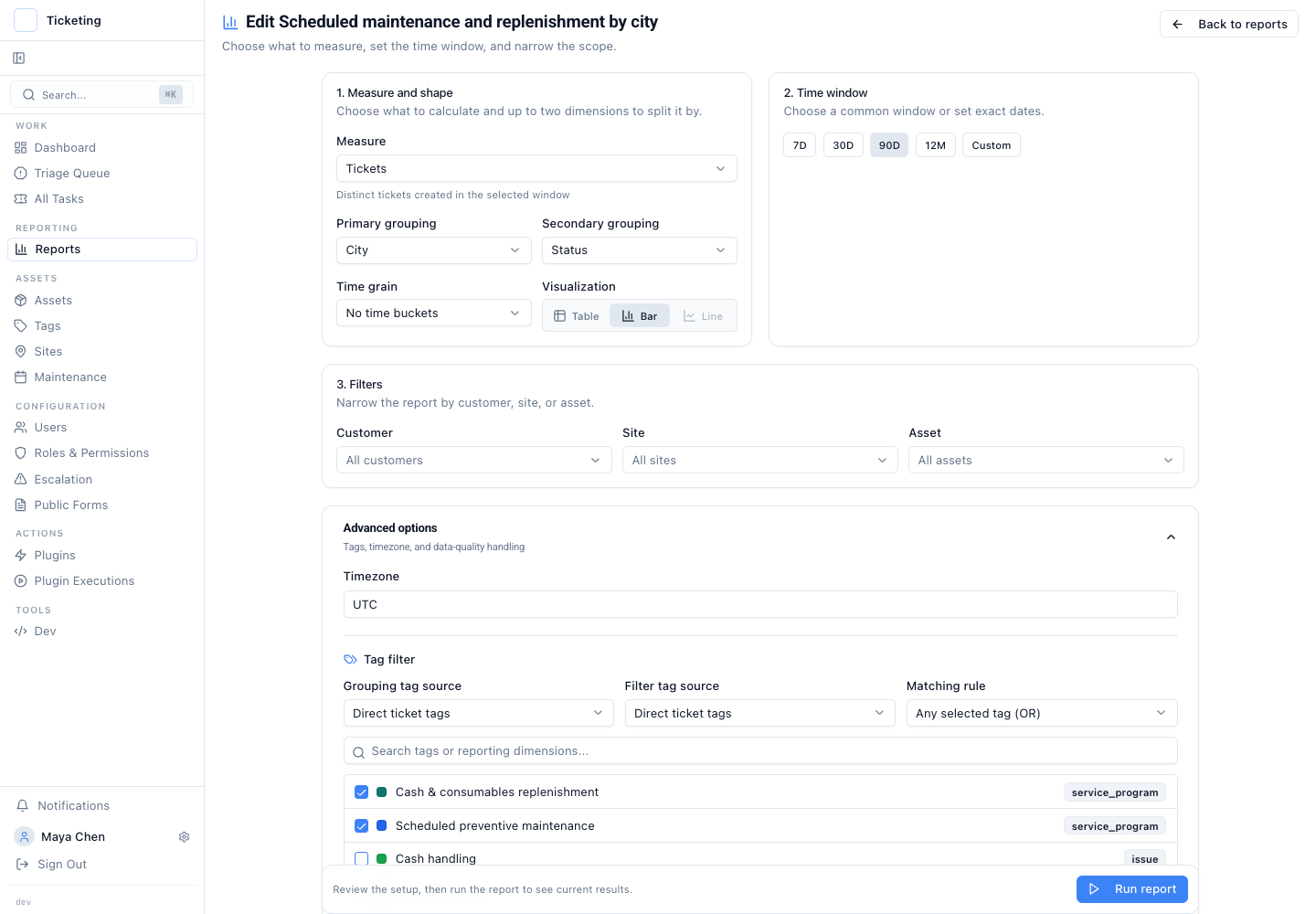
The builder shows the measure, 90-day window, city and status grouping, and the two selected planned-work tags.
The measure can change when the question changes. Ticket count shows demand. Open ticket count focuses on work that still needs attention. Resolved ticket count supports a completion review. SLA breach count and average resolution time show whether the operation is meeting its service commitments.
Grouping works the same way. A field-service lead might group by engineer and asset type. A regional lead might choose city and status. An asset manager might compare asset type with issue type. Latch allows up to two grouping dimensions so the result stays readable.
Filters keep the report tied to planned work
The report can narrow by customer, site, asset, or tag. Tag filters support direct, inherited, or effective tags and can match any or all selected values.
For this planned-work report, direct ticket tags separate replenishment from preventive maintenance. The two tags act as the scope. Incident repairs stay out of the result even when they involve the same ATM, CDM, POS terminal, or printer.
That produces a view the weekly review can use immediately.
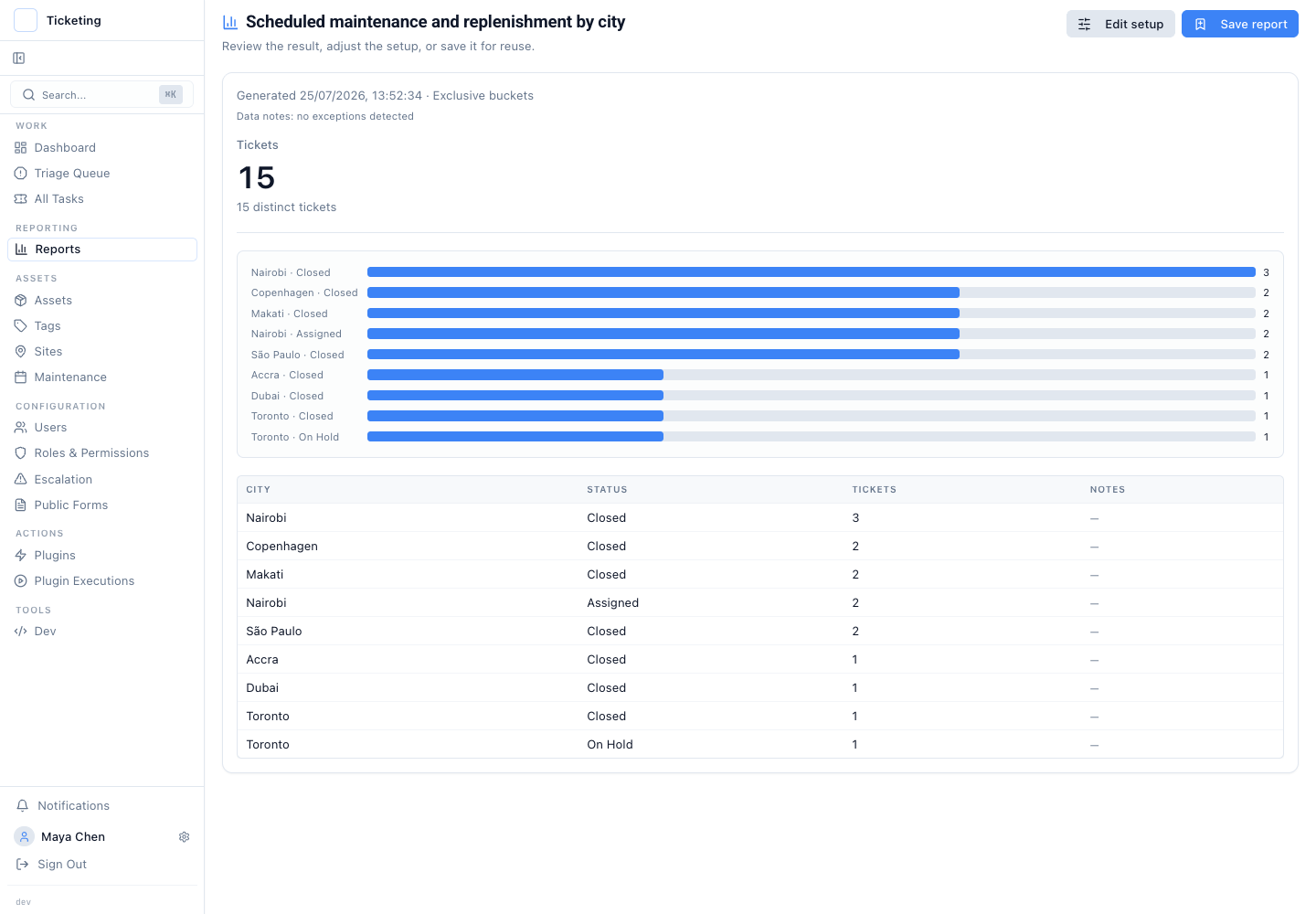
The result shows fifteen planned-work tickets across Nairobi, Copenhagen, Makati, Sao Paulo, Accra, Dubai, and Toronto.
The chart gives the pattern. The table gives the exact buckets. Nairobi has both closed and assigned work. Toronto has a visit on hold. Those are places to inspect the underlying tickets, not conclusions the chart makes on its own.
Saving a personal definition makes the next review repeatable
Once the setup answers the question, the operator saves it under a clear name such as "Scheduled maintenance and replenishment by city." Latch assigns the report a stable URL for that operator.
Reopening the URL reruns the same definition against current ticket data. The setup stays consistent. The numbers change as tickets move through the workflow.
This has two limits. A saved report is not an immutable historical snapshot. It is also owner-scoped today, so the URL does not automatically grant another operator access. If the team needs a point-in-time record, it should export or record the result through its established review process.
Data quality remains part of the result. A report cannot correct an unlinked asset, missing site, absent engineer, or unclassified ticket. Those gaps should remain visible because they affect the operating decision.
Working-hours-aware measures can use SLA schedules that reflect the hours a team actually operates. The choice of measures should follow the principles in queue health measures beyond first response. The wider move from stored ticket notes to operational action is covered in moving from a case record to a system of action.
For the full release and the finance-hardware field-service example, see the reporting release overview.
The operating rule is straightforward. Define the question once. Keep the filters and groupings visible. Save the setup under a name the operator will recognise next week.