A claims checklist often sits beside the work. An operator marks eight checks complete, then moves to email for evidence, chat for approval, and the claims platform for settlement. The checklist records completion. It does not drive what happens next.
Loss details came through one channel. Photographs sit in another folder. The repair estimate was checked in email. A manager approved the amount in chat. The payment instruction ran somewhere else. Months later, someone rebuilds the claim file from names, attachments, and timestamps.
That is a checklist beside a fragmented process. A checklist-driven claims workflow is different. The claim type selects the required checks. Missing evidence stays visible. A completed review can prepare the next action. A sensitive action stops for approval. The upstream result returns to the same claim.
This walkthrough follows one synthetic motor claim through that workflow, from intake checklist to upstream settlement instruction. It also shows how custom claim types start different checklist workflows and how support staff and AI work inside the same operating record. The organisation, people, policy, loss, vehicle damage, amount, evidence, and settlement response are illustrative. The screens come from the real Latch product.
A useful claims audit trail answers four basic questions about each event: who acted, what they did, when it happened, and what resulted. It also preserves before-and-after values when the claim changes. That is the distinction between an activity list and evidence someone can test later. The same core language appears in Navan's audit trail guide, but the claims workflow adds its own evidence, coverage, and settlement controls.
A Recurring Schedule Starts the Next Checklist Workflow
A claim event does not repeat. The control around an unresolved claim does.
The example uses a 30-day schedule for open motor claim files. Each cycle starts a high-priority review with the Motor damage claim checklist type and its required fields. The team gets a new piece of work before an unresolved file quietly ages past its next check.
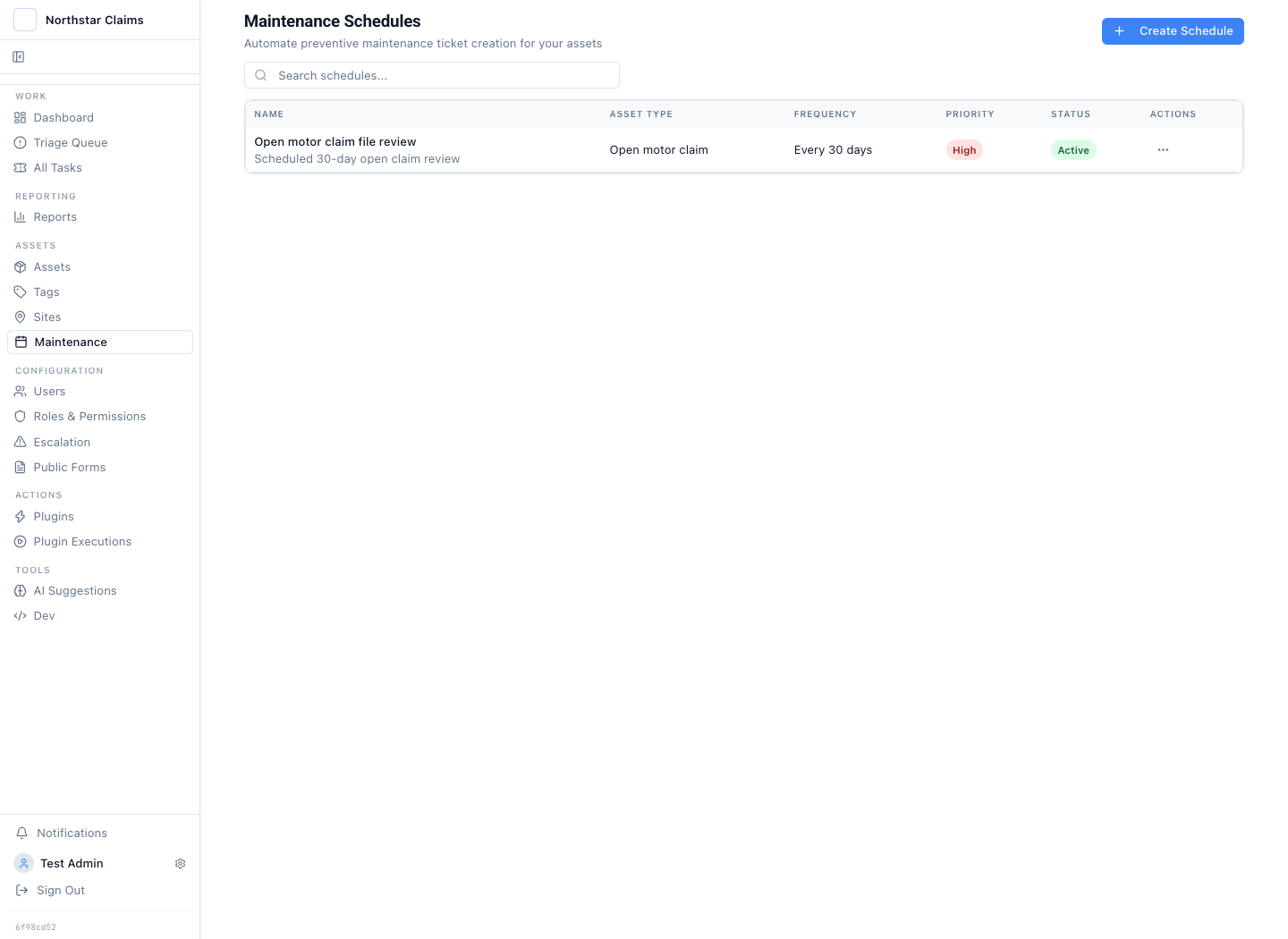
The schedule creates the next open-file review at the expected interval.
The schedule is the workflow trigger, not evidence that the claim was handled correctly. It makes the checklist due, assigns the work, and keeps the review visible. The claim record still has to show what the operator checked and what changed.
The Claim Type Starts the Right Checklist Workflow
A claims intake checklist should not flatten every loss into the same fields. A motor collision needs vehicle damage, coverage, repair evidence, and a settlement path. A property claim needs the location, cause of loss, affected area, mitigation status, and contractor evidence. Travel medical and warranty claims need different facts again.
Latch uses custom claim types to start the work with the right checklist:
- Motor damage claim: loss date, collision category, damage summary, claimed amount, coverage confirmation, and evidence completeness.
- Property damage claim: property address, cause of loss, affected rooms or structures, emergency mitigation, and contractor estimate.
- Travel medical claim: treatment date, country, provider, diagnosis summary, invoice amount, and policy-exclusion check.
- Warranty service claim: serial number, purchase date, fault category, diagnostic result, proof of purchase, and proposed remedy.
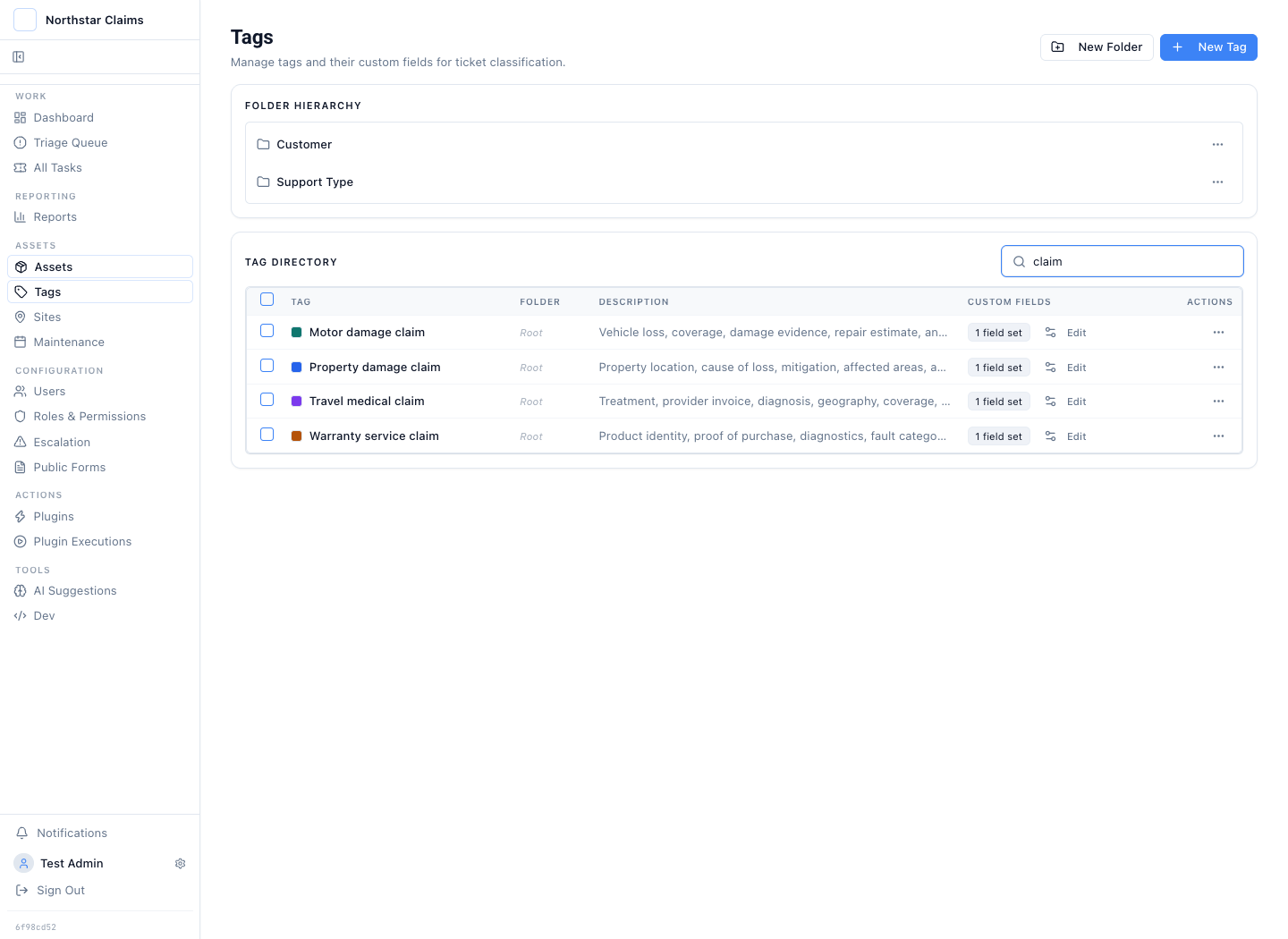
Each claim type carries its own named field set instead of relying on one generic checklist.
The checklist fields are not instructions in a document. They are governed workflow fields on the claim. Required values stay visible while support staff work. A missing value remains a data condition that can hold the workflow at review rather than becoming a note someone has to interpret later.
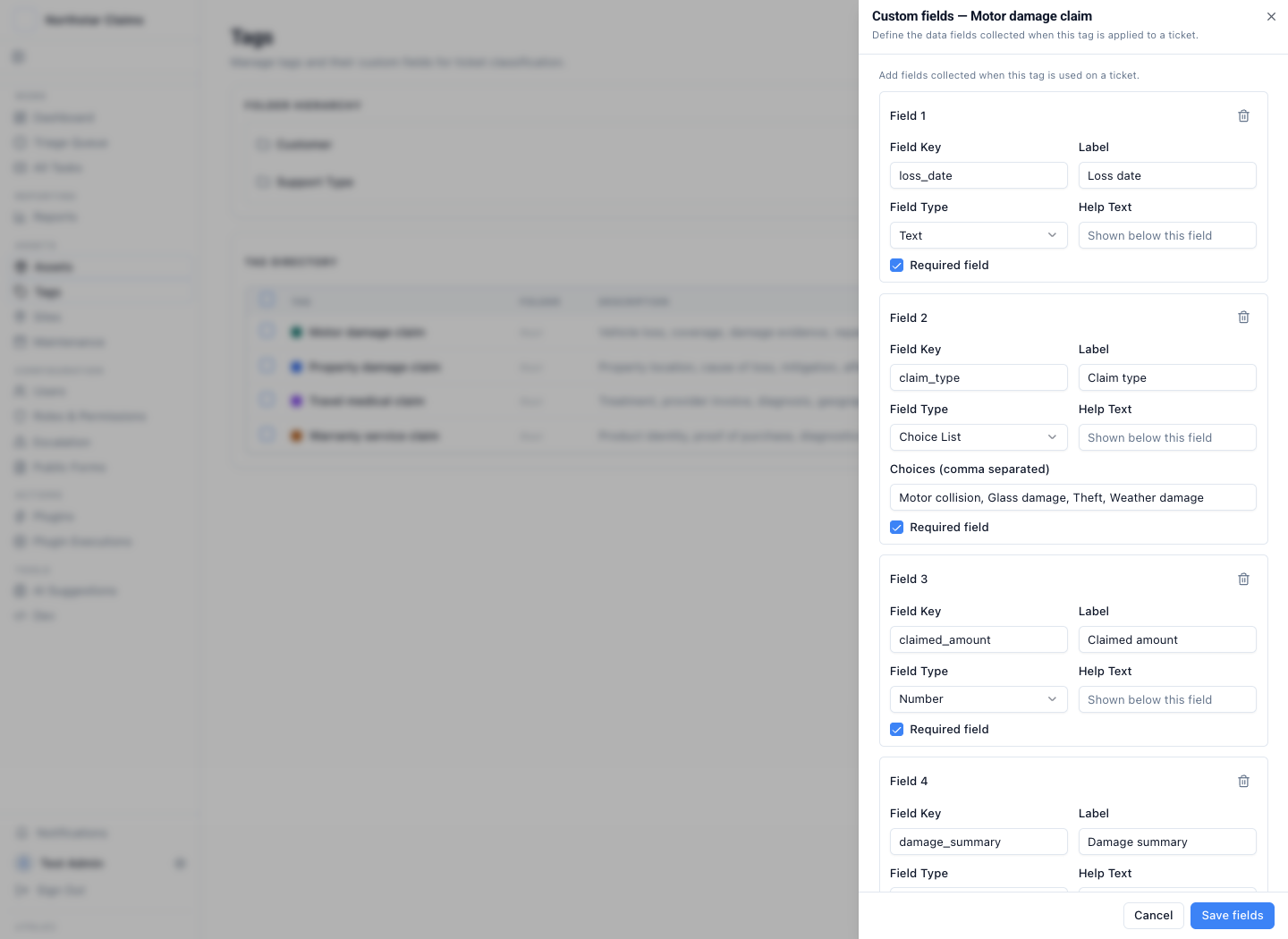
The motor checklist defines required dates, choices, amounts, evidence checks, and coverage checks.
The checklist design follows the same practical categories found in a conventional claims auditing checklist: verify claim information, test policy terms, check for duplicates or discrepancies, apply regulatory requirements, record the outcome, and review the process regularly. The difference is that these checks are active workflow state. They remain attached to the claim, its operator, its evidence, and the action the workflow permits next.
Intake Starts the Workflow with Required Evidence
The example starts with a public form named Motor damage claim. It asks for the claimant, policy reference, loss date, claim type, damage summary, claimed amount, and photographs. Required evidence is part of the intake path, not a checklist someone remembers after submission.
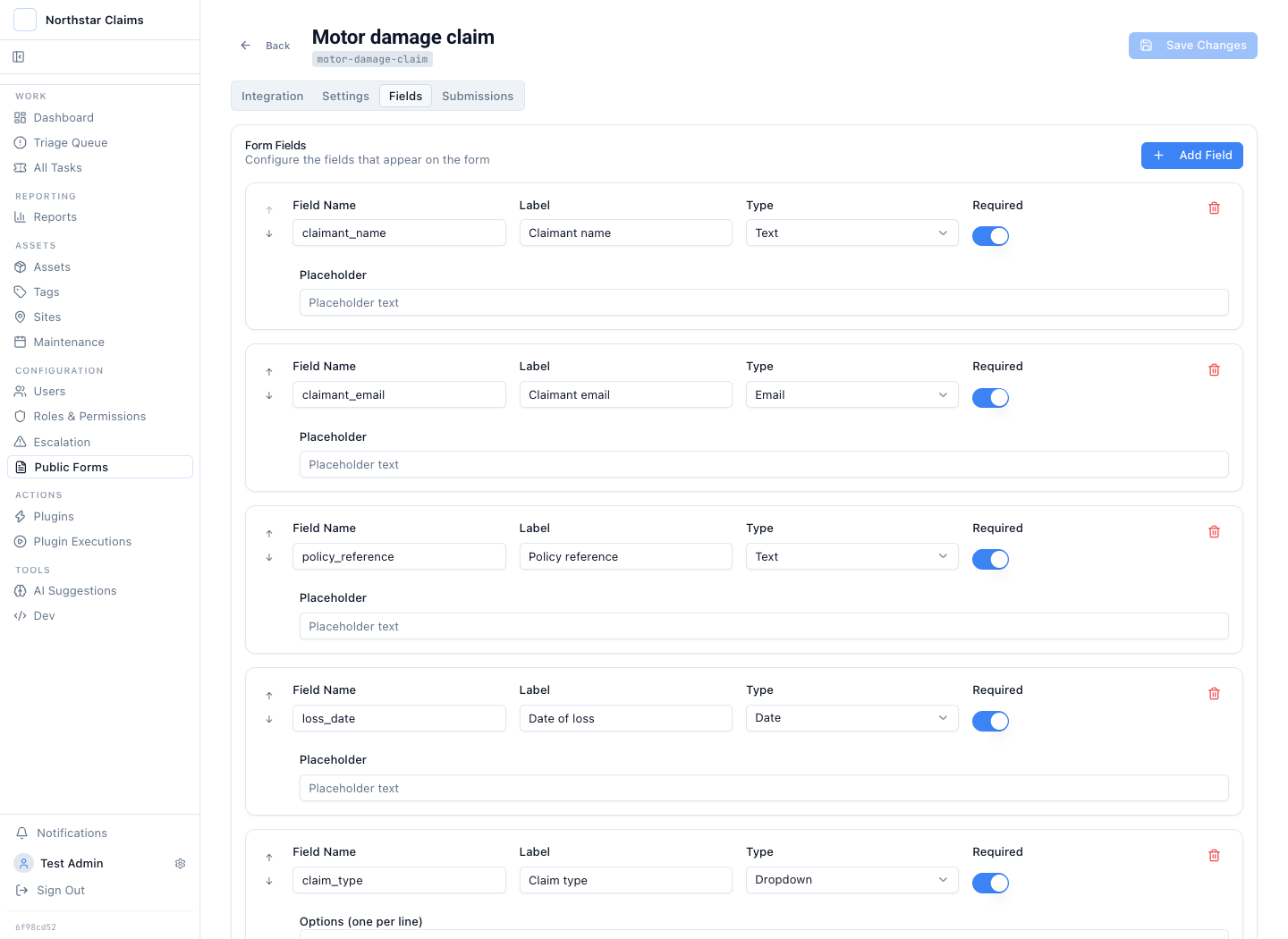
The intake form names the facts and photographs needed before the claim enters the queue.
The form accepts up to five attachments. It links the submission to the governed motor-claim classification and applies a fixed priority. The same case type follows the work into review, approval, execution, and reporting.
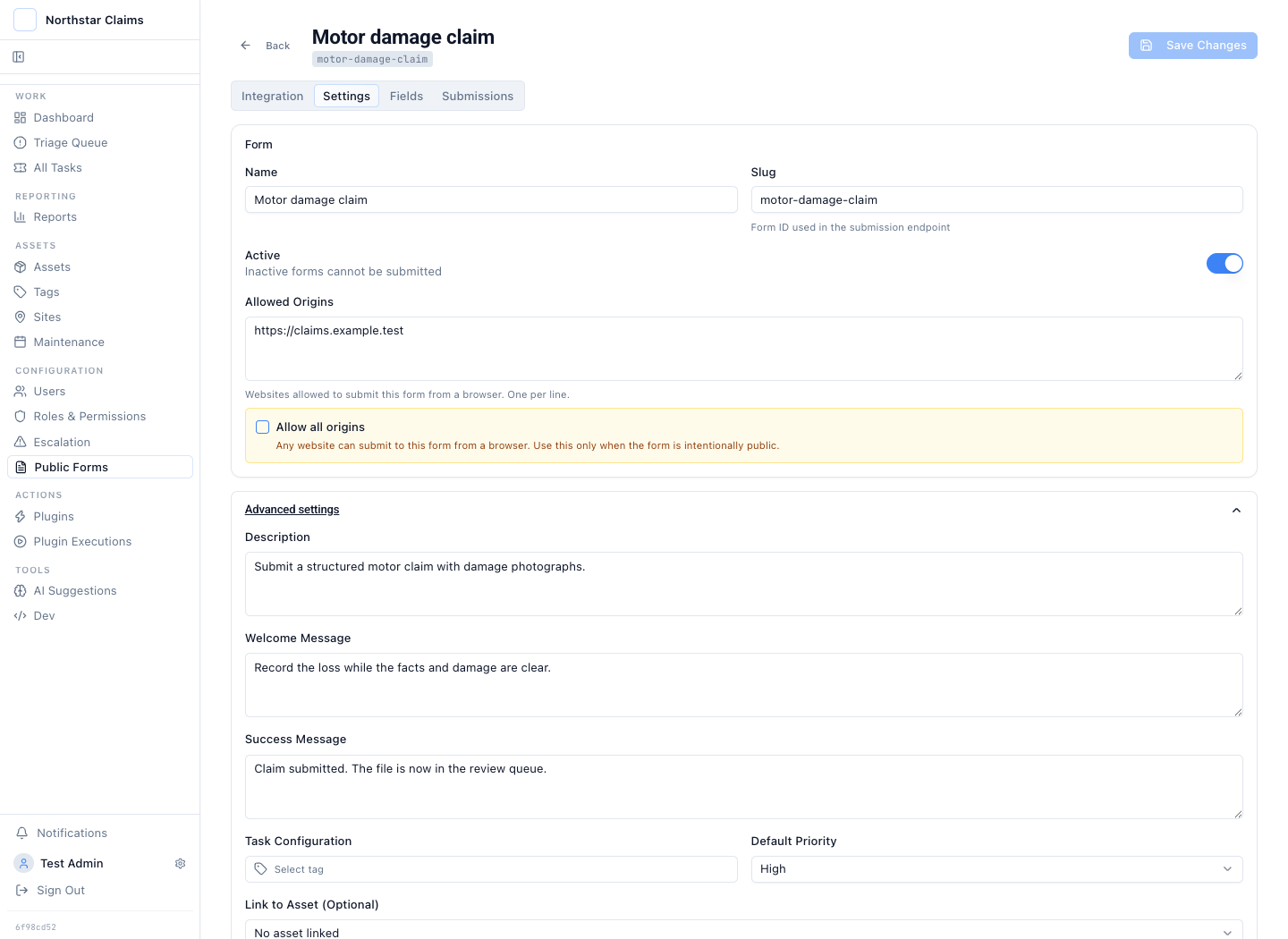
Evidence rules and operating controls stay attached to the claim from the start.
This is narrower than a survey form. A survey stores a response. A claim intake checklist starts work with an owner, required evidence, a review path, approval conditions, and a downstream result to prove.
Support Staff Advance the Checklist on the Claim
The synthetic queue contains four claim files. One settlement waits for approval. Two have been approved. One was rejected because the itemised repair estimate was missing.
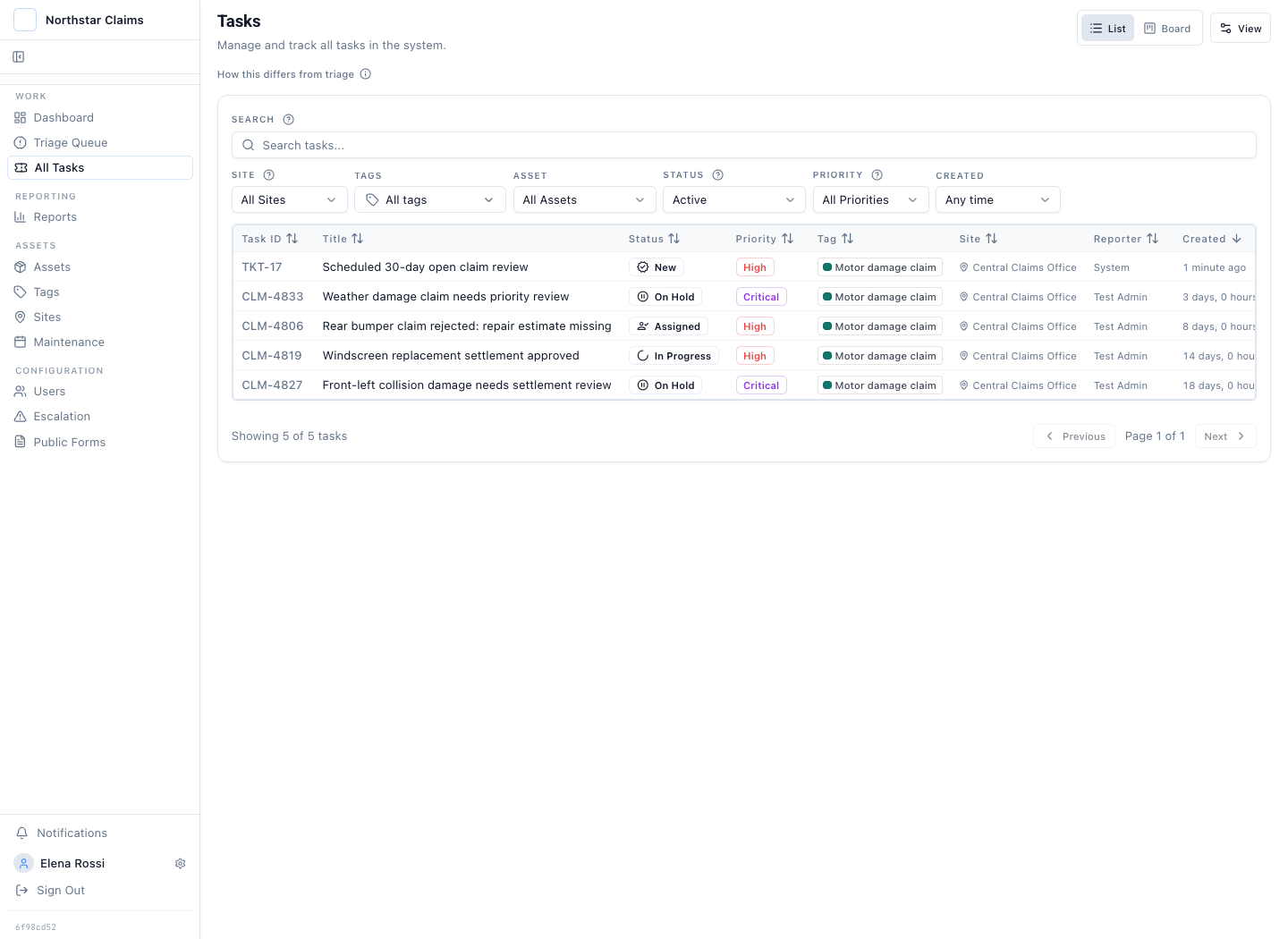
Support staff see claim type, status, priority, ownership, and case context in the operating queue.
The central case is CLM-4827. It records a collision on 14 August 2026. The front-left wing is dented, the bumper is scraped, and the headlamp edge is cracked. The claimed amount is GBP 3,850. Coverage and evidence checks are both complete.
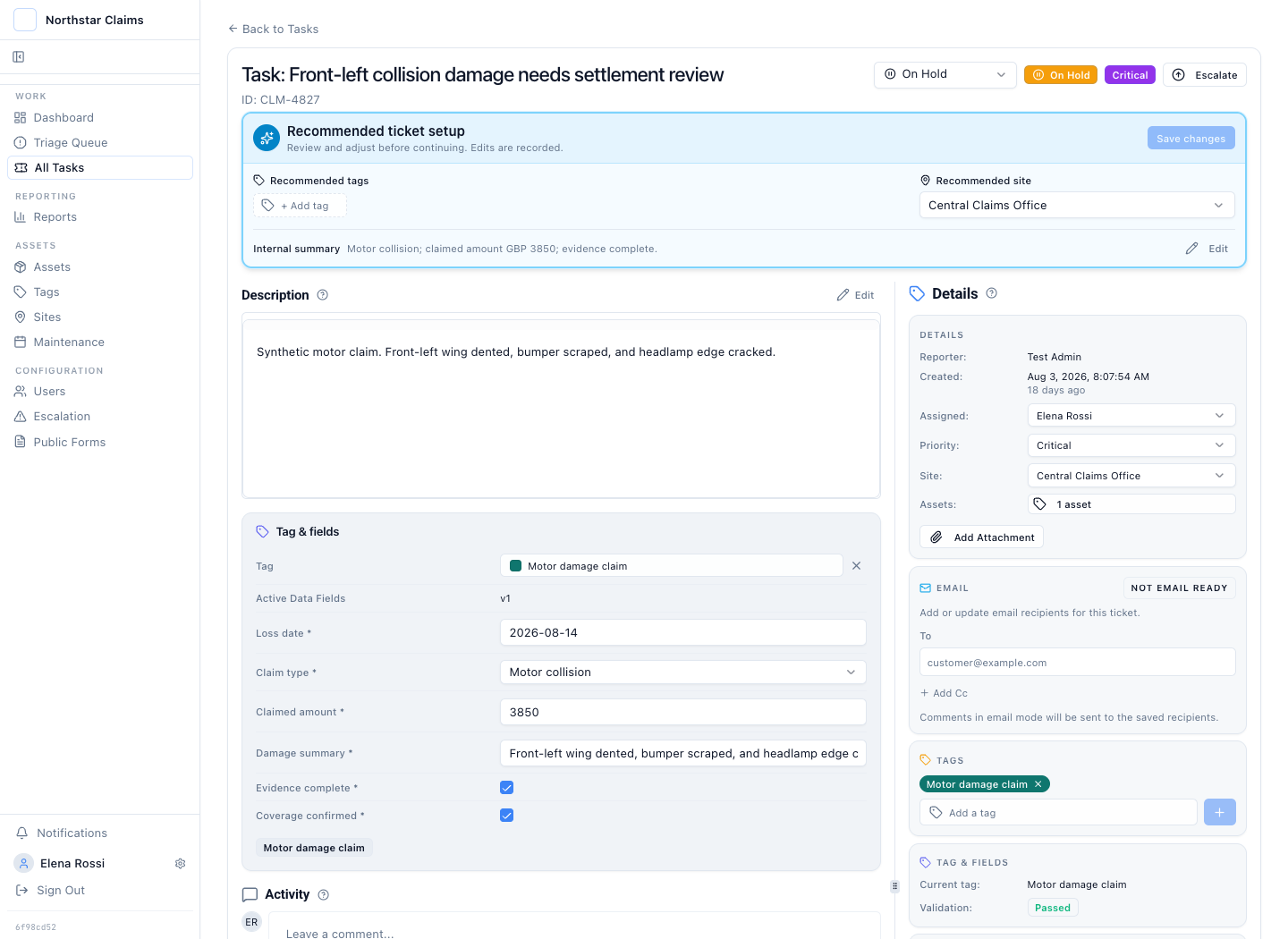
Elena Rossi works the claim against its required loss, amount, coverage, and evidence fields.
The damage photograph and adjuster note sit on the same case as the proposed settlement instruction. The workflow moves because the required facts and evidence are present, not because someone copied a completion status from another checklist. A reviewer does not need a separate shared drive or chat thread to reconstruct what happened.
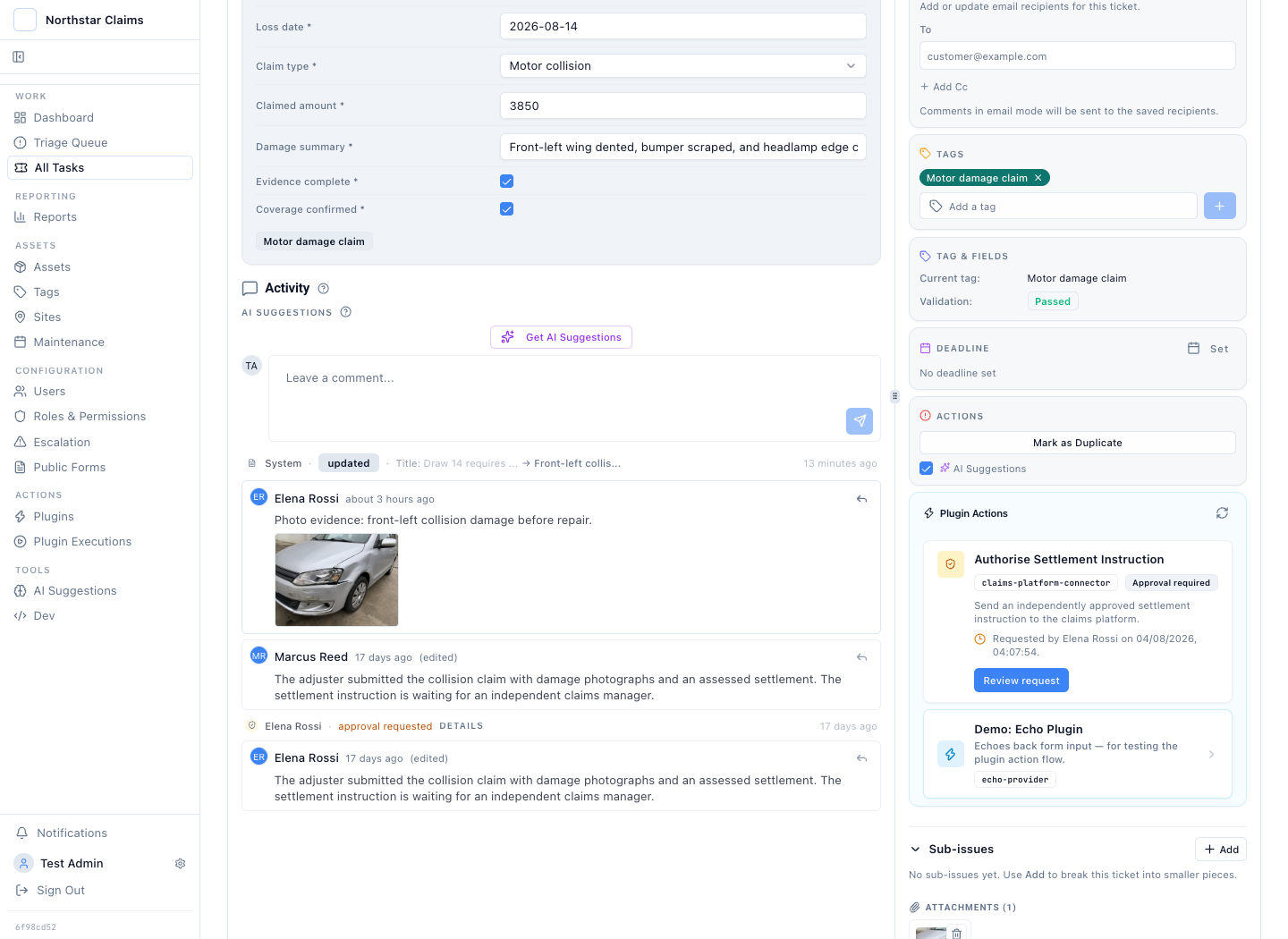
The loss facts, photograph, adjuster note, requester, and approval state share one timeline.
The vehicle image in this synthetic story is illustrative. In a live workflow it would be the photograph supplied by the claimant, assessor, repairer, or adjuster.
Checklist Completion Can Gate the Exact Settlement Instruction
The adjuster proposes a settlement of GBP 3,420 to the approved repair network after the motor-claim checks are complete. The next workflow step is consequential, so the operator cannot authorise their own instruction. A different authorised person must review it.
The approval screen shows the stored payload: claim ID, policy reference, loss date, damage, claimed amount, settlement amount, currency, payee, and evidence filename. The reviewer approves or rejects that exact request.
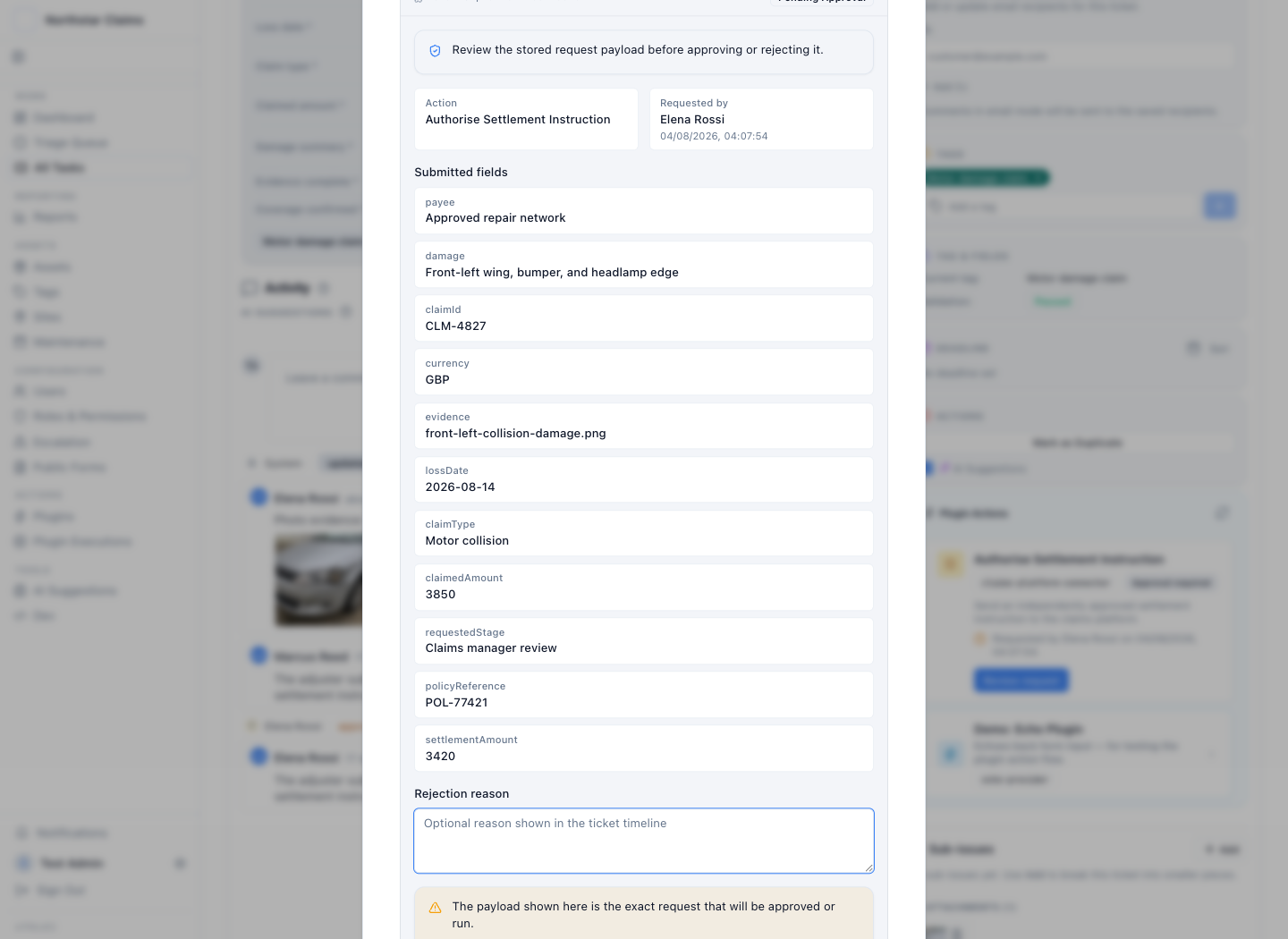
The decision applies to the stored settlement payload, not to a summary copied into email or chat.
Does this mean one settlement instruction can require an arbitrary serial, parallel, or n-of-m approval chain? No. The current control is maker-checker for each gated plugin action. A workflow can contain several separately gated actions. The product does not claim a configurable multi-stage approval chain for one action.
That boundary still addresses a common claims-control failure. The person who prepares the settlement cannot approve it. A rejection keeps its reason. A later request does not erase the earlier decision.
The approved windscreen case preserves the requester, independent approver, timestamps, action state, and payload covered by the decision.
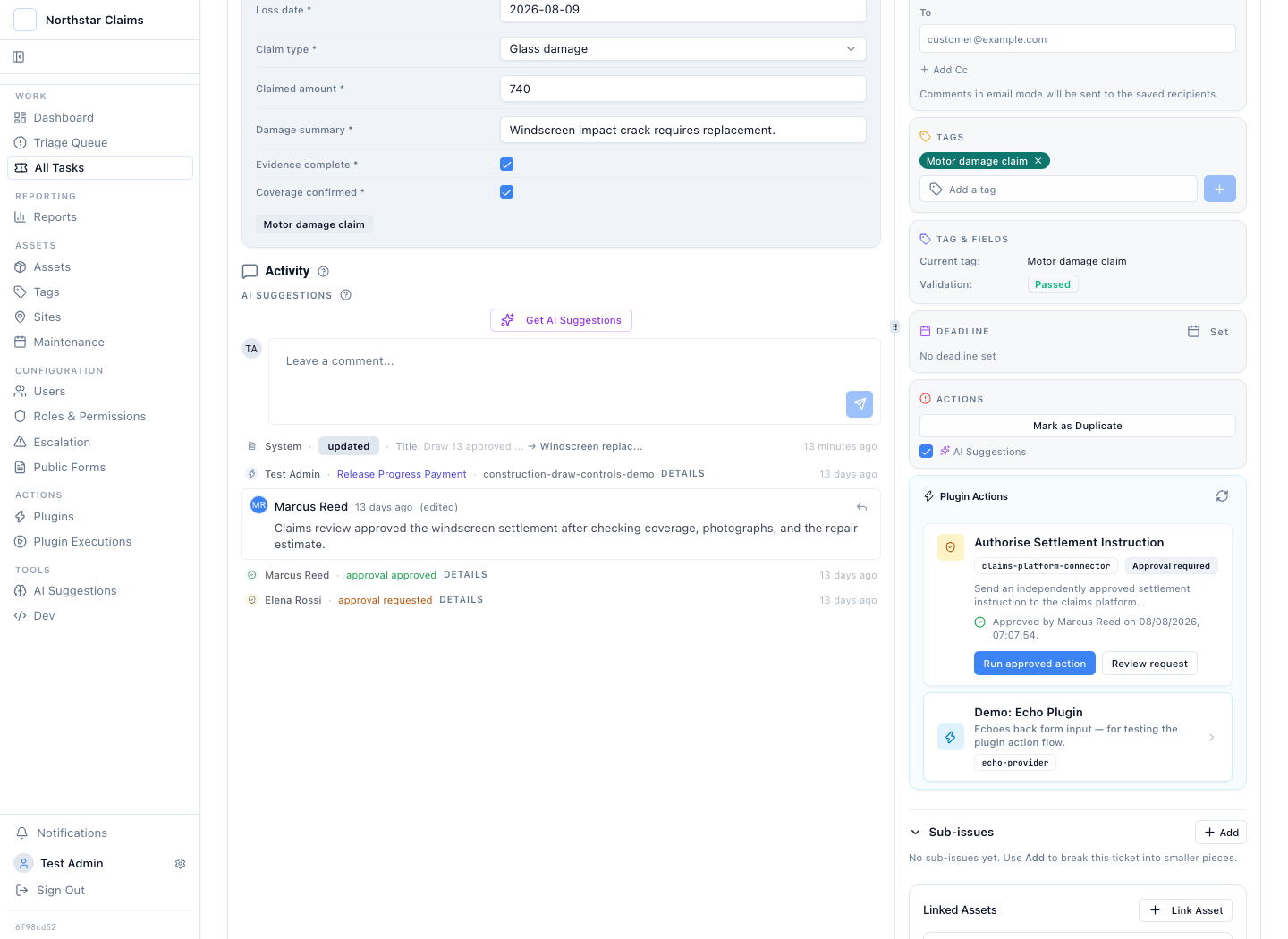
The claim history preserves separation of duties and the exact request that earned approval.
The Workflow Returns the Upstream Result to the Claim
Approval is not proof that the settlement instruction ran. The plugin sends the reviewed payload to the upstream claims platform. Its execution record captures the request, endpoint, response, operator, status, and timing.
In this synthetic example, the approved windscreen claim returns settlement reference SET-4819 with an Authorised state.
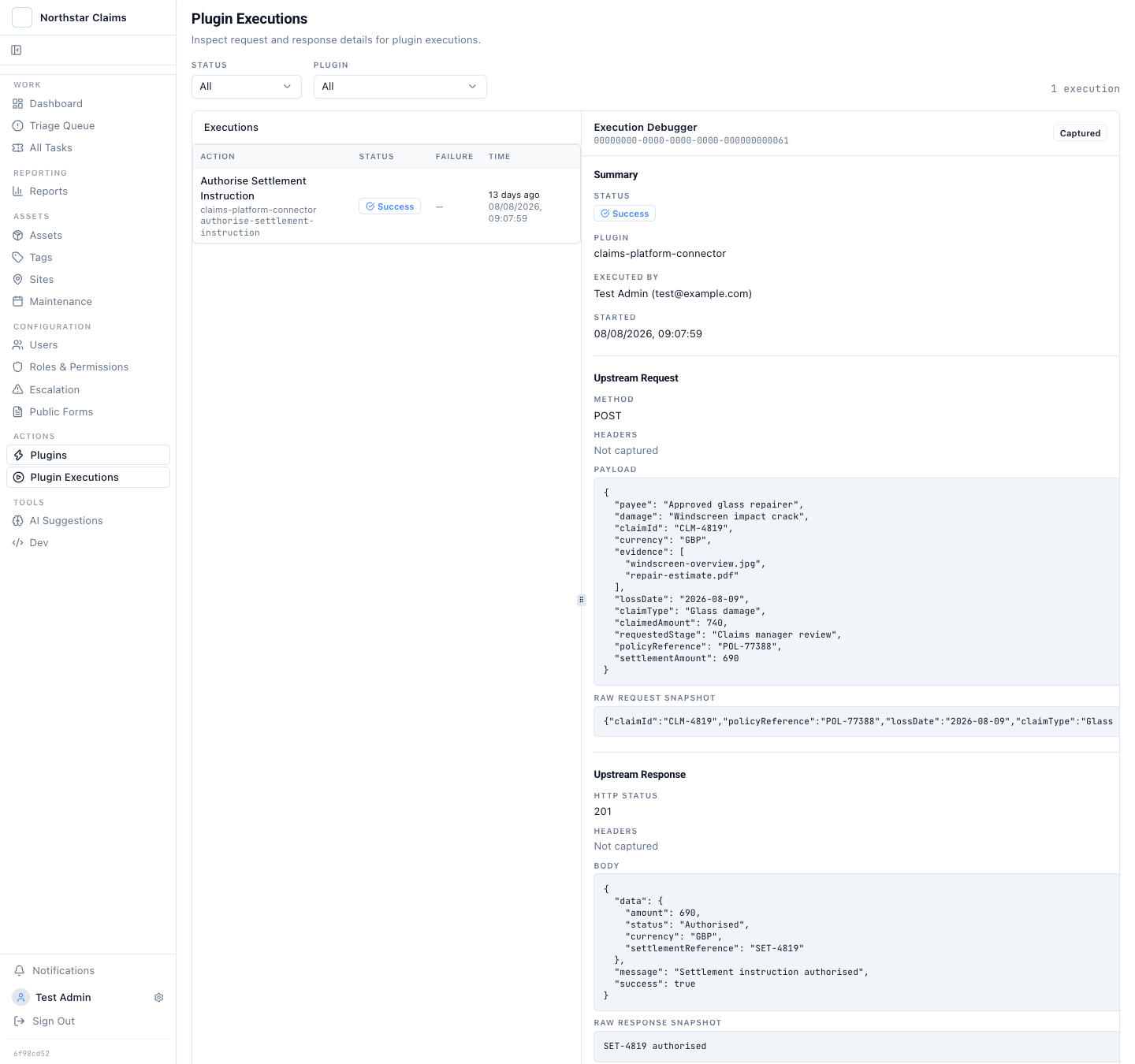
The settlement reference and response close the loop between the claim decision and the upstream system.
A note that says "sent for payment" is still an assertion. The execution response shows what the connector sent and what the other system returned.
Plugins fit where the upstream system has a real action to perform: authorise a settlement instruction, open a repair job, update a reserve, or notify another controlled register. A team that only needs intake and manual review may not need an action plugin. The audit trail should match the work, not force automation into every claim.
AI, MCP, and Plugins Work Inside the Checklist Workflow
Claims work is a strong fit for AI-assisted operations because the checklist gives the model a bounded job. A model can classify the incoming claim, extract candidate checklist fields, summarise the loss, identify a missing repair estimate, or propose the next workflow action. The operator accepts, corrects, or rejects that recommendation.
An AI automation can start a recurring checklist, prepare a settlement request when required evidence is present, or hold a claim when a check fails. An MCP client can search claims and call the tools allowed by its credential. A plugin can send an approved instruction to the claims platform. None of those paths bypasses the claim type, checklist state, role, permission, approval, or audit checks.
That is what AI-native means here. AI works inside the checklist-driven workflow and the action path. It is not a separate copilot that produces suggestions outside the claim. The model proposes. Support staff decide. The system records both.
Source Access Keeps the Claim Process Portable
Claims evidence can contain personal, financial, medical, and incident data. Latch can run in your environment, private cloud, or a disconnected network. The claim database, attachments, model inference, MCP endpoint, plugins, approval evidence, and audit trail stay inside the deployment boundary.
Source code is available to Enterprise customers. Teams can inspect what runs, build their own plugins, query or export their data, and operate the software on infrastructure they control. That removes the hosted-only exit barrier: the workflow does not disappear because a vendor API, model, or managed service changes.
Running Latch yourself still creates work. The team owns upgrades, backups, retention, monitoring, and security. A small claims team that does not want to run infrastructure should use a managed deployment. The important point is that managed and customer-deployed editions use the same claim types, controls, plugins, MCP boundary, and audit record.
Report the Control Without Rebuilding It
The standard approval audit report groups the four synthetic requests by status and action. It shows two approved or executed requests, one waiting for a decision, and one rejection. Each result keeps a path back to its claim file.
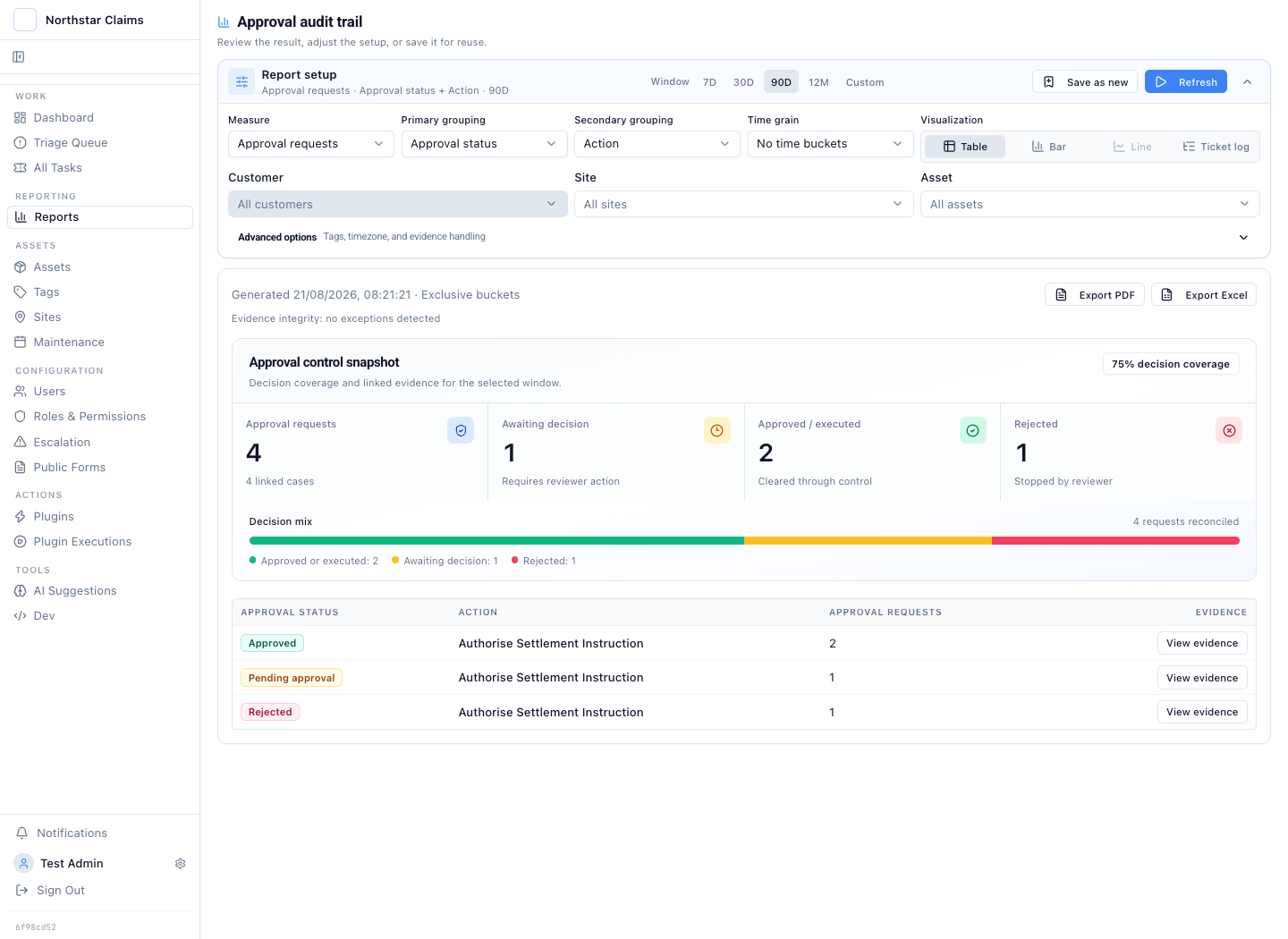
Approval outcomes remain reportable, drillable, and exportable to PDF or Excel.
The report answers a control question. How many settlement instructions entered review? Which ones are still waiting? Where did a reviewer stop an incomplete request? The underlying case answers the claim question. What loss, evidence, amount, and decision produced that outcome?
A checklist-driven claims workflow connects seven stages:
- A claim type starts the checklist required for that category of claim.
- The intake form collects the facts and evidence needed to begin work.
- Support staff advance the claim by completing and correcting required checks.
- A recurring schedule starts the next review for unresolved claim files.
- Checklist state and policy determine when a proposed action can enter approval.
- The plugin returns the upstream claims-platform result to the workflow.
- The report keeps every aggregate linked to its source claims and checklist evidence.
Break those links and an audit starts with reconstruction. Keep them together and the claim stays readable from first notice of loss to the returned settlement reference.