A support queue can tell you what is open. It usually cannot tell you which work belongs to an ongoing operational responsibility, which work belongs to a rollout with an end date, and which equipment or locations are covered by both.
That distinction matters. An ATM fault at Westlands Branch is ongoing support work. A software upgrade at the same branch is part of a finite rollout. The site and asset are the same. The reason for the work, the owner, the deadline, and the definition of done are not.
Projects in Latch keep those contexts visible without splitting the work into disconnected systems. Tickets remain the unit of work. Sites and assets explain what the work touches. A project explains why those records belong together.
The screenshots below use deterministic, illustrative sample data. They show the shipped product behaviour without exposing a customer workspace.
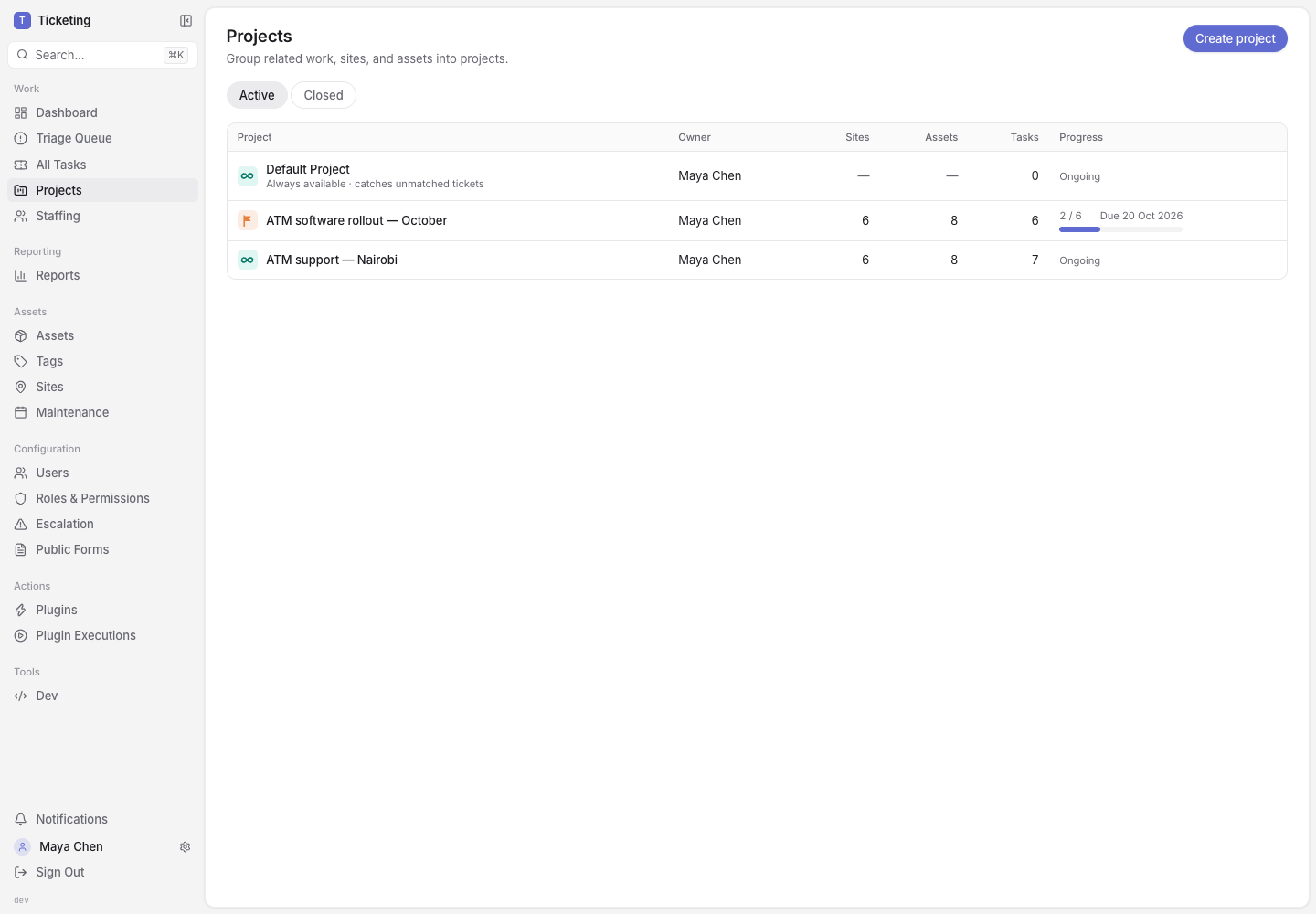
The Projects list separates the permanent fallback, ongoing ownership, and finite work. Counts and progress come from the records inside each project.
Three Places Work Can Land
Every ticket belongs to a project. The routing order gives that assignment a reason rather than treating it as a filing choice.
The Default Project catches work that has no stronger match. It remains available so a form submission, manually created ticket, or email never needs a fabricated site or asset just to enter the system.
An open-ended project represents ongoing responsibility. Add sites and assets to it, and new tickets at those sites or on those assets join automatically. When both exist, the primary asset match is more specific than the site match. An inbox can also route new tickets directly to the project.
A bounded project represents work with a finish line. A rollout, inspection campaign, branch opening, or migration fits here. Adding a site creates one project task for that site. Progress is derived from those tasks reaching Resolved or Closed, not from a manually typed percentage.
The same site or asset can be covered by a bounded rollout while its routine incidents continue to route to an open-ended support project. That overlap is deliberate. Operational ownership and a temporary programme are different facts.
Ongoing Projects Route New Work by Context
The example below follows ATM support — Nairobi. Six branches and eight terminals sit inside the ongoing project. A printer fault joined through its primary asset. A cash-deposit issue joined through its site. A monitoring alert arrived through the routed inbox. The overview retains that source beside each ticket.
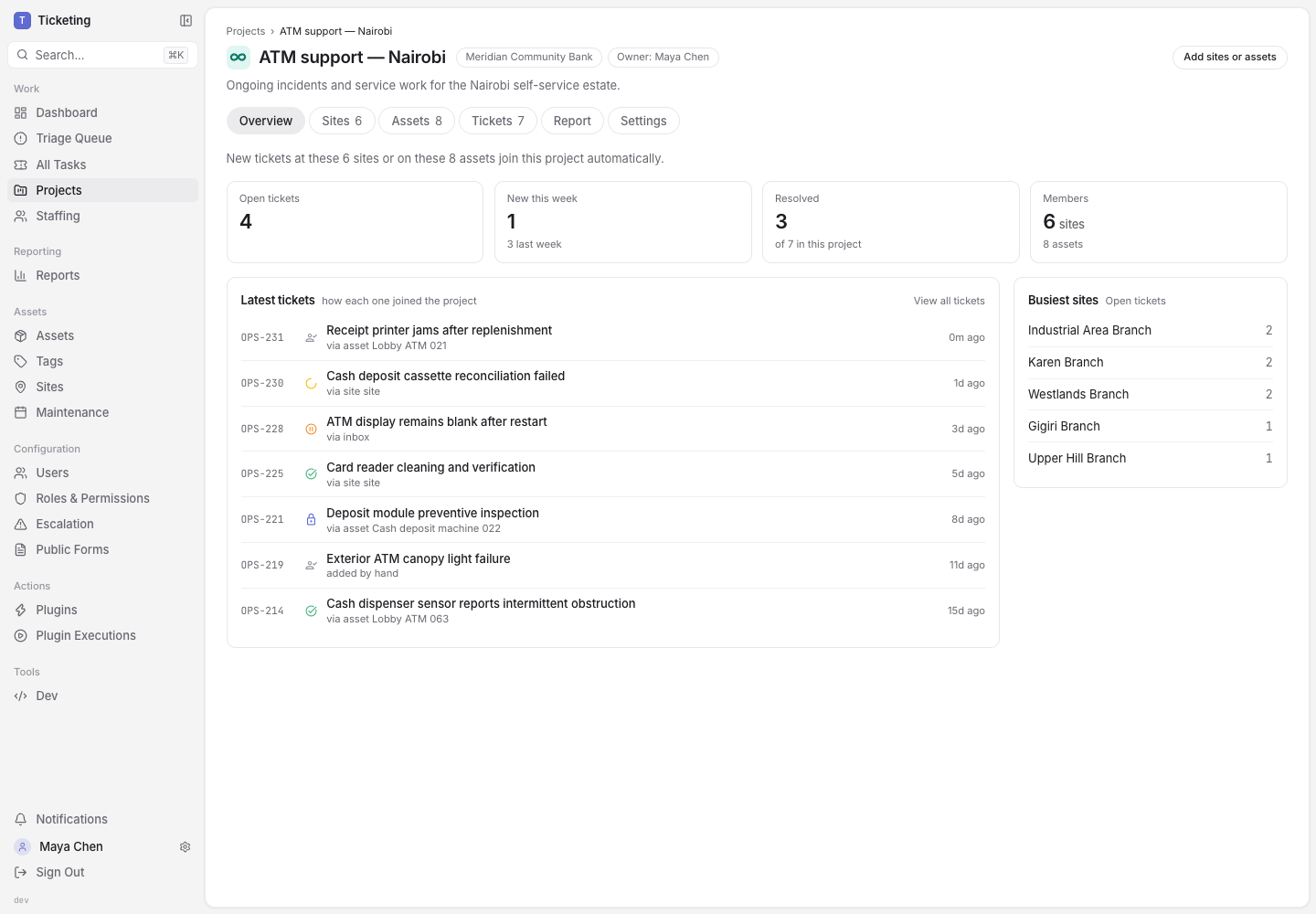
An ongoing project is a routing boundary, not just a label. Each ticket shows how it joined, while the overview keeps workload and member context together.
This makes the project useful before someone opens an individual ticket. The manager can see current volume, recent completions, and the branches generating the most open work. The ticket still carries its full activity and audit record. The project adds operating context around it.
If a site later leaves an ongoing project, its existing tickets stay where they were worked. Only future matching changes. Closing an ongoing project follows the same principle: the historical record remains, while its sites and assets become available to another ongoing project.
Bounded Projects Turn Scope into Site Tasks
The software rollout uses the same branches and terminals, but it has a target date and a clear completion rule. Each selected site has one rollout task. Assets at that site are attached to the same coverage record, so the branch task remains the coordination point.
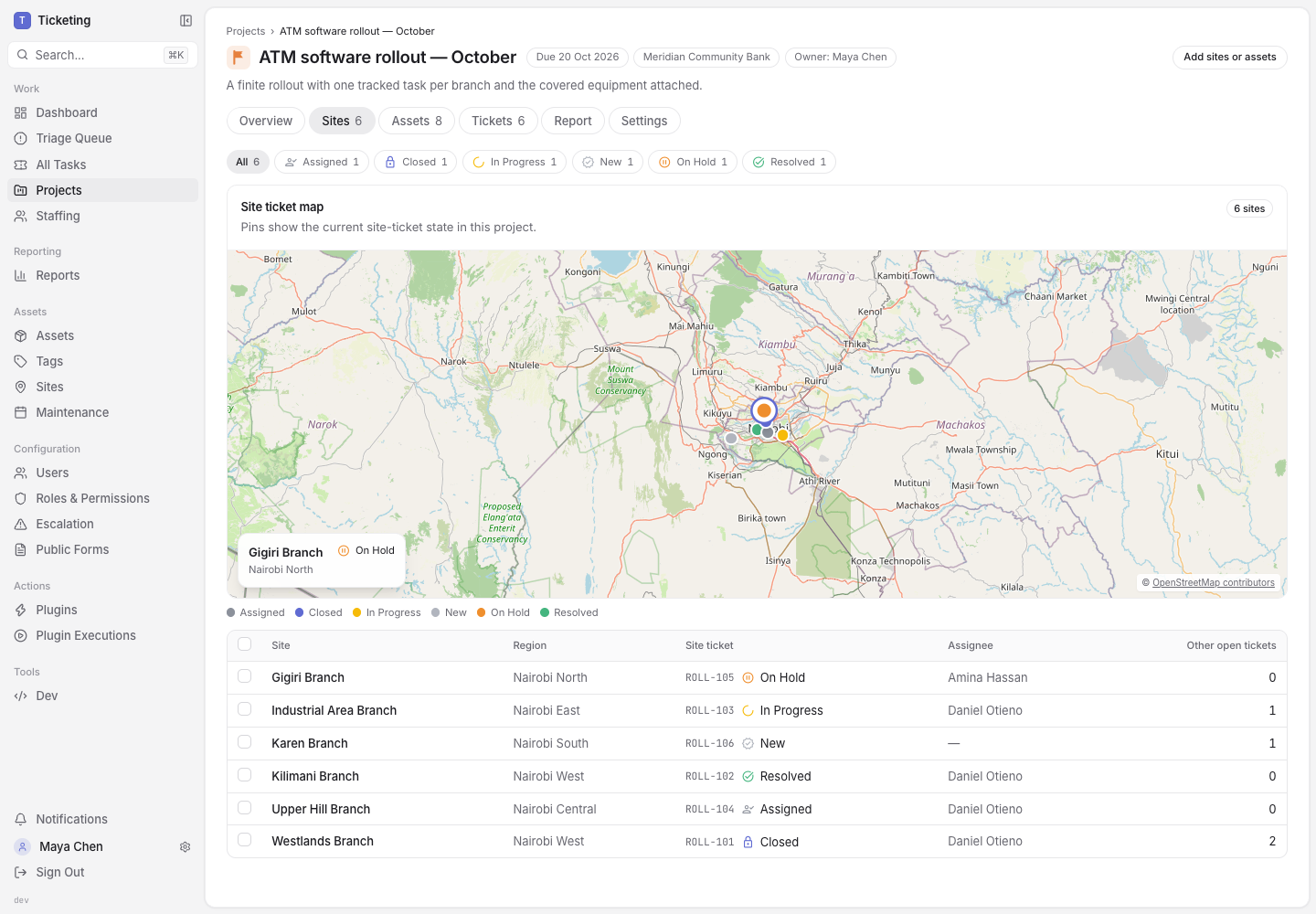
One task per site keeps the rollout count honest. The map and table show where work is complete, blocked, assigned, or not yet started.
This is different from creating one large ticket with a checklist of branches. Each site has its own owner, status, activity, and evidence. A blocked branch does not hide inside a project-level comment. A completed branch does not wait for every other branch before its outcome becomes visible.
The Sites tab also shows surrounding workload. The rollout task answers whether the planned work is done. The “other open tickets” count shows whether the branch has unrelated operational pressure at the same time. That is the same geographic context used in Latch site reporting, brought into the project rather than exported to a separate tracker.
Assets Explain What the Site Task Covers
Sites locate the work. Assets identify the equipment affected by it.
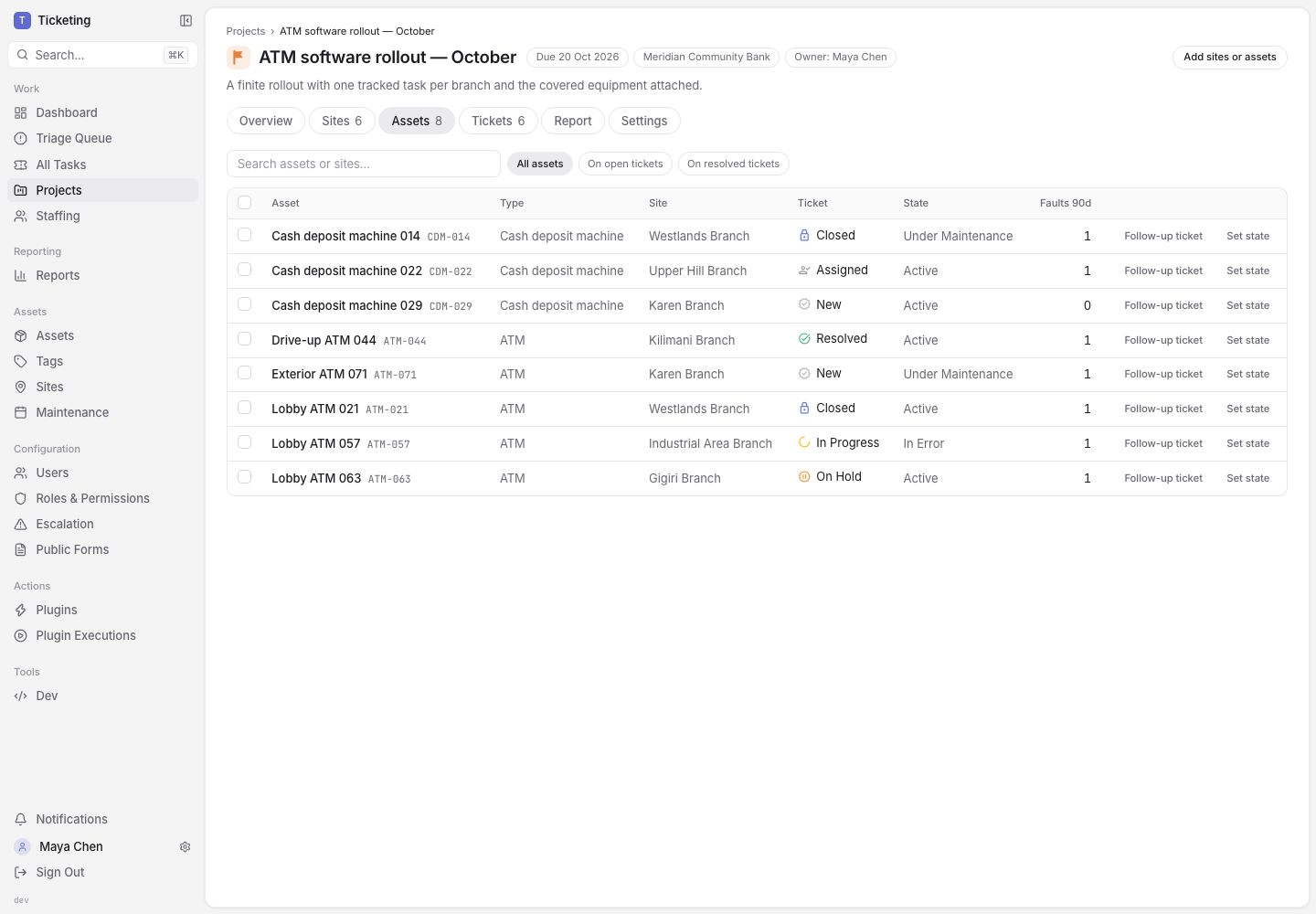
Assets inherit the covering site task. Their type, site, operating state, recent faults, and ticket status remain visible without creating a duplicate rollout ticket per machine.
Adding a site to a project brings its assets with it. A manager can still add an individual asset when the scope is narrower than a whole site. The Assets tab keeps three questions next to each other:
- Which machine is covered?
- Which site task coordinates the work?
- What is happening to that machine outside the rollout?
The last question is easy to lose in a project plan. An ATM can be under maintenance because of the rollout and still have recent service faults worth reviewing. Project coverage does not replace the asset record or its operational state. It connects them.
Progress Comes from Work, Not Status Meetings
The bounded project report counts completed site tasks, open tasks, covered faults, and uncovered faults. The burn-up compares created and completed work against the target date. Regional totals are calculated from the same site tasks shown on the Sites tab.
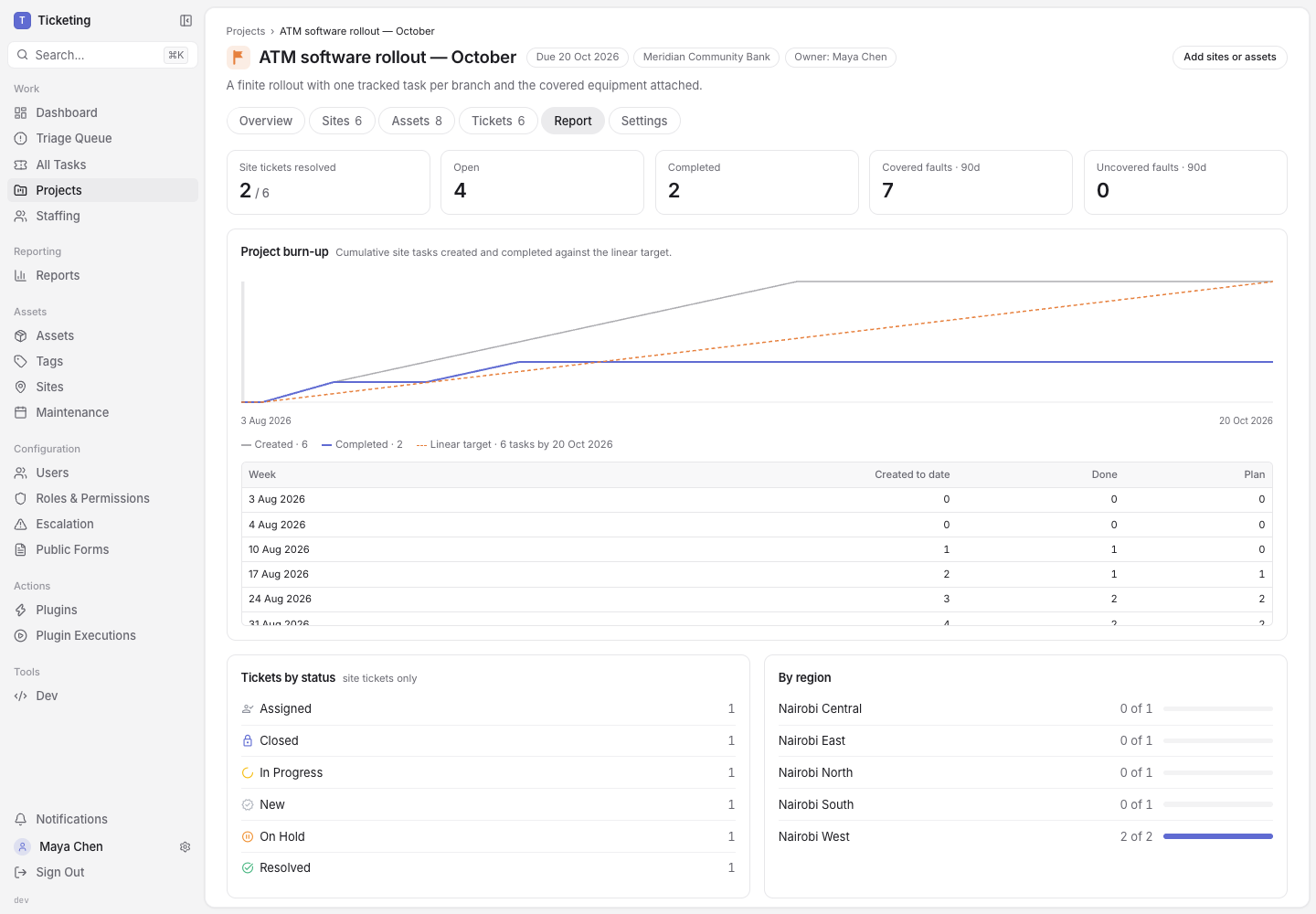
The report derives progress from ticket state. A status meeting can explain the numbers, but it does not create them.
Cancelled, rejected, and duplicate tasks do not inflate completed work. Resolved and Closed are the completion states. The result is a project view that can answer “how much is done?” and still let a reviewer open the exact site task behind the number.
Inboxes Can Represent a Project Boundary
Some work enters through a physical location or asset. Other work enters through an address such as nairobi-support@inbound.example.test. An existing mailbox can route directly to an open-ended project. Hosted workspaces can also request a new address from the project settings; the request stays visible until an operator fulfils or rejects it.
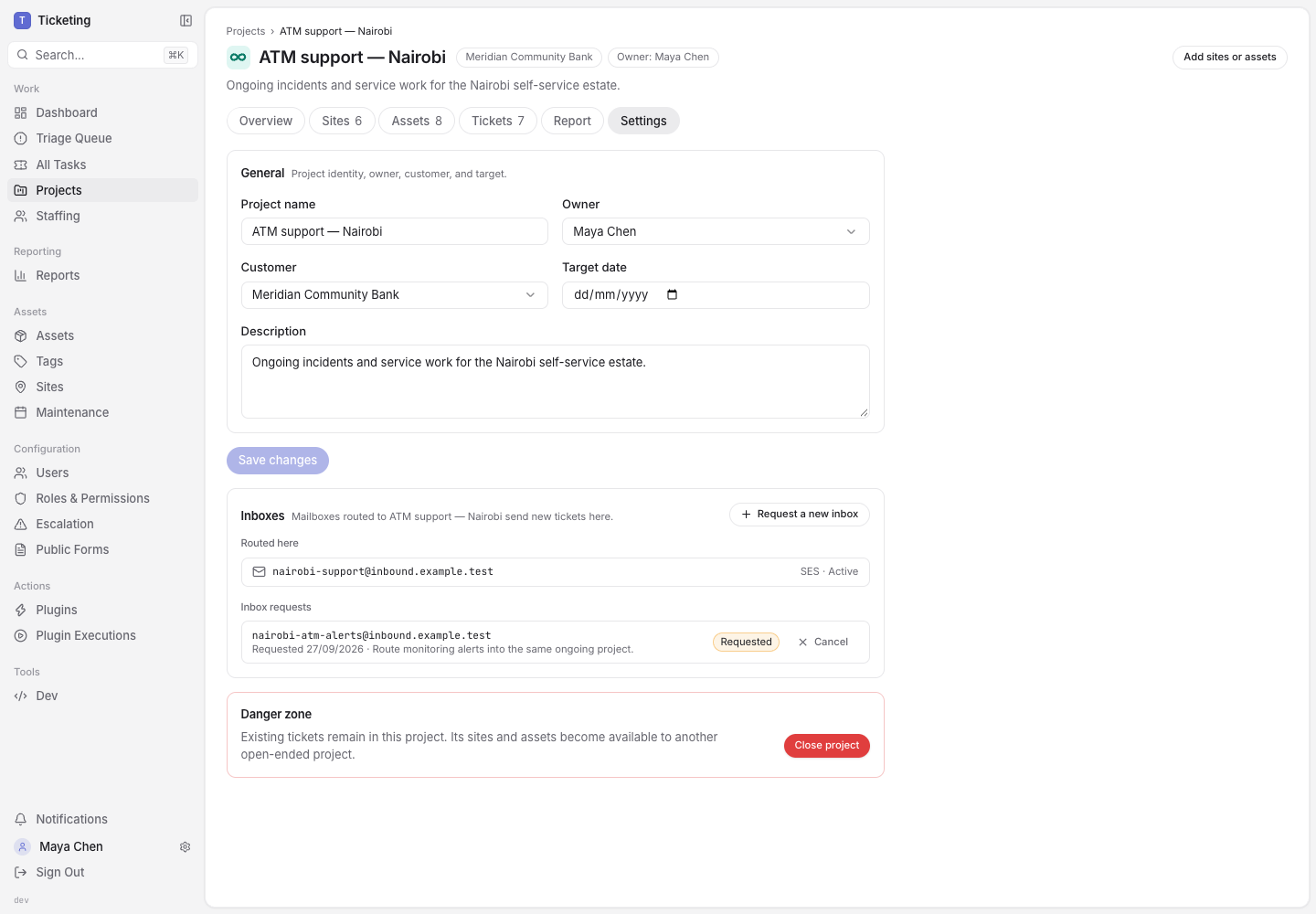
Inbox routing is available only for ongoing projects. A finite rollout cannot become the permanent destination for future mail by accident.
That restriction is important. A bounded project eventually ends. An address may keep receiving mail for years. Latch rejects a bounded project as the route target rather than relying on someone to remember to move it later.
What a Project Does — and Does Not Do
A project does not replace tickets. It does not turn every asset into a task. It does not require every support desk to model a physical estate.
It adds one layer of operating context:
- The Default Project catches unmatched work.
- An open-ended project owns ongoing routing from sites, assets, manual assignment, or an inbox.
- A bounded project creates and tracks one task per selected site until the defined work is done.
- Sites show geographic and local workload context.
- Assets show the equipment, state, service history, and faults inside that scope.
Teams with one queue and no meaningful grouping can keep using the Default Project. Teams managing a field estate, a customer portfolio, or a finite rollout can add structure only where it reflects real operating responsibility.
The result is not another hierarchy to maintain. It is a way to keep the ticket, the place, the equipment, and the reason for the work connected from intake to completion. See the wider Latch workflow or talk through a project model with us.