Most teams set one SLA. Every ticket inherits the same response and resolution targets. That works for uniform work. It fails when work splits by urgency, complexity, or operating hours. One policy then produces two failure modes. Some tickets face targets that are too aggressive, so the team lives in permanent breach. Others face targets that are too loose, so real delays go unreported.
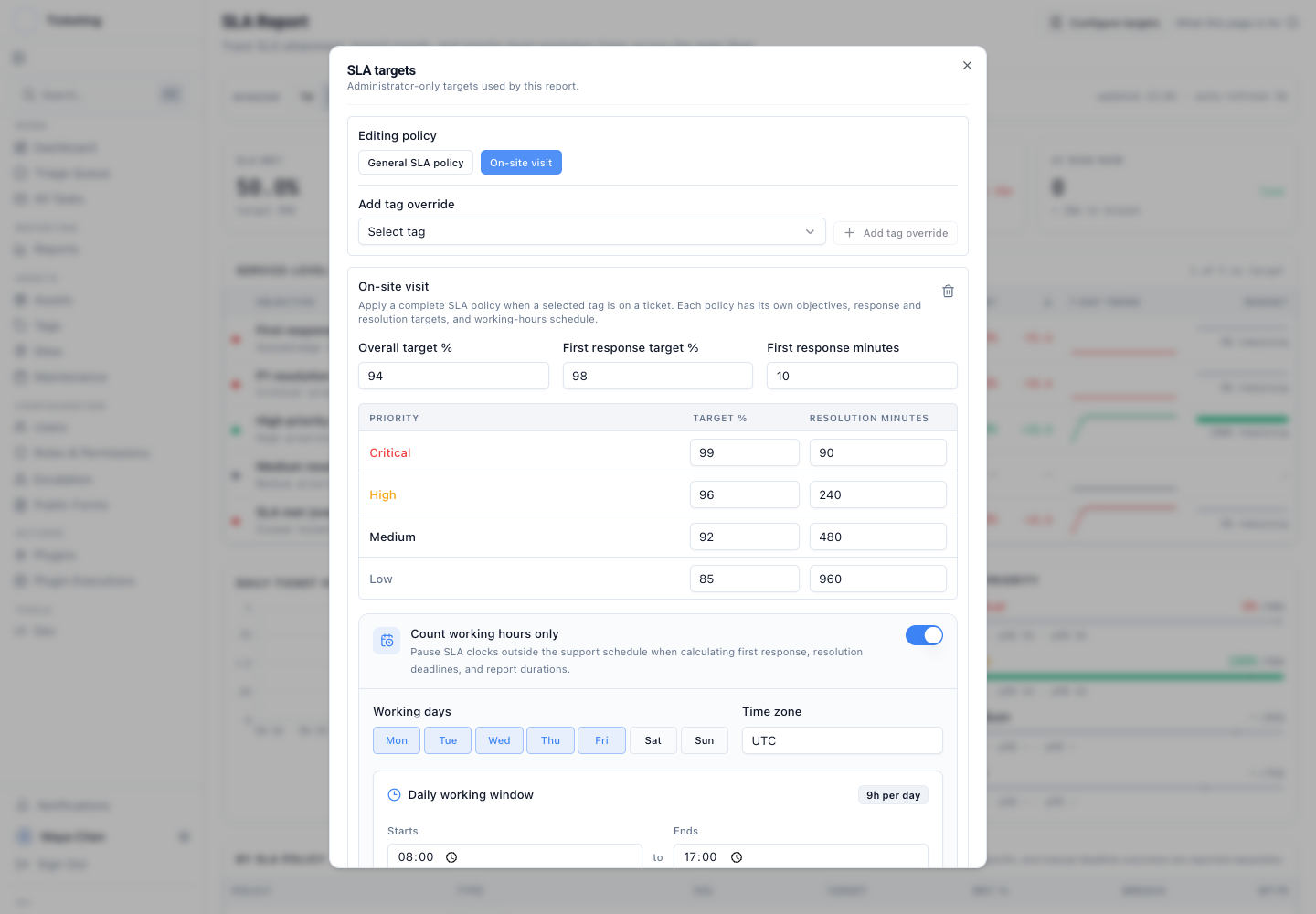
This release adds complete tag-specific SLA policies. A direct ticket tag can now select the full configuration: overall attainment target, first-response target and minute threshold, resolution targets and minute thresholds for Critical, High, Medium, and Low priorities, and working-hours definitions. If several tags map to policies, Latch applies a deterministic selection rule and records which tag triggered the match.
SLA selection changes: each tag carries one complete policy
Earlier tag overrides changed limited timing values. The rest of the commitment still came from the general policy. An operations lead could not say: "On-site visits use one set of attainment targets and local working hours. Remote recovery uses another complete commitment." Timing could differ, but the policy explanation stayed partly blended.
Tag-specific policies remove that constraint. An operations lead can define distinct SLA policies and anchor each one to a ticket tag. When a ticket is created or updated with a matching tag, the policy is selected and snapshotted onto the ticket record. The ticket then runs against that policy's targets and working hours. Reporting shows the commitment at the time the ticket was open. It does not show the current configuration.
Each policy is a self-contained commitment block
Each tag-specific policy is a self-contained commitment block. It specifies:
- An overall attainment target percentage.
- A first-response attainment target percentage and minute threshold.
- Resolution attainment target percentages and minute thresholds per priority tier: Critical, High, Medium, Low.
- A working-hours configuration that determines when the clock runs.
Each policy uses the same working-hours-aware SLA deadlines model as general policies. The difference: tags can now carry different working-hours windows. An on-site tag can track a 9-to-5 window in the customer's time zone. A remote tag can track a 24/7 clock.
Policy selection uses the strictest resolution target
A ticket can carry multiple tags. When more than one maps to an SLA policy, Latch selects the strictest resolution target for the ticket priority. Equal targets get a stable tie-break. The selected source is recorded on the ticket. The result is predictable, with no separate policy-order setting.
The chosen policy and triggering tag are written into the ticket record as a snapshot. The snapshot preserves the target percentages, response and resolution minutes, and working-hours basis that governed the ticket. If the policy is later updated, old tickets keep the old commitment. Without the snapshot, a report generated after a change could re-measure old tickets against new targets.
Reporting by policy shows the real split
SLA reports now break outcomes down by policy. A report shows which policy governed each ticket, the targets, and whether the ticket met them. Default, tag-specific, and manually set policies appear as separate populations. One dashboard does not hide the difference between a 2-hour on-site target and a 4-hour remote target.
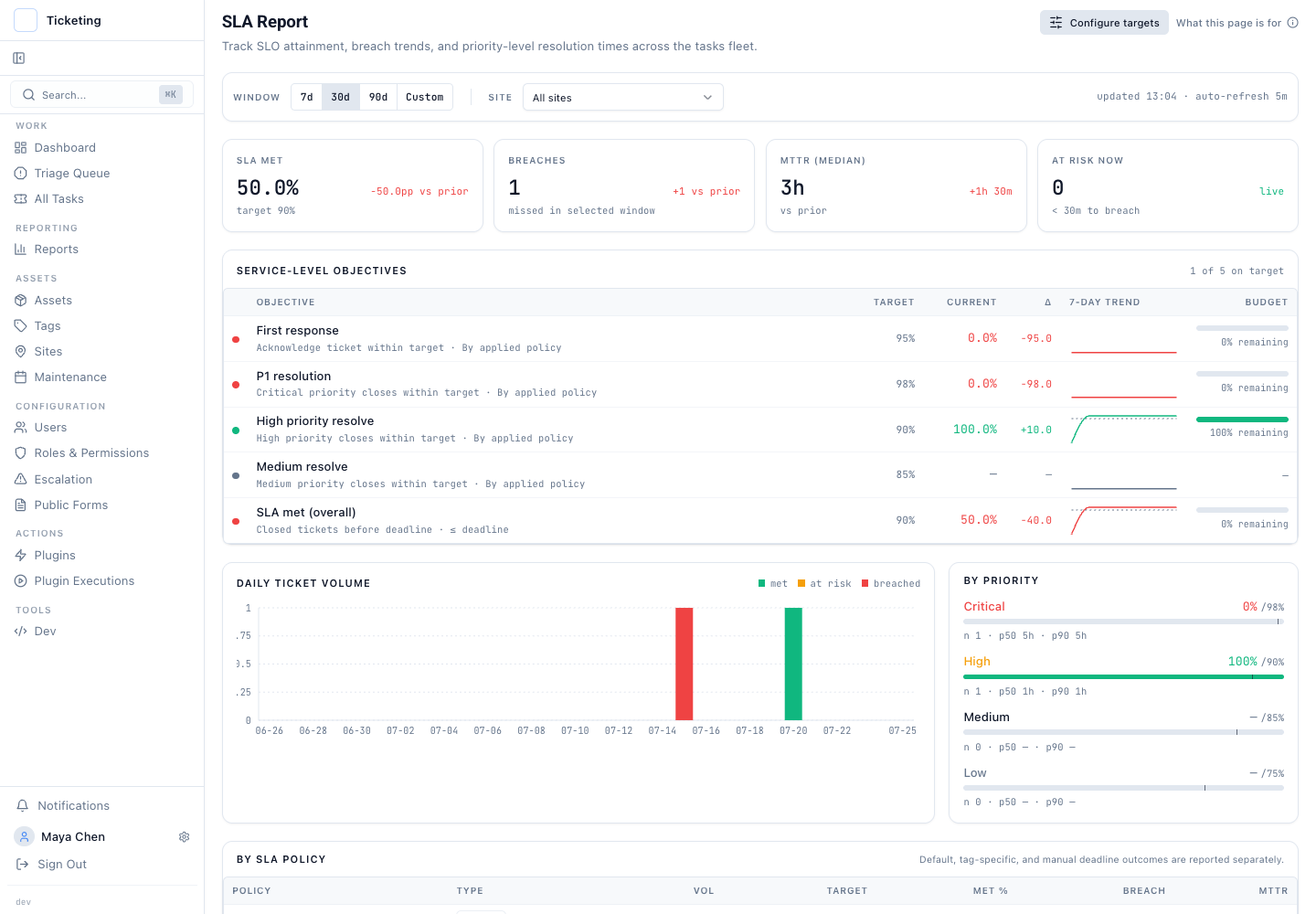
This separation matters when commitments differ. A blended rate that flattens everything into "95% met SLA" hides the real story. One team might fail on-site visits while remote tickets pass. Breaking outcomes by policy exposes that pattern without a separate queue rebuild.
This is not an automation rule
Tag-specific policies do not replace the default SLA policy. The default remains the fallback for any ticket with no matching tag. The model does not automate tag assignment. Tags must be applied during ticket creation or triage, manually or through an external automation rule, before policy selection fires.
This update does not introduce new queue-health metrics. Breach status, time-to-response, and time-to-resolution stay the same. The change is in how targets are assigned and how reporting explains the commitment that applied. For teams that want to measure more than first response, queue health measures beyond first response still apply across all policies.
This fits the SLA into the control model
Tag-specific SLA policies extend the control model from the April and May product update, which added SLA editing and working-hours support. That update made the SLA configurable. This update makes it unambiguous. Together they turn the SLA from a single flat rule into a structured set of commitments that match the shape of the team's work.
A shared inbox hides variation. A single SLA ignores it. Tag-specific policies let the measurement model match the operational model.