Field work breaks down when the record falls apart between dispatch and the site visit. The coordinator has the service context. The engineer has the physical evidence. Management needs a dependable answer to a simple question: what is happening now?
This release connects those parts of the operation in one ticket record. A focused Field Engineer view turns an assignment into a job conversation. Photos and voice notes stay beside the work. Status changes are explicit. If the connection drops, the interface says so and preserves the engineer's typed draft.
Consider Meridian Device Services. The team maintains cash deposit machines, ATMs, point-of-sale devices, and receipt printers across several cities. A cash deposit machine in an Accra branch stops presenting notes after a cassette exchange. Operations creates the ticket and assigns Kwame Mensah. The dispatch brief names three tasks: inspect the dispenser-sensor alignment, run a controlled note-present test, and keep the branch team updated.
That is where this workflow begins.
A Focused Queue Keeps Engineers on Their Own Work
Kwame opens Latch and sees his assigned, open jobs. The critical Accra repair sits at the top of a focused queue, alongside another active network incident. Search and status filters help him find the right job without exposing the wider operations backlog.
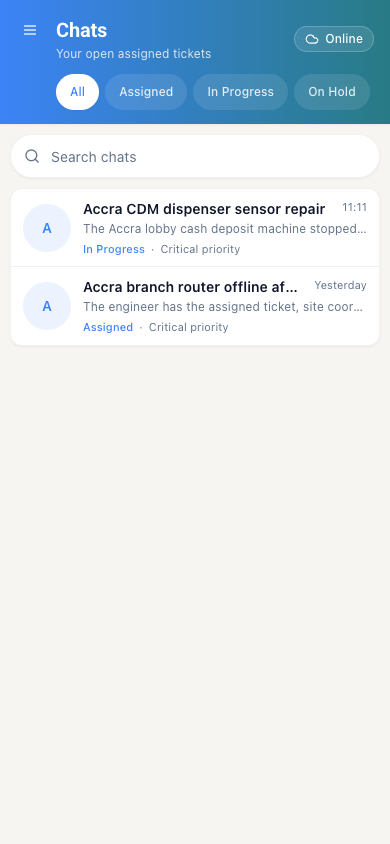
The queue is more than a smaller list. It gives operations a clean handoff boundary. Dispatch decides who owns the work. The engineer sees the jobs they are responsible for. The server enforces that scope.
GPS Location Context Points Engineers to the Right Site
Operations also needs confidence that the assignment points to the right place. Latch service sites can carry latitude and longitude. Coordinates can be entered directly or imported in bulk. The device's current GPS location works too.
That gives the coordinator and engineer a consistent location reference. It matters when several branches share similar names or hardware sits away from the main customer entrance.
For the Accra repair, the site record identifies the Osu Service Hub and its coordinates before Kwame travels. The ticket, asset context, and field conversation refer to the same operational location. This is GPS-backed service-location tracking. It does not imply continuous background tracking of the engineer.
One Conversation Holds Dispatch and Site Context
Inside the Accra ticket, the job reads like an operational conversation. It is not a form passed between departments. The dispatch brief, Kwame's site assessment, the coordinator's request for evidence, and the engineer's test result stay together.
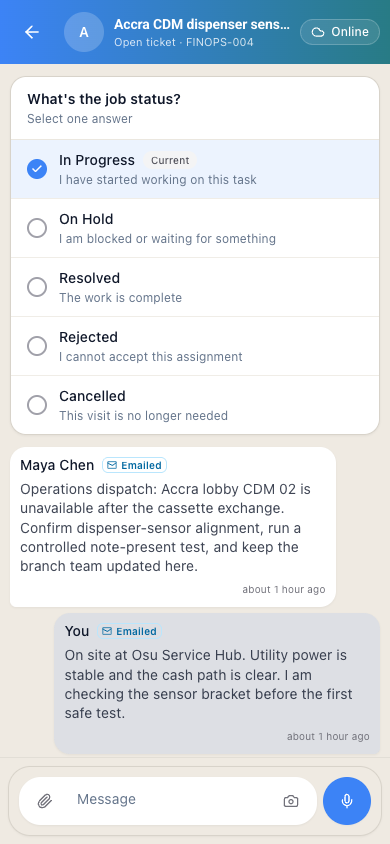
The sequence matters:
- Operations explains the failure and the safe test procedure.
- The engineer reports what they find on site.
- Operations asks for the evidence needed to review the repair.
- The engineer records the result before leaving.
Anyone with access to the ticket can review the same operational notes and activity history. The thread refreshes periodically. It is a shared work record, not a claim of instant messaging.
Field Evidence Sits Beside the Decision
A note saying "fixed" is rarely enough for financial hardware. Operations may need a photograph of a shifted sensor bracket, a short video of a note-present test, a voice explanation from a noisy equipment room, or a service document supplied by the branch.
The composer keeps those evidence options where the work is discussed. It supports photos, video, files, and voice notes. An engineer captures evidence without leaving the ticket.
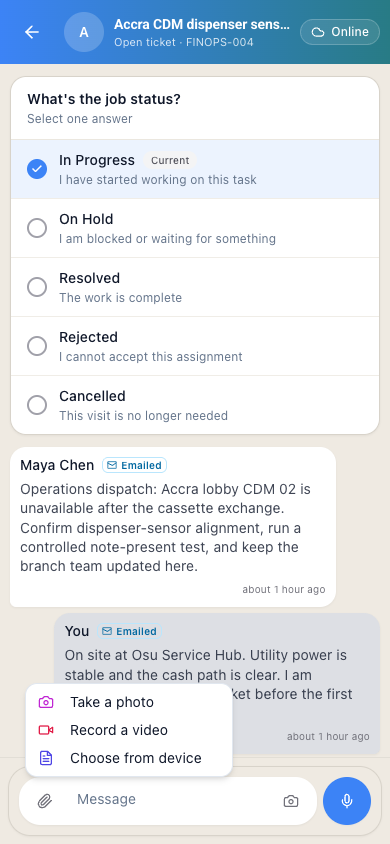
This creates a more useful management record. The evidence attaches to the ticket conversation. The next person reviewing the job sees both the field observation and the material that supports it.
A Field Update Becomes a Confirmed Operational State
Conversation explains the work. Status makes the work manageable across a queue.
The Field Engineer view presents the workflow-valid next states as a simple choice. Selecting Resolved does not silently change the ticket. Kwame still confirms Update job status. The decision is deliberate and joins the shared history.
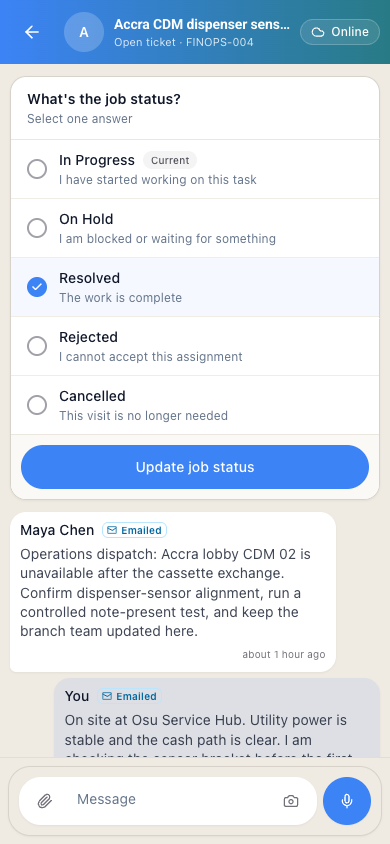
That confirmation closes the loop between the site and the operations desk. Managers can separate work under investigation from work on hold. Explicit resolution is the third state. On refresh, the same persisted status can feed queue reviews and operational reporting.
The Connection State Stays Honest When It Drops
Field work does not happen on office Wi-Fi. A plant room, loading bay, or remote branch turns a reliable connection into an intermittent one.
Latch shows whether the Field Engineer view is online, reconnecting, or offline. If Kwame has typed the final test result and the connection drops, the text remains as a local draft. He can review and submit it once the connection is stable again.
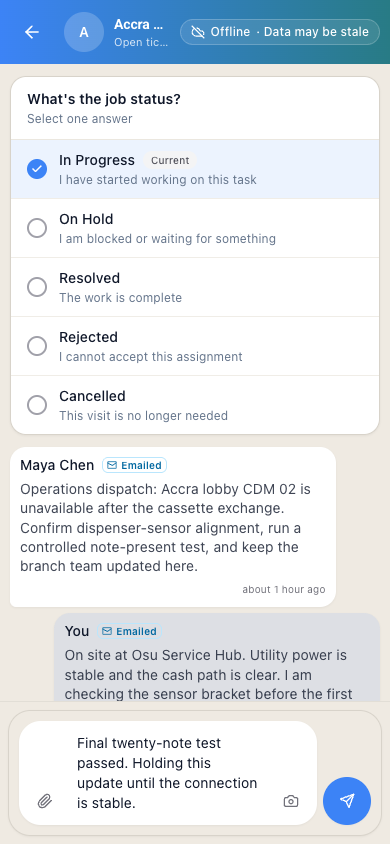
The boundary is deliberate. This release does not promise a background queue for offline status changes or media uploads. It preserves typed work. It restores previously loaded job context where available. The connection state stays visible. Failure is not hidden behind a spinner.
A Clearer Control Loop Ties the Operation Together
The practical release story is not "chat on mobile." It is a tighter operating loop:
Assignment → site conversation → evidence → confirmed status → reporting
For a repair operation, a coordinator can assign a failed ATM, cash deposit machine, POS device, or receipt printer at a GPS-recorded service location and follow the work through a single ticket.
The same pattern works for planned maintenance and replenishment. Assign the visit. Provide the checklist or stock context. Capture proof from the site. Confirm the outcome before the job disappears into a weekly spreadsheet.
The Field Engineer view gives the person on site a familiar, focused interface. More importantly, it gives operations a stronger record. The record shows what was assigned and what happened. It also shows what proved it. The current state is explicit.
Continue reading: build operational reports in Latch, asset context for field service work, and why ticket status workflows need hard edges.